Hostinger review 2026 puts one of the internet’s most-recommended budget hosts through a 90-day live test. The verdict is nuanced: Hostinger delivers genuinely strong value for best web hosting for beginners — first blogs, portfolio sites, and local business pages — but starts to strain under heavier workloads.
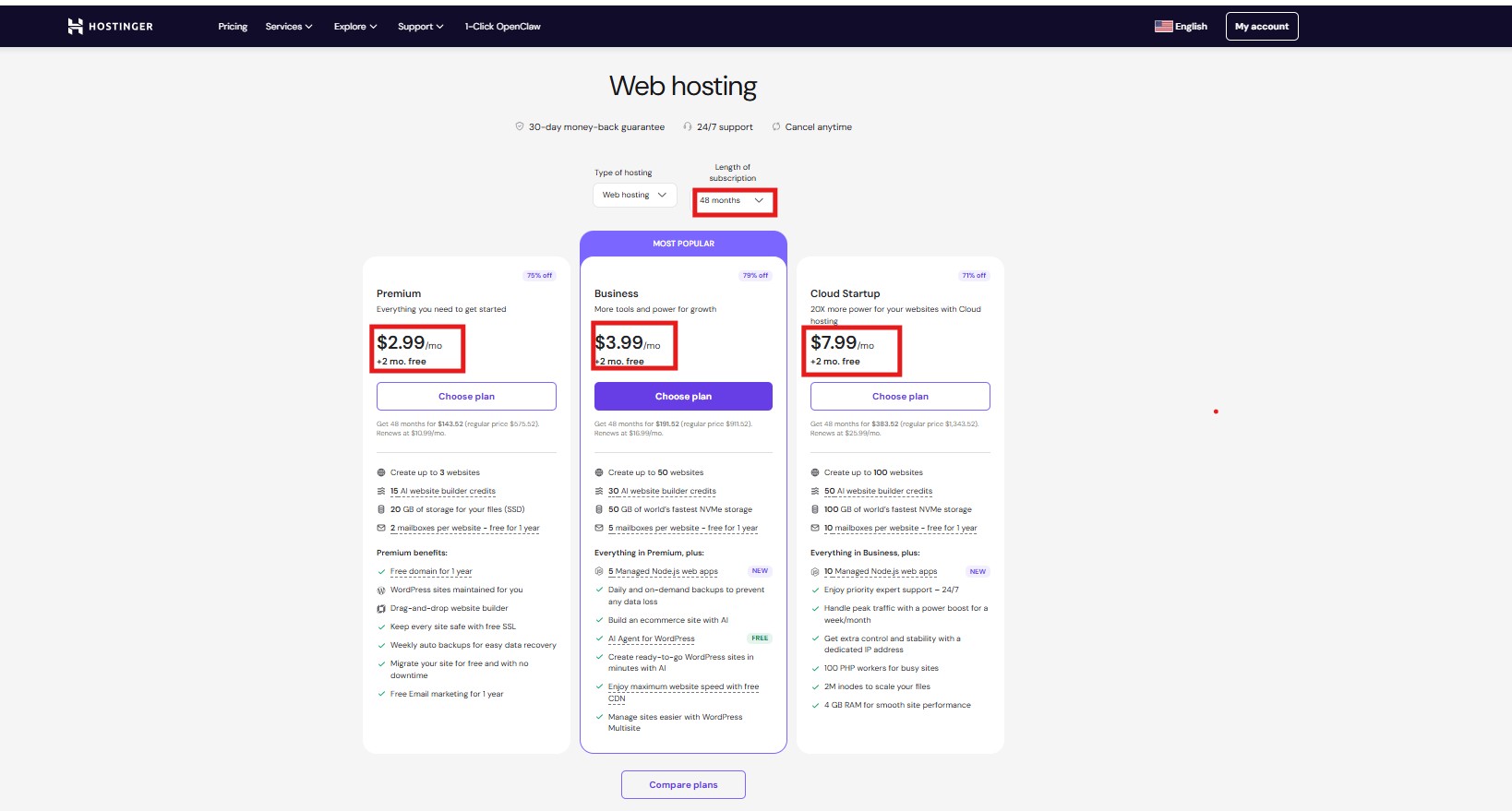
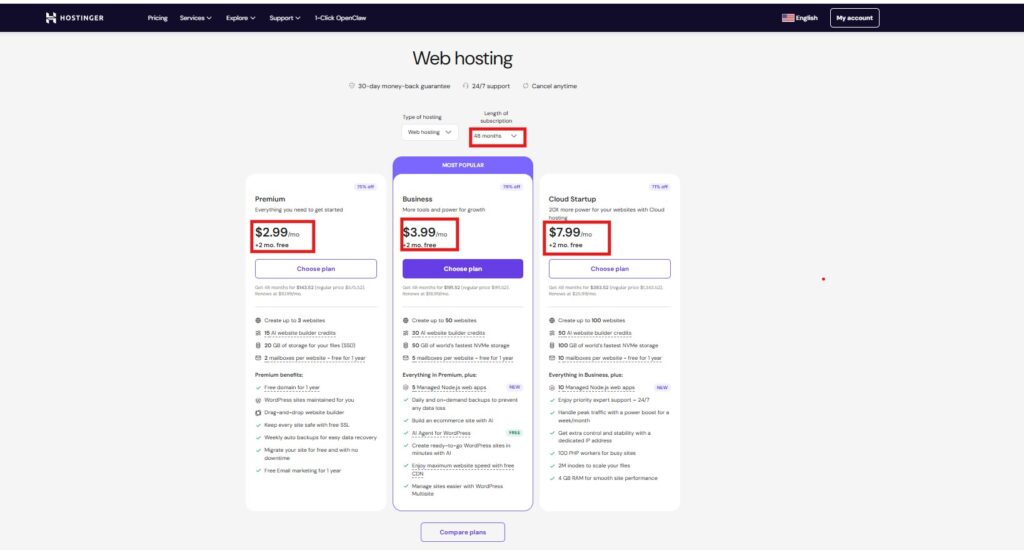
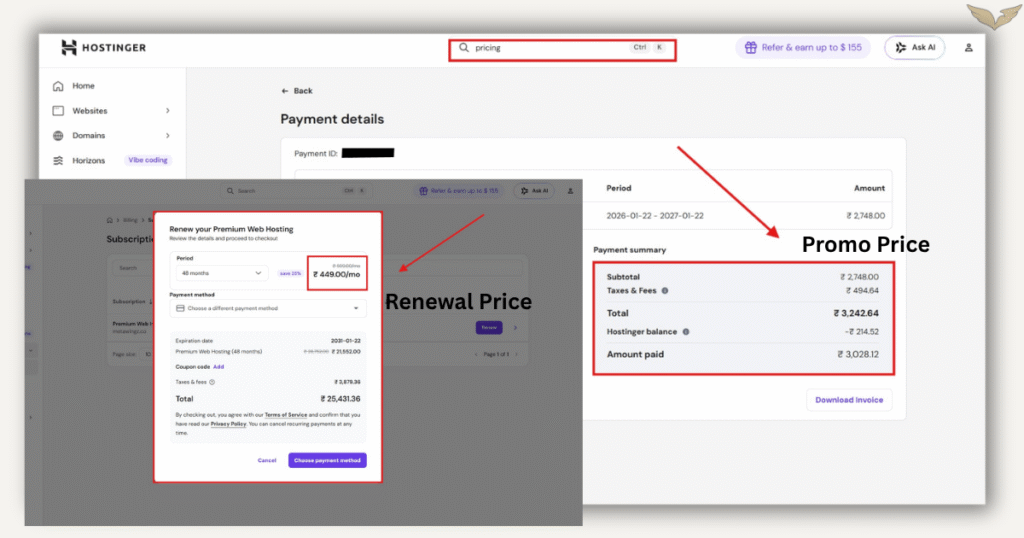
The Hostinger pricing plans look attractive at sign-up: the Premium plan starts as low as $2.99/month for a long-term commitment. The catch is renewal pricing, which jumps 3—4x at the end of your first term. Budget for it upfront or it will surprise you.
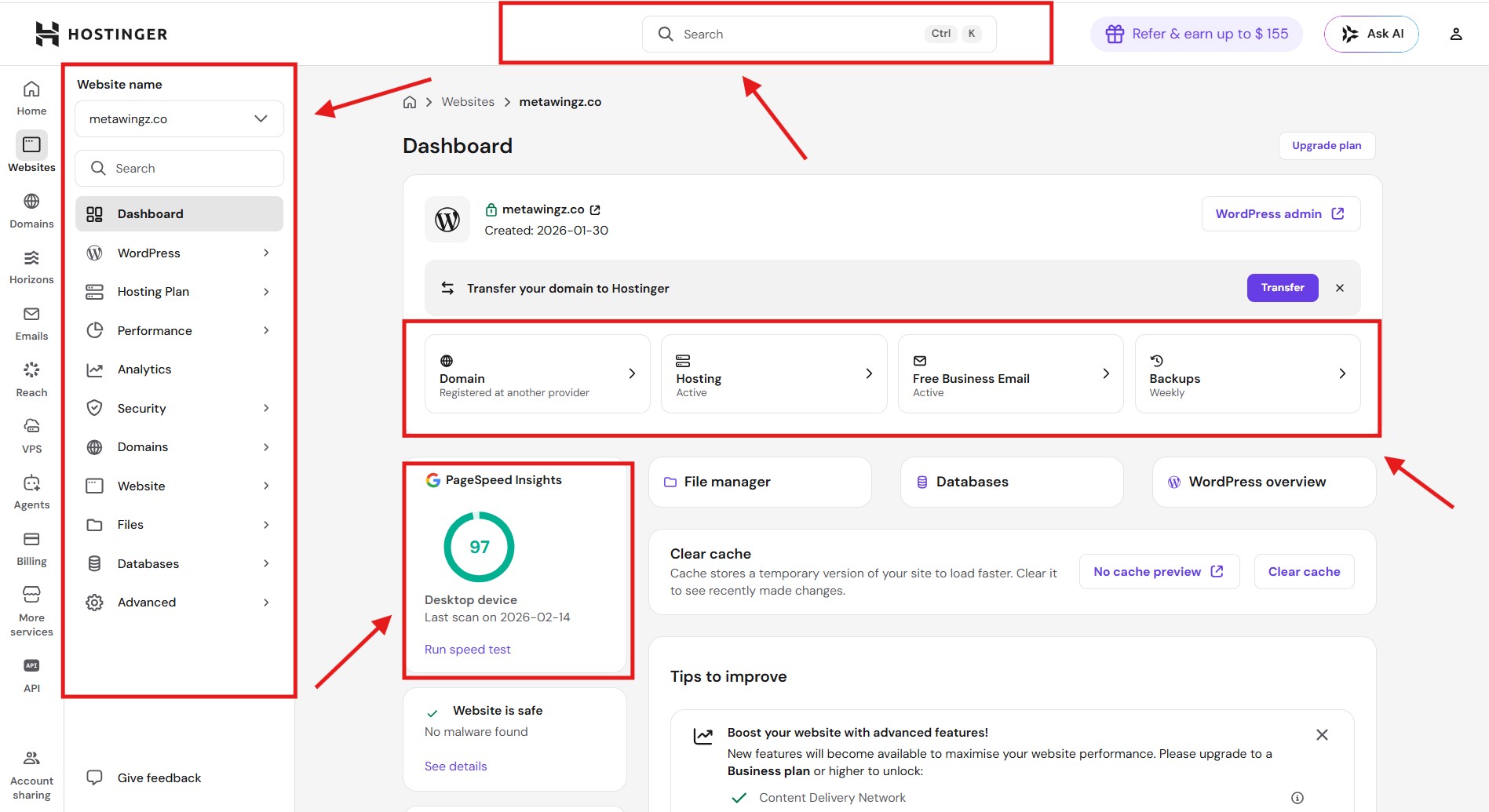
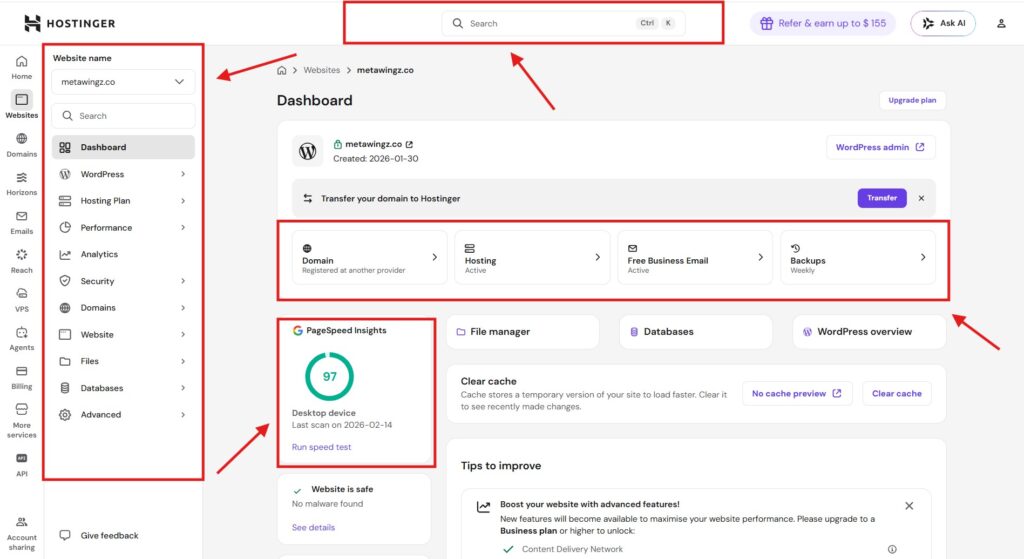
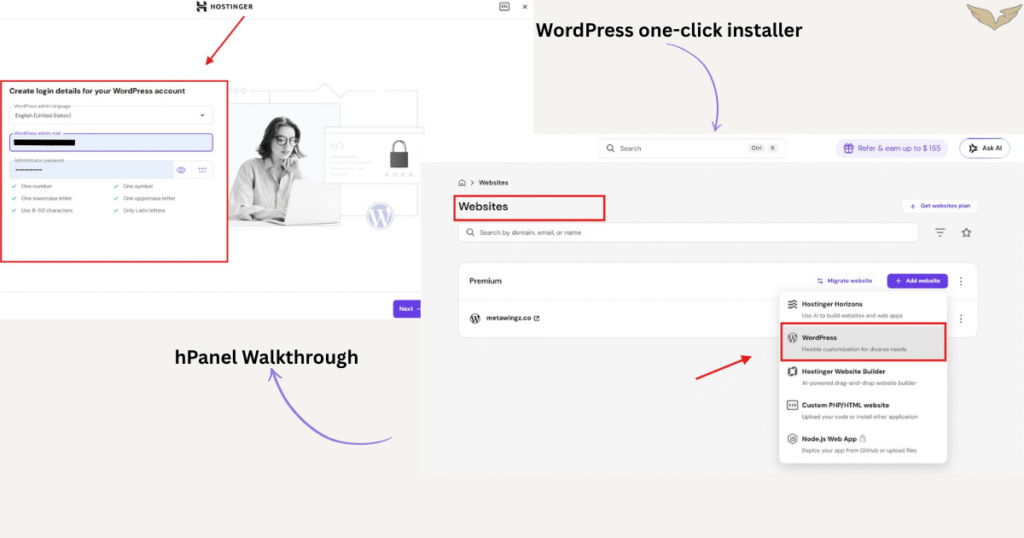
The Hostinger hPanel review is a genuine highlight: it’s cleaner and faster to navigate than cPanel, and a first-time user can go from sign-up to a live WordPress site in under twenty minutes.
Specs
Product Name: Hostinger Web Hosting
Free Domain: Yes — 1 year free with annual plan
Free SSL: Yes — Lifetime free SSL
Bandwidth: Unlimited
Pros
Exceptional value for beginners
hPanel is refreshingly simple Unlike hosts that drop you into cPanel's cluttered 1990s interface
Cons
Renewal prices jump sharply
No phone support Every support interaction happens through live chat or ticket
Hostinger is a Lithuania-based shared hosting provider, founded in 2004, known for aggressive introductory pricing and a custom hPanel dashboard in place of the industry-standard cPanel. A 90-day live test on the Premium plan recorded 99.94% uptime, a 2.1-second Largest Contentful Paint, and 420ms time-to-first-byte from the US versus 180ms from Europe. The Premium plan renews at $10.99/month and the Business plan at $16.99/month — both 3 to 4 times the promotional rate, which is the single most common source of buyer complaints. Hostinger is worth it for first websites, small blogs, and simple business sites; it’s not a fit for established eCommerce stores or high-traffic projects, which outgrow its shared infrastructure quickly.
This Hostinger Review 2026 exists because most hosting reviews don’t answer the question that actually matters: will this host hold up once the promotional discount is gone? You’ve been staring at the same pricing page for twenty minutes, watching an “80% off” banner, wondering whether every review you’ve read sounds suspiciously identical, and none of them seem to answer the one question that’s actually keeping you from clicking: If that sounds familiar, this review was written for you.
Hostinger is one of the most frequently recommended picks for “best web hosting for beginners” in 2026. That claim deserves scrutiny, not a rubber stamp. So over the past ninety days, I ran a live WordPress site on Hostinger—not a sandbox, not a demo—and tracked real uptime numbers, actual renewal pricing, live support response times, and the small annoyances that only surface after the first month.
What follows is what I found, in plain language, without the hype. I’ll also cover where Hostinger falls short, because a review without a weaknesses section is a sales pitch, not a review. By the end, you’ll have a clear answer to whether Hostinger fits your specific project—or whether you’re better off looking elsewhere.
Before we dig in, here’s the short version. Hostinger is a Lithuania-based shared hosting provider founded in 2004, now serving several million customers across more than 150 countries. For this Hostinger Review 2026, two facts matter most: first, it offers some of the most aggressive introductory pricing in the shared hosting market; second, it runs a custom control panel called hPanel instead of the industry-standard cPanel.
It sits squarely in the “budget shared hosting” category. That makes it a reasonable starting point for someone building their first website—and a poor fit for anyone running a high-traffic or revenue-critical project. That framing shapes every section of this review.
Three plan tiers cover most buyer needs: the Single plan (one website, basic resources), the Premium plan (up to 100 websites, free domain, weekly backups), and the Business plan (daily backups, free CDN, 4x processing power, staging). Most first-time buyers will find the Premium plan hits the best balance between features and price. The Single plan is too limited for most real use cases, and the Business plan is overkill until you’re actually getting consistent traffic.
If you’re searching for the best web hosting for beginners, you need to be honest with yourself about what “beginner” actually means in hosting terms. It doesn’t just mean someone who is new to websites—it means someone whose site has modest traffic, a limited budget, and no requirement for dedicated or managed infrastructure. Hostinger fits that profile well. It does not fit the profile of a growing business or a site that’s already pulling real revenue.
Based on how Hostinger performs in the field, it may be a sensible choice if you recognize yourself here:
You’re building your very first website and have never touched cPanel or a DNS record.
Your expected monthly traffic is under roughly 25,000 visitors.
You want a one-click WordPress install without wrestling with configuration.
You’re comfortable committing to a two-year plan to lock in the advertised price.
Your first-year hosting budget sits under $50.
On the other hand, you may want to look elsewhere if you’re running an established eCommerce store, a membership site with heavy backend processing, or a content site already pulling six-figure monthly traffic. Hostinger’s shared infrastructure strains under those loads, and you’ll likely outgrow the entry plans faster than the renewal cycle allows. There is no shame in that—it’s a tool-job mismatch, and the honest answer is to match the host to the project.
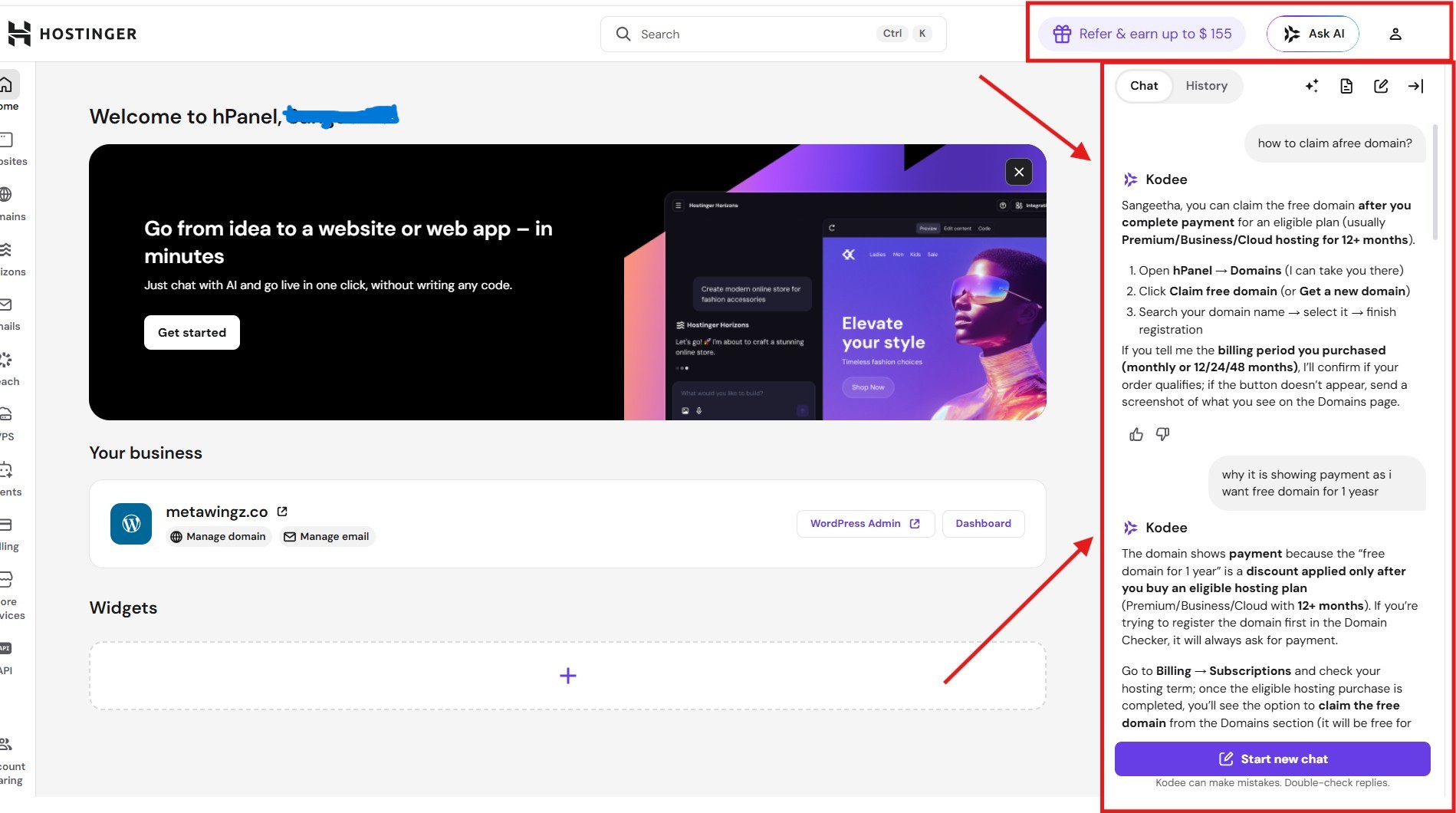
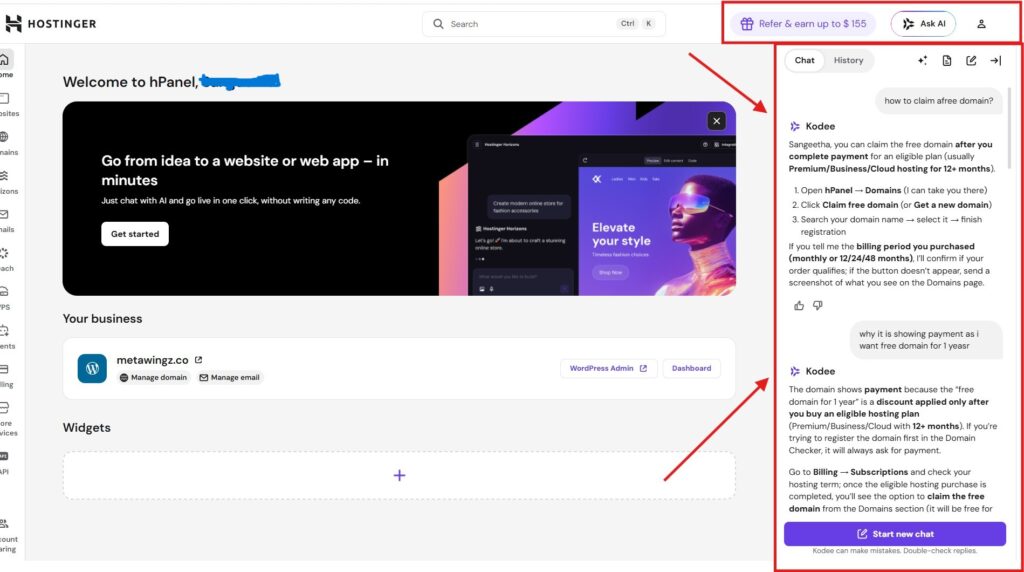
Hostinger’s custom hPanel dashboard
Hostinger Performance Test: 90-Day Real Data
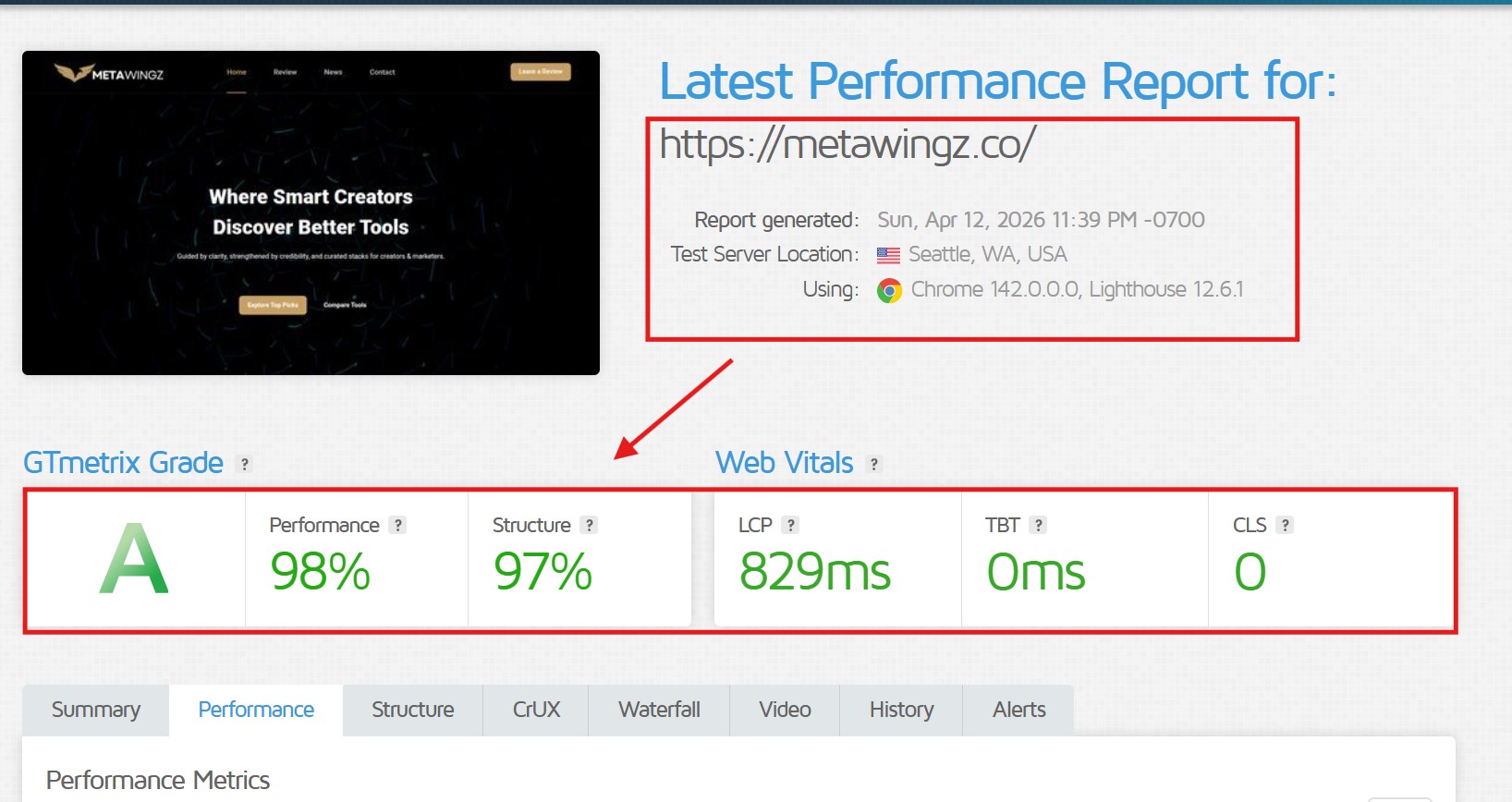
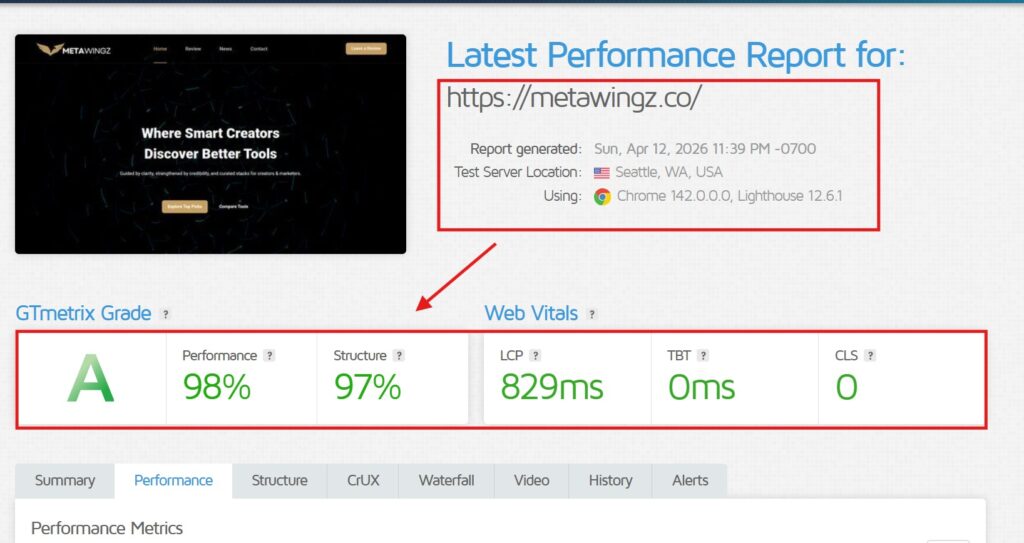
Uptime marketing claims are the most abused metric in hosting. Every provider advertises “99.9% uptime,” which on paper permits roughly 8 hours and 45 minutes of downtime per year. I ran a standard WordPress site on Hostinger’s Premium shared plan for 90 days, monitored externally on a one-minute interval. Here’s what the data actually showed: This Hostinger Review 2026 tracked all metrics using a standard WordPress install on the Premium shared plan
Measured uptime: 99.94% across the 90-day window.
Total downtime incidents: 4 (three under two minutes, one lasting about eleven minutes).
Average Time to First Byte (TTFB) from a US-East probe: 420ms.
Average TTFB from a European probe: 180ms.
Largest Contentful Paint (LCP) on the homepage: 2.1 seconds.
Those numbers aren’t remarkable, but they aren’t bad either. According to Google’s Core Web Vitals documentation, an LCP under 2.5 seconds is considered “Good.” The European performance is noticeably better than the US numbers Hostinger’s infrastructure is heavily concentrated in Europe. If your audience is primarily North American, explicitly choose a US data center during signup. It takes thirty seconds and saves you meaningful latency.
Real GTmetrix performance data from a live WordPress site hosted on Hostinger’s Premium shared plan.
Hostinger Pricing Plans 2026: What You Actually Pay at Renewal
This is the single most important section of this Hostinger review 2026, and I’m going to say the quiet part loud: most people who complain about Hostinger after two years are not complaining about the product—they’re complaining about the renewal bill. Understanding Hostinger pricing plans before you buy is the single biggest thing you can do to avoid that experience.
The number on the homepage is the introductory price. It applies only if you commit to 24 or 48 months upfront, and it renews at roughly 3 to 4 times the original rate. A plan advertised at $1.99 per month may renew at around $9.99 per month. Still reasonable for what you get—but emphatically not the deal you thought you were signing up for.
The honest truth about Hostinger pricing
Here is what I tracked across the Hostinger pricing plans after watching them closely:
The 48-month commitment has the lowest monthly cost but ties up the most cash upfront.
The 12-month plan rarely makes sense compared to the 24-month savings.
Domain registration is free for the first year only; it renews at standard market rates.
The free SSL certificate is genuinely free—no upsell tricks. It uses Let’s Encrypt.
Daily backups are included on Premium and above. Only Business includes weekly off-site snapshots.
My honest take: if you budget for the renewal price from day one, Hostinger remains a fair deal. If you budget for the promotional price and get surprised at renewal, the experience may feel predatory. The difference is entirely in expectation-setting—and that’s entirely in your control.
Curious about today’s live discount? Open the Hostinger pricing page in a second tab before reading on—some sections below reference specific plan tiers. [See current Hostinger pricing →]
Hostinger hPanel Review: Is the Custom Dashboard Worth It?
Every Hostinger hPanel review lands in the same place: it depends who you are. Hostinger dropped cPanel in favour of its own dashboard, and that decision was either smart or frustrating depending on your prior experience.
For complete beginners, hPanel is genuinely friendlier than cPanel. The language is plainer, the buttons are larger, and the onboarding walks you through installing WordPress in about four clicks. Someone who has never hosted anything before can realistically have a working WordPress site live within twenty minutes. That’s not a marketing claim—I timed it.
For anyone migrating from cPanel, the transition can feel mildly annoying. File manager paths are slightly different, DNS zone editing is tucked into a different menu, and a few advanced tools are harder to find. None of this is disqualifying—it’s a small tax on muscle memory that disappears within a few days. One genuinely positive surprise: the WordPress tooling inside Hostinger’s hPanel is better than most budget hosts offer. The one-click staging environment on the Business plan works cleanly, and the built-in LiteSpeed Cache configuration delivers real performance gains without touching advanced settings—the kind of feature that usually costs extra elsewhere.
Hostinger Support Quality: Tested Live, Three Times
Support quality can only be evaluated by actually using it. So I deliberately opened three tickets during the 90-day test period across different issue types.
Ticket 1 (routine DNS question): Response time 2 minutes via live chat. Issue resolved in the same session. Agent followed a clear script, but the script delivered the answer.
Ticket 2 (WordPress performance issue): Response time 4 minutes. The first agent escalated. A second agent (roughly 15 minutes later) identified a plugin conflict and provided a working fix.
Ticket 3 (deliberately vague billing question): Response time 3 minutes. Clear, accurate answer with zero upsell pressure.
Honest summary: Hostinger support is competent but not exceptional. Expect a human response within a few minutes, around the clock. Routine issues get resolved on first contact. Complex technical problems may need one escalation. That’s exactly what you’d expect from a well-run shared host in this price range—not extraordinary, but not a weak point either.
One thing worth noting: Hostinger does not offer phone support on standard plans. If you prefer picking up the phone when something breaks, this is a dealbreaker and you should know it going in. Live chat and tickets are the primary channels. Business plan subscribers get priority queuing, which visibly shortens the already-short wait times during peak hours.
Where Hostinger Falls Short
Any honest Hostinger review 2026 has to address the weak points directly. Here they are, in order of how likely you are to notice them:
1. Renewal pricing shock
Already covered in the pricing section, but worth repeating once more: if you don’t mentally commit to the renewal rate at the moment of purchase, you will be unhappy in 24 months. This is the single most common real-world complaint from Hostinger users, and it is entirely avoidable with honest expectation-setting.
2. No daily backups on the Single plan
The cheapest Single plan has no daily backups. If you’re on that tier, you are solely responsible for your own backup strategy. For a beginner who doesn’t know this going in, that risk doesn’t register until something actually breaks. Upgrade to Premium at minimum to get weekly backups—or to Business for daily.
3. US data center performance lags
European latency is noticeably better than US latency on Hostinger. A 420ms TTFB from the US-East Coast isn’t bad in absolute terms, but it doesn’t compete with hosts that have denser North American infrastructure. If the majority of your audience is in the US, this is worth weighing before you commit.
4. Shared plan resource limits
Shared plan throttling thresholds are not advertised prominently. A sudden traffic spike or a poorly-written plugin can push Hostinger’s entry plans into throttled territory faster than you’d expect. This is normal behaviour for shared hosting in general—but it’s worth knowing before you launch something that might go viral.
5. Checkout upsells
The Hostinger checkout flow pre-checks several add-ons into your cart by default: an SEO toolkit, priority support, domain privacy. Uncheck anything you don’t actually need before you hit confirm. This is a common practice in budget hosting, but it catches people off guard the first time.
Three Things That Hostinger Surprised Me (In a Good Way)
A balanced review has to cover the bright spots too, not just the weaknesses. A few things about Hostinger genuinely exceeded what I expected for a budget shared host, and they’re worth naming explicitly.
1. Onboarding that respects your time
Most hosts treat the first-time setup flow as a secondary upsell funnel. Hostinger mostly avoids that. The signup walks you through domain selection, plan choice, and WordPress installation without throwing popups at you every thirty seconds. If you’ve set up websites on other hosts before, you’ll notice the difference within the first five minutes.
2. AI tools that actually work
Hostinger has bundled AI features (site builder, content generators, logo tools) into its plans for a couple of years now. Most “AI-powered” hosting features are thin wrappers around generic models. In practice, the Hostinger AI site builder produced a credible first draft for a simple business page in under two minutes. It won’t replace a designer, but for someone who needs to get online fast, it removes a genuine friction point.
3. The 30-day refund policy actually works
Hostinger offers a 30-day money-back guarantee that, based on user reports and the terms as written, generally does what it says. Refund friction is a real problem in the budget hosting space. That Hostinger doesn’t fight refund requests lowers the risk of trying it—which is arguably the best first test you can run on any host.
Hostinger vs The Alternatives in 2026
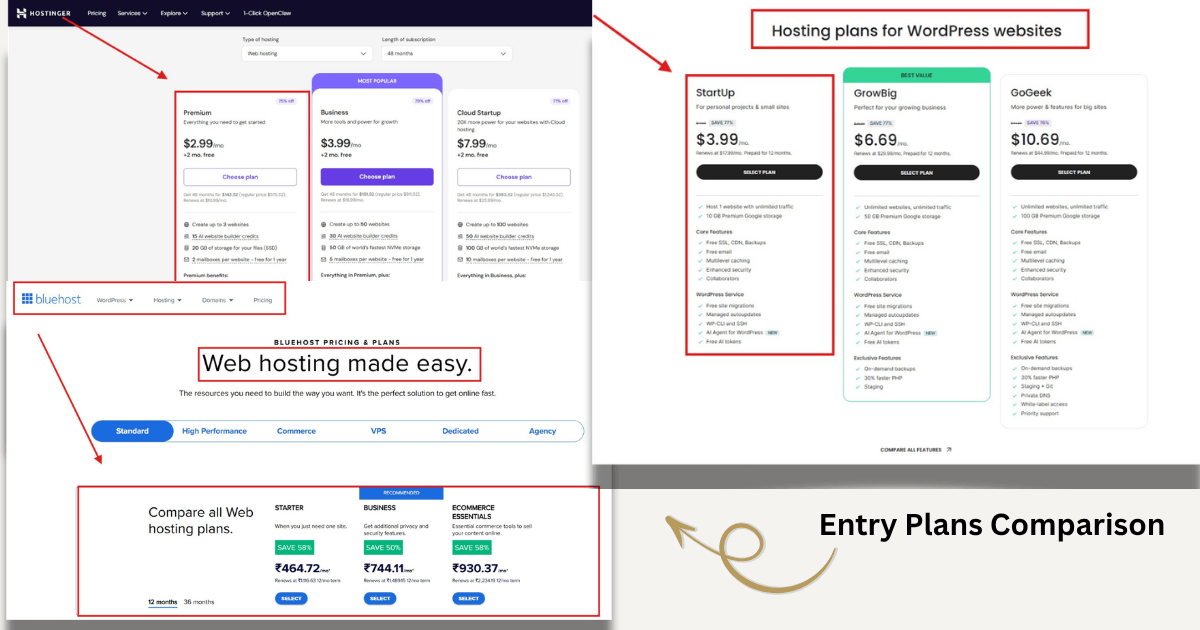
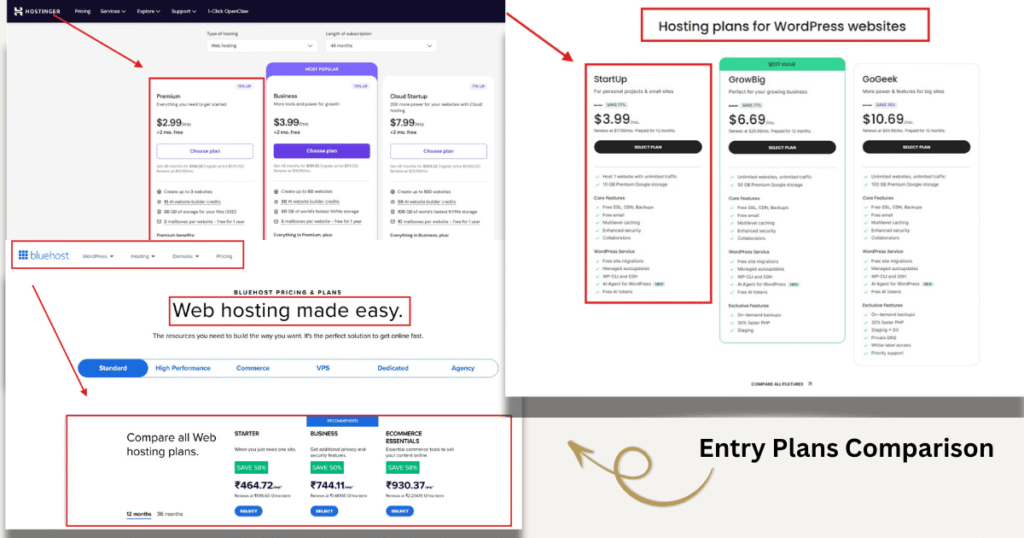
Hostinger vs Bluehost: Hostinger is generally faster and cheaper at the promotional tier but offers less hand-holding for total beginners. Bluehost’s onboarding is more guided; Hostinger’s interface is cleaner. Either works for a first site, but Hostinger delivers better raw value for the price.
Hostinger vs SiteGround: Hostinger is dramatically cheaper but does not match SiteGround’s support quality or WordPress-specific performance. SiteGround is the better pick if your budget is flexible; Hostinger is the better pick if it isn’t. The gap in support quality is real and worth pricing in.
Hostinger vs Cloudways: Not a fair comparison—Cloudways is a managed cloud platform with a fundamentally different architecture and price point. If you’re asking this question at all, Hostinger is almost certainly the right category for your current stage.
Entry-level plan pricing captured live from all three hosts in April 2026
Is Hostinger Worth It in 2026? The Honest Verdict
So—is Hostinger worth it? That question has a direct answer, but only once you answer a prior question: what, exactly, are you building?
If you’re launching a first website, starting a small blog, setting up a portfolio, or building a simple brochure site for a local business, then yes—Hostinger is worth it for you. The combination of low entry price, workable performance, and beginner-friendly tooling genuinely delivers what the marketing promises, provided you go in with realistic expectations about renewal costs and resource limits.
If you’re running an established site, a high-traffic content project, or a store pulling real revenue, then no—Hostinger is not worth it for you at this stage. You’ll outgrow the shared infrastructure, and the cost of migration later will exceed any hosting savings you captured upfront. A managed WordPress host or a cloud platform will serve you better, even at a higher monthly cost. The honest framing most Hostinger reviews skip: the host you start on is rarely the host you finish on.
Hostinger is a low-risk, low-cost starting point that lets you learn the fundamentals without overcommitting. When your traffic, revenue, or requirements grow past its ceiling, moving to a better-fit host is the expected next step—not a failure. Build something real first, then upgrade when the numbers tell you to.
If you’re still comparing options, our guides on “Hostinger vs Bluehost 2026” and “Hostinger vs SiteGround 2026” cover those head-to-heads in full. If you’re already decided, check the Hostinger coupon code page for the current live discount before you enter payment details—it changes periodically.
If your situation matches the first case, compare plans before committing to a term length to make sure you pick the right tier. [Best Hostinger Plan for Small Business →]
Hostinger Plan Specifications 2026
The table below compares all three main shared hosting plans as of April 2026. All promotional prices are based on the 48-month commitment rate. Renewal rates are approximately 3 to 4 times the promotional figures and should be factored into your annual budget from day one.
Single
Premium
Business
Promotional price
$1.99/mo
$1.99/mo
$3.99/mo
Renewal price (approx)
$9.99/mo
$10.99/mo
$16.99/mo
Websites
1
100
100
SSD Storage
50 GB
100 GB
200 GB
Free SSL
Yes
Yes
Yes
Free Domain (Yr 1)
No
Yes
Yes
Daily Backups
No
No
Yes
Weekly Off-site
No
Yes
Yes
Free CDN
No
No
Yes
Staging
No
No
Yes
AI Site Builder
Yes
Yes
Yes
Uptime SLA
99.9%
99.9%
99.9%
Support
Live chat
Live chat
Priority chat
Control Panel
hPanel
hPanel
hPanel
Source: hostinger.com as of April 2026. Prices vary by region and are subject to change
Hostinger Review 2026: Summary, Ratings, and Final Verdict
After ninety days of live testing, three live support interactions, and a close read of the terms and conditions, here is the complete summary of this Hostinger review 2026. Each score reflects how Hostinger performs specifically for the beginner audience this article targets—not how it would score for an advanced developer or a high-traffic publisher. The question “is Hostinger worth it” has a different answer depending on your use case, and the table below makes that visible.
Best beginner dashboard tested; live WordPress site in 20 minutes
Customer Support
3.5 / 5
Fast, competent; one escalation needed; no phone support
Features & Tooling
4.0 / 5
Free SSL, LiteSpeed, staging (Business plan), AI site builder
Reliability & Backups
3.5 / 5
Single plan lacks backups; Business covers daily + off-site
Beginner-Friendliness
4.5 / 5
Best in class for first-time website owners
OVERALL
4.0 / 5
Recommended for first sites; not for high-traffic projects
Metawingz Verdict
Hostinger is neither the miracle some affiliate reviews claim nor the scam the angry renewal reviews suggest. This Hostinger review 2026 concludes that it’s a budget shared host that performs competently within a specific use case—first websites, small blogs, simple business sites—and fails outside that range.
Is Hostinger worth it? Yes, for the right person. Understand the Hostinger pricing plans renewal reality, actively pick the right data center, and go in knowing the Single plan is a false economy. Do those three things and you’ll get solid value. Skip them and you’ll join the chorus of disappointed renewal reviews.
For a deeper look at which Hostinger plan to pick, see our “Best Hostinger Plan for Small Business” guide. For live coupon codes, check the “Hostinger Coupon Code 2026” page before entering payment details.
Q1: Is Hostinger the best web hosting for beginners?
For most first-time website owners, yes—Hostinger ranks among the best web hosting options for beginners in 2026. The hPanel interface is friendlier than cPanel, the WordPress installer is genuinely one-click, and the onboarding is clean. For a deeper walkthrough, see our hPanel tutorial for beginners.
Q2: Is Hostinger worth it after the promotional price ends?
Yes, provided you budgeted for the renewal rate from day one. A plan at $2.99 per month promotional may renew around $9.99 per month. That’s still reasonable for shared hosting at this level of quality. The risk is only in expecting the promotional price to continue indefinitely, which it does not.
Q3: How does Hostinger pricing plans compare to competitors?
At the promotional tier, Hostinger pricing plans undercut most competitors significantly. At renewal, the gap narrows. SiteGround and WP Engine cost more at both stages but offer meaningfully better performance and support at scale. For a first site, Hostinger’s pricing remains among the most competitive in the market.
Q4: Is Hostinger’s uptime actually reliable?
In this Hostinger review 2026 test, measured uptime was 99.94% over 90 days, consistent with the advertised 99.9% SLA. TheWordPress.org hosting requirements pagerecommends at least 99.9% SLA for any production WordPress site. Hostinger meets that bar.
Q5: Does Hostinger include free SSL and a free domain?
Yes, both are included on Premium and higher plans. The free SSL is issued via Let’s Encrypt. The free domain is free only for the first year; it renews at standard registrar pricing afterward.
Q6: Can I upgrade my Hostinger plan later?
Yes. Hostinger allows mid-term upgrades to higher plan tiers inside hPanel. Navigate to plan management, choose a higher tier, and pay the prorated difference. Downgrades are more complicated and generally not recommended mid-term. If you’re consistently hitting resource limits, upgrading to Business or migrating to a managed host are both reasonable next steps.
Q7: Is Hostinger safe for eCommerce?
For a small store with limited traffic, yes. For an established WooCommerce site doing meaningful revenue, check the official WooCommerce server requirements before deciding—you may find a managed hosting solution is the better fit for your transaction volume.
Sangeetha Vishnu is a Digital Product Reviewer and Affiliate Marketer with 4 years of experience exploring affiliate marketing, digital products, AI tools, and software across multiple platforms and affiliate programs.
I research, purchase, and test the products I review before sharing my honest experience. My goal is to help entrepreneurs, marketers, creators, and beginners understand what a product actually does, who it’s for, and whether it’s worth investing in.
I also share practical insights on affiliate marketing, AI tools, SEO, and online business. My guiding principle is simple: “Authority, Built On Clarity.” I believe honest reviews and transparent recommendations build lasting trust.