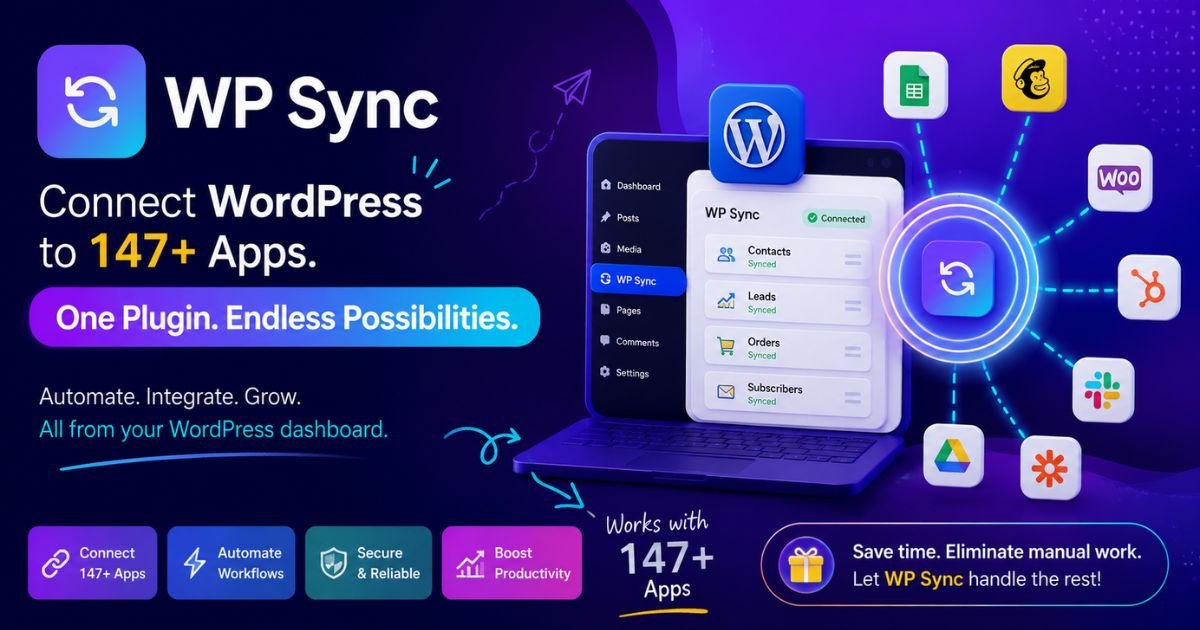
WP Sync is a WordPress plugin that replaces Zapier, Make, and Pabbly with 147 direct app-to-app connections, for a one-time payment instead of a monthly bill. No task meter, no third-party server in the middle, and a 30-day guarantee if it's not for you.
Pros
Kills a recurring Zapier/Make/Pabbly bill with one payment.
No task meter — automation volume never changes the price.
147 app connections, including 35 autoresponders built in.
Data moves app-to-app directly, never through a third-party server
Instant sync on push sources like forms, webhooks, and lead ads.
Refund and cancellation triggers, not just new-sale automation.
30-day money-back guarantee.
Cons
Requires a self-hosted WordPress site — won't work on Wix or a Shopify-only setup.
Multi-site use needs the separate Developer License, not included on the front end.
The Early Bird window runs for 4 hours after cart open, at $47 with no coupon needed. After that, the price increases every 6 hours for scarcity, so earlier is cheaper.
Disclaimer : I strongly believe in transparency. Some links on this website are affiliate links, which means I may earn a small commission if you purchase through them — at no extra cost to you. This helps support the work I do and allows me to continue creating honest reviews, tutorials, and creator-focused content.
Stop Renting Automation. Own It For A One-Time Payment.
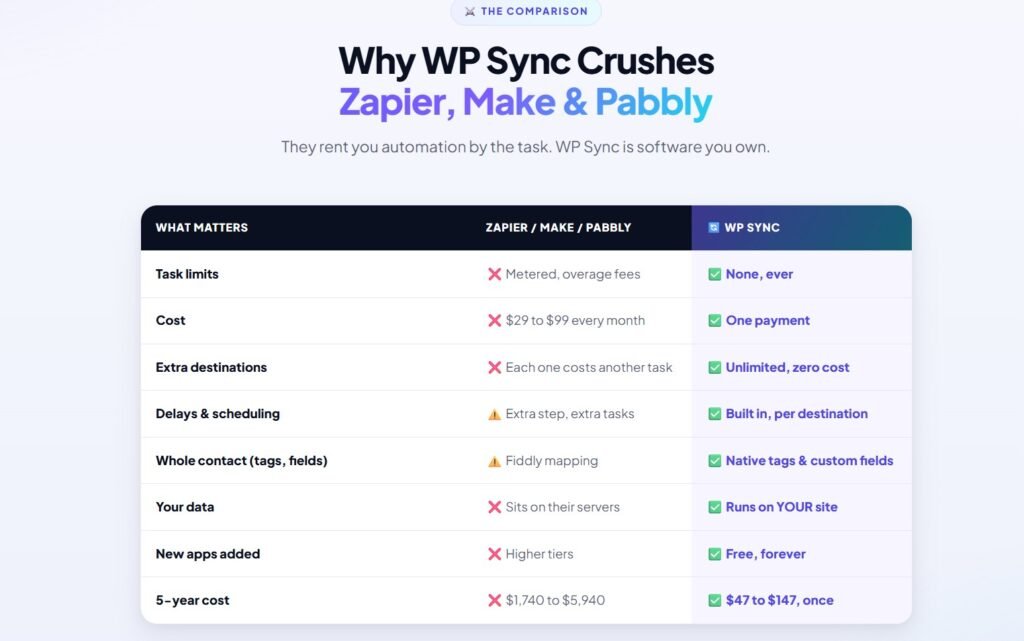
This WP Sync review is for anyone whose list is paying Zapier, Make, or Pabbly every single month just to move contacts between their own tools. That bill doesn’t stop — it just quietly renews, month after month, whether you used it heavily or barely touched it.
WP Sync is built to end that bill for good: connect 147 apps inside WordPress, pay once, and own the bridge that moves your data forever — no monthly bill, no task caps.
In this review, I’ll walk through what WP Sync does, how the funnel is put together, what each upgrade adds, and my honest take on whether it’s worth buying.
What Is WP Sync?
WP Sync is a WordPress plugin that works as a self-hosted alternative to Zapier. It connects your site directly to the apps you already use — autoresponders, checkouts, calendars, lead ads, team chat — and moves data between them without a monthly subscription.
One feature that stands out is that there’s no task meter. Zapier and Make both charge based on how many actions you run each month, so your bill grows the moment your list or your funnel gets busier. It doesn’t work that way — sync 50 contacts or 100,000, and the price you paid stays exactly the same.
Another advantage is where your data actually goes. WP Sync makes direct API calls between apps, so your subscriber and buyer data never passes through a third-party server sitting in the middle. For anyone handling client data, that’s a meaningful difference from a cloud automation platform.
WP Sync was built by Kevin Fahey, who’s been marketing online since 2007 with more than 30 launches behind him, with Neil Napier running the launch itself. This isn’t a first-time vendor testing an idea — it’s a plugin built by a team that’s shipped a lot of software before.
Overall, it’s more than a “connect two apps” plugin. It covers autoresponders, commerce, bookings, lead ads, and team alerts under one license, which makes it a practical replacement for a general automation subscription rather than a narrow, single-purpose tool.
One of the biggest strengths of WP Sync is that it doesn’t try to be a single-purpose plugin. It combines automation, filtering, scheduling, and refund handling into one dashboard, so you’re not stitching together several smaller tools to get the same result.
Let’s go through the core features that make this plugin stand out.
Unlimited Automations
It lets you map one trigger to one destination or several at once, with no cap on how many automations you build or how often they run. A new sale can add the buyer to an autoresponder, log a row in Google Sheets, and post a Slack alert, all from the same event.
Key Highlights
No cap on the number of automations you build.
One trigger can fire multiple destinations at once.
No task meter, no matter how much volume you run.
Works the same whether you’re syncing 50 contacts or 100,000.
Removes the biggest reason a Zapier bill grows over time.
Hands-Off Auto-Sync
New contacts sync every five minutes on their own. Push-based sources — forms, webhooks, stores, calendars, and lead ads — don’t even wait that long; they fire the instant the event happens.
Key Highlights
Instant sync for forms, webhooks, stores, and lead ads.
Five-minute sync cycle for everything else.
No manual refreshing or checking needed.
Keeps time-sensitive sequences (like cart abandonment) on schedule.
Runs whether you’re logged in or not.
Private By Design
Every connection is a direct API call between two apps. Your data goes from your WordPress site straight to its destination, without a third-party server storing or processing a copy along the way.
Key Highlights
No third-party server in the data path.
Data stays app-to-app, not routed through a cloud platform.
A real advantage for agencies handling client data.
Useful selling point for privacy-conscious niches.
Nothing sits on someone else’s servers.
35 Autoresponders Built In
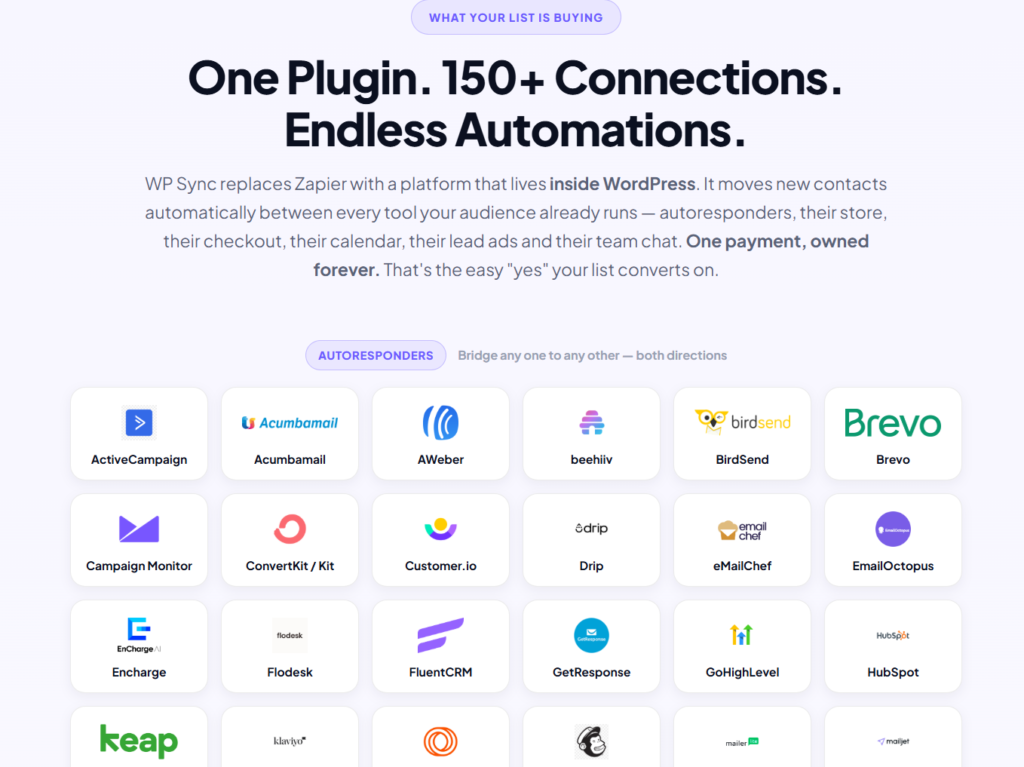
It ships with ready-made connections to 35 email platforms — ActiveCampaign, ConvertKit, GetResponse, GoHighLevel, Klaviyo, Mailchimp, and more. Setup is a matter of pasting in an API key.
Key Highlights
35 autoresponders supported out of the box.
No custom integration work needed.
Covers most platforms a typical marketer already runs.
Beyond email, it connects workflow tools, commerce platforms, course and membership platforms, booking tools, lead ads, and team chat — 147 connections in total, spanning nearly every part of a funnel.
Covers workflow tools: Webhooks, Zoom, Google Sheets, Airtable, Notion, Trello, and more.
Covers bookings: Calendly, Cal.com, Amelia.
Covers lead ads: Facebook & Instagram straight into your list.
Covers team alerts: Slack, Discord, Telegram.
Filters & Field Mapping
Per-destination field mapping, filter conditions, and a dry-run test mode let you control exactly what moves where, before anything goes live. Every result lands in an activity log.
Key Highlights
Field mapping per destination.
Filter conditions so only the right contacts move.
Dry-run testing before automations go live.
Every sync result logged for troubleshooting.
Keeps lists properly segmented instead of one big blanket rule.
Refund & Cancel Triggers
It’s not just new sales. Refunds, chargebacks, cancellations, and failed payments can route to their own lists — perfect for win-back and dunning sequences.
Key Highlights
Routes refunds and chargebacks automatically.
Handles failed payments, not just successful ones.
Built for win-back and dunning sequences.
Stops refunded buyers from getting upsell emails.
Covers the events most automation tools ignore.
Delays & Scheduling
Every destination can deliver instantly, after a delay, or at an exact date and time — set per automation, no separate tool required.
Key Highlights
Instant, delayed, or scheduled delivery per automation.
No extra scheduling tool or monthly fee.
Built in rather than gated behind an upsell.
Useful for webinar reminders and evergreen sequences.
Timing set per destination, not globally.
30-Day Money-Back Guarantee
Every purchase is backed by a 30-day guarantee, giving you time to test it against your current setup with minimal risk.
Key Highlights
Full 30 days to try it.
Low-risk way to test replacing your current tool.
Result (a contact moving between apps) is visible fast.
Backs up the one-time-payment decision.
Standard refund process through JVZoo.
What Can You Connect & Automate With WP Sync?
WP Sync helps you do a lot more than sync a subscriber list. From lead ads to refunds, the plugin covers almost every event type your funnel produces.
With WP Sync, you can automate:
🎯 New leads from Facebook & Instagram ads straight into your autoresponder
📧 Buyer tagging and sequencing across 35 built-in autoresponders
🛒 New sales, refunds, chargebacks, and cancellations from WooCommerce, Stripe, PayPal, JVZoo, WarriorPlus, and ClickBank
📅 Booking confirmations from Calendly, Cal.com, and Amelia
📊 Contact and deal syncing to Google Sheets, Airtable, Notion, and Pipedrive
💬 Team alerts to Slack, Discord, and Telegram
🔁 Win-back and dunning sequences for failed or cancelled payments
⏳ Delayed or scheduled delivery for time-sensitive sequences
🔗 Migrations between any two connected autoresponders
One thing I like about WP Sync is that everything runs from a single dashboard inside WordPress. Instead of one tool for email, another for tracking sales, and another for team alerts, it brings all of it together under one license.
How Does WP Sync Work?
One thing I like about WP Sync is that the setup is straightforward. You don’t need to touch code — you install the plugin, paste in your app keys, and build the connection from the dashboard.
Here’s how the process works:
Step 1: Install & Activate The Plugin
Install WP Sync on your WordPress site like any other plugin, then activate your license to unlock the dashboard.
Step 2: Connect Your Apps
Paste in the API keys for the apps you want connected — your autoresponder, your checkout, your booking tool, whatever’s part of your funnel.
Step 3: Choose Your Source & Destination
Pick a trigger event (a new sale, a form submission, a booking, a refund) and choose where that data should go — one destination or several.
Step 4: Map Your Fields & Add Filters
Match up the fields between apps and add any filter conditions so only the right contacts move through the automation.
Step 5: Test & Go Live
Run a dry-run test to confirm everything’s mapped correctly, then switch the automation live.
Step 6: Monitor & Scale
Check the activity log to confirm syncs are running, then repeat the process for as many automations as your funnel needs — there’s no cap.
What Can WP Sync Do for You?
WP Sync is designed to do more than just move contacts around. It helps simplify your entire tech stack, so you spend less time managing subscriptions and more time running your business.
One of the biggest advantages is cost. A $50/month Zapier plan adds up to $600 or more a year — it replaces that with one payment, and the price never moves as your automation grows.
Another benefit is that it fills a gap most automation setups leave open: refunds and cancellations. Instead of ignoring the “bad news” events, it routes them to their own lists, so win-back and dunning sequences actually work.
I also like that everything runs from inside WordPress. There’s no separate login, no new platform to learn — it’s the same dashboard you’re already using.
Overall, it combines automation, filtering, scheduling, and refund handling into one plugin. Whether you’re running a single site or managing automations for clients, it gives you the tools to consolidate a stack you’re currently paying for piece by piece.
Who Should Buy WP Sync?
Straight from how the vendor positions it — and matching what I saw testing it — WP Sync is perfect for:
✅ Marketers & list-builders already paying a monthly automation bill (Zapier, Make, Pabbly)
✅ WordPress site owners who want automation without another SaaS subscription
✅ Agencies & freelancers running automations across multiple client sites
✅ Course creators, e-commerce sellers, and coaches moving buyers into sequences
✅ Anyone tired of task caps and usage-based billing on their own data
Not For
❌ People who don’t run a WordPress site
❌ Anyone expecting an enterprise iPaaS with hundreds of niche B2B SaaS endpoints
WP Sync FE Pricing
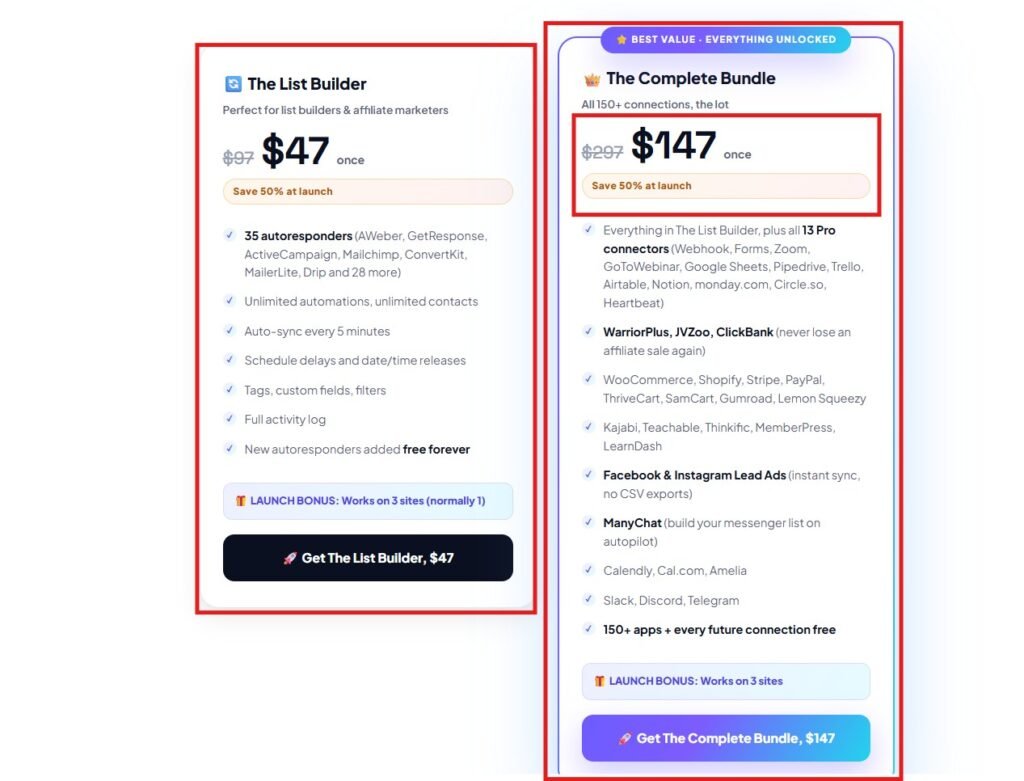
WP Sync is available at an affordable launch price, starting at just $47 for the Core tier during the Early Bird window — a 4-hour window after cart opens, no coupon needed.
The Core tier ($47) includes the plugin with a core connection set, enough for a straightforward setup covering an autoresponder and a checkout platform.
The Bundle tier ($147) unlocks all 147 connections in one install — every autoresponder, every workflow tool, every commerce platform, bookings, lead ads, and team alerts. If your funnel touches more than two or three of those categories, the Bundle is the safer buy.
What I like about the front end is that it’s genuinely usable on its own. You don’t need any of the OTOs to get real value — they’re aimed at multi-site usage and a separate conversion-tracking product, not at unlocking core functionality withheld from the front end.
Every purchase includes a 30-day money-back guarantee, so you can test it against your current setup with minimal risk.
WP Sync also offers a few optional upgrades for buyers who want multi-site coverage and deeper conversion tracking. The front end works fine on its own — these are for anyone ready to scale further.
OTO 1: Developer License ($297 / $397 / $497)
The Developer License removes the single-site limit and lets you run WP Sync across up to 25 WordPress sites.
Built for agencies, flippers, and multi-brand operators.
Priced well below buying 25 separate front-end licenses.
No extra plugin install per site.
If you manage more than one WordPress site, this is the clearest “worth it” upgrade in the whole funnel.
OTO 2: WP Conversion Tracker ($17 / $67)
WP Conversion Tracker is a separate product that tracks and attributes conversions inside WordPress — a strong second offer for anyone running paid traffic.
REMEMBER! If you buy this product through my link, you can also get these huge bonuses (Please remember that these bonuses are not for the TRIAL or FREE versions):
You can have an opportunity to receive extra bonuses if you finish 2 steps below:
♦ Step 1: Order the product by Clicking here.
♦ Step 2: After you complete the order, send [the receipt ID] in a message to my email at connect@metawingz.co You Will Get ALL my Bonuses and REMEMBER to hit me through email to confirm that you had done step 2. You will get my Bonuses within 24 hours.
My Final Thoughts on WP Sync Review
After going through everything WP Sync offers, I think it’s one of the easier one-time-vs-monthly decisions I’ve reviewed this year. The math is simple: a $47–$147 payment against a bill that’s already costing $600 a year or more.
What impressed me most is the privacy angle — direct API calls with no third-party server in the middle isn’t just marketing language, it’s a real structural difference from a cloud automation platform.
I also like that it doesn’t ignore refunds and cancellations the way a lot of simpler automation setups do. Routing those events to their own lists is a small detail that makes a real difference for win-back sequences.
Overall, I think WP Sync delivers strong value for anyone already automating their business who’s tired of paying for it every month. It’s not trying to be an enterprise iPaaS — it’s built specifically for WordPress-based marketers, and that focus is exactly why it works as well as it does.
Thank you for taking the time to read my WP Sync Review 2026. I hope this review has helped you understand what the platform offers and whether it’s the right fit for your business. I wish you great success with your audience growth journey!
If you’re looking for a one-time replacement for your Zapier, Make, or Pabbly bill, WP Sync is definitely worth considering.
Your Questions, Answered
❓Is WP Sync a one-time payment or a subscription?
It’s a one-time payment during the launch window, not a subscription. You pay once for the Core or Bundle tier and own the plugin going forward, with no monthly fee tied to how much automation you run.
❓Do I need to know how to code to use WP Sync?
No. Setup is pasting in app keys and mapping a source to a destination through the dashboard. The vendor says it demos itself in under two minutes — connect two apps, map the fields, and watch a contact move.
❓What’s the difference between the Core and Bundle tiers?
Core ($47) includes a core connection set, enough for a simple setup. Bundle ($147) unlocks all 147 connections in one install. If you expect to add more platforms later, the Bundle saves you an upgrade down the line.
❓Can WP Sync fully replace Zapier?
For most WordPress-based marketers, yes. It covers the same core function across 147 connections. The exception is if you need enterprise-grade, niche B2B integrations outside that list — in that case, a broader platform may still be needed for those specific workflows.
❓Is my data safe with WP Sync?
Yes. WP Sync makes direct API calls between apps rather than routing data through a third-party server, so your data moves from your site straight to its destination without a middle platform storing a copy.
❓What happens if a customer requests a refund?
WP Sync includes dedicated refund and cancel triggers. Refunds, chargebacks, and failed payments route to their own lists, separate from your standard buyer sequence, so you can build win-back or dunning sequences around them.
❓Do I need the Developer License if I only run one site?
No. The Developer License is for running it across multiple sites. If you’re only automating one WordPress site, the front-end Core or Bundle tier covers everything you need.
❓Is there a money-back guarantee?
Yes. Every purchase is backed by a 30-day money-back guarantee, so you can test WP Sync against your current setup before committing long-term.
Sangeetha Vishnu is a Digital Product Reviewer and Affiliate Marketer with 4 years of experience exploring affiliate marketing, digital products, AI tools, and software across multiple platforms and affiliate programs.
I research, purchase, and test the products I review before sharing my honest experience. My goal is to help entrepreneurs, marketers, creators, and beginners understand what a product actually does, who it’s for, and whether it’s worth investing in.
I also share practical insights on affiliate marketing, AI tools, SEO, and online business. My guiding principle is simple: “Authority, Built On Clarity.” I believe honest reviews and transparent recommendations build lasting trust.