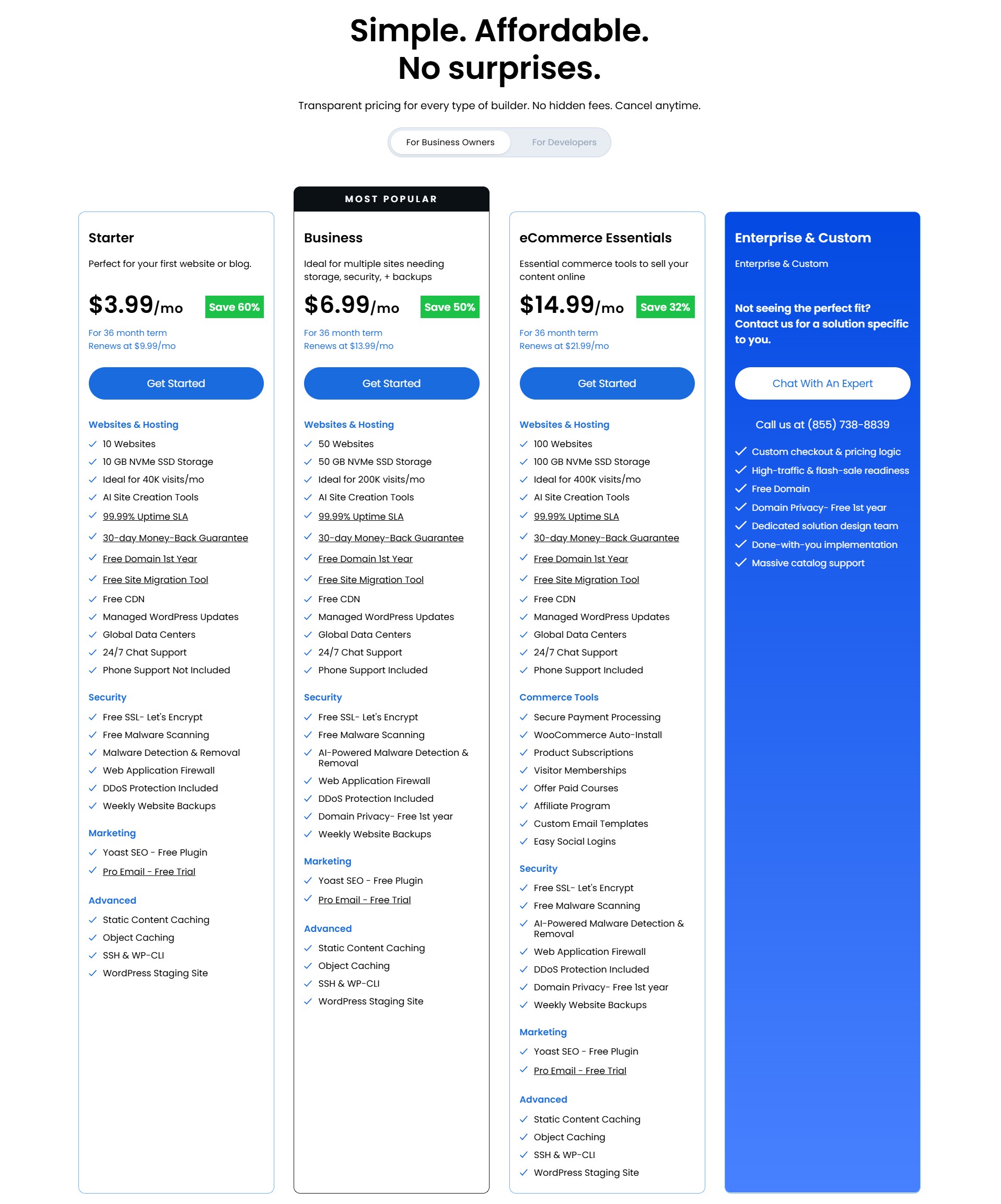
Bluehost is a beginner-friendly WordPress host, officially recommended by WordPress.org, with current web hosting plans from $3.99/month on a 36-month term. It is genuinely easy to use — one-click WordPress, a clean dashboard, free domain for the first year, and guided setup.
The catch most reviews skip: the Starter plan renews at $9.99/month on the 36-month renewal term, so the next 36-month cycle costs far more than the first. Best for first WordPress sites where setup simplicity matters.
Not ideal if you want the absolute lowest long-term cost without comparing alternatives. Affiliate commission: $65–$130+ via Impact.
Specs
Provider: Bluehost (Newfold Digital subsidiary since 2021)
Data centre: Current web hosting page lists Global Data Centers; verify exact data-centre selection during checkout
Pros
WordPress.org officially recommends it — a verified technical endorsement, not paid.
Simplest beginner setup in shared hosting — live in under 30 minutes
Free domain + SSL in year one cuts real first-year cost.
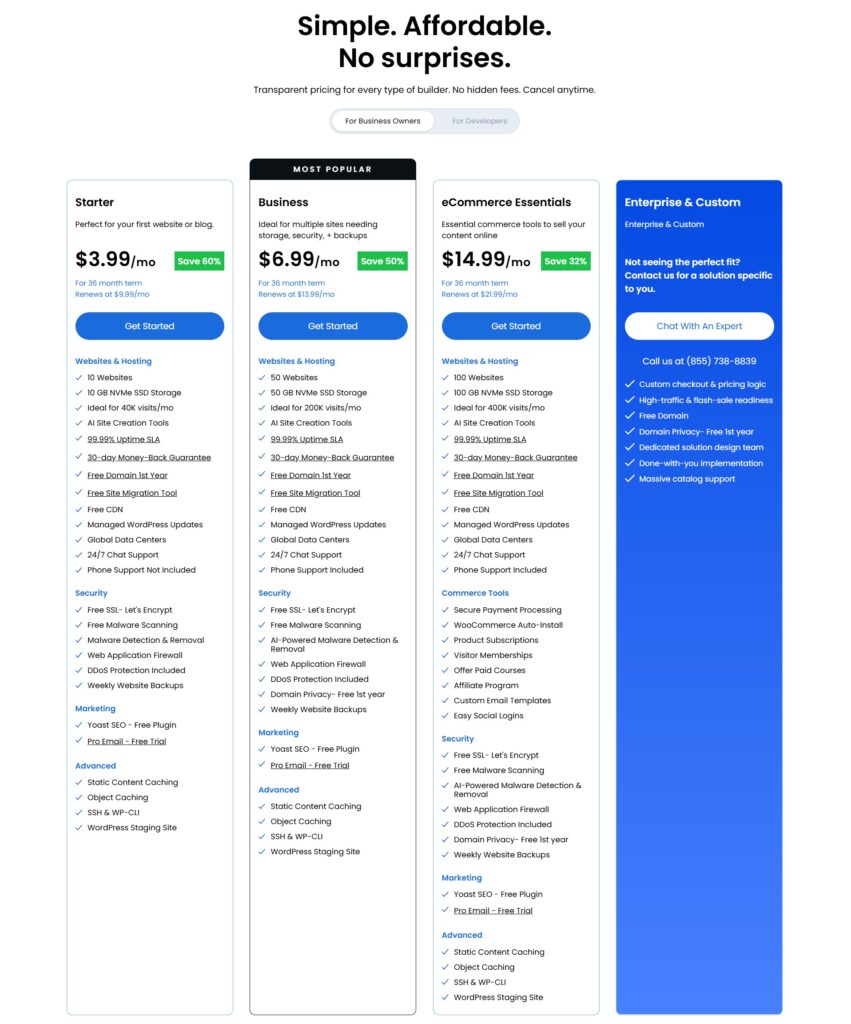
Business adds 50 websites, 50GB NVMe storage, phone support, and domain privacy for the first year.
30-day money-back guarantee lowers the risk of trying it.
Cons
Starter renewal jumps about 150% — from $3.99/month promo to $9.99/month on a 36-month renewal term.
Starter is no longer 1-site only, but 10GB storage and ~40K visits/month positioning can still limit growth.
Do not rely on the old US-only warning; Bluehost now advertises Global Data Centers, but real speed should still be tested.
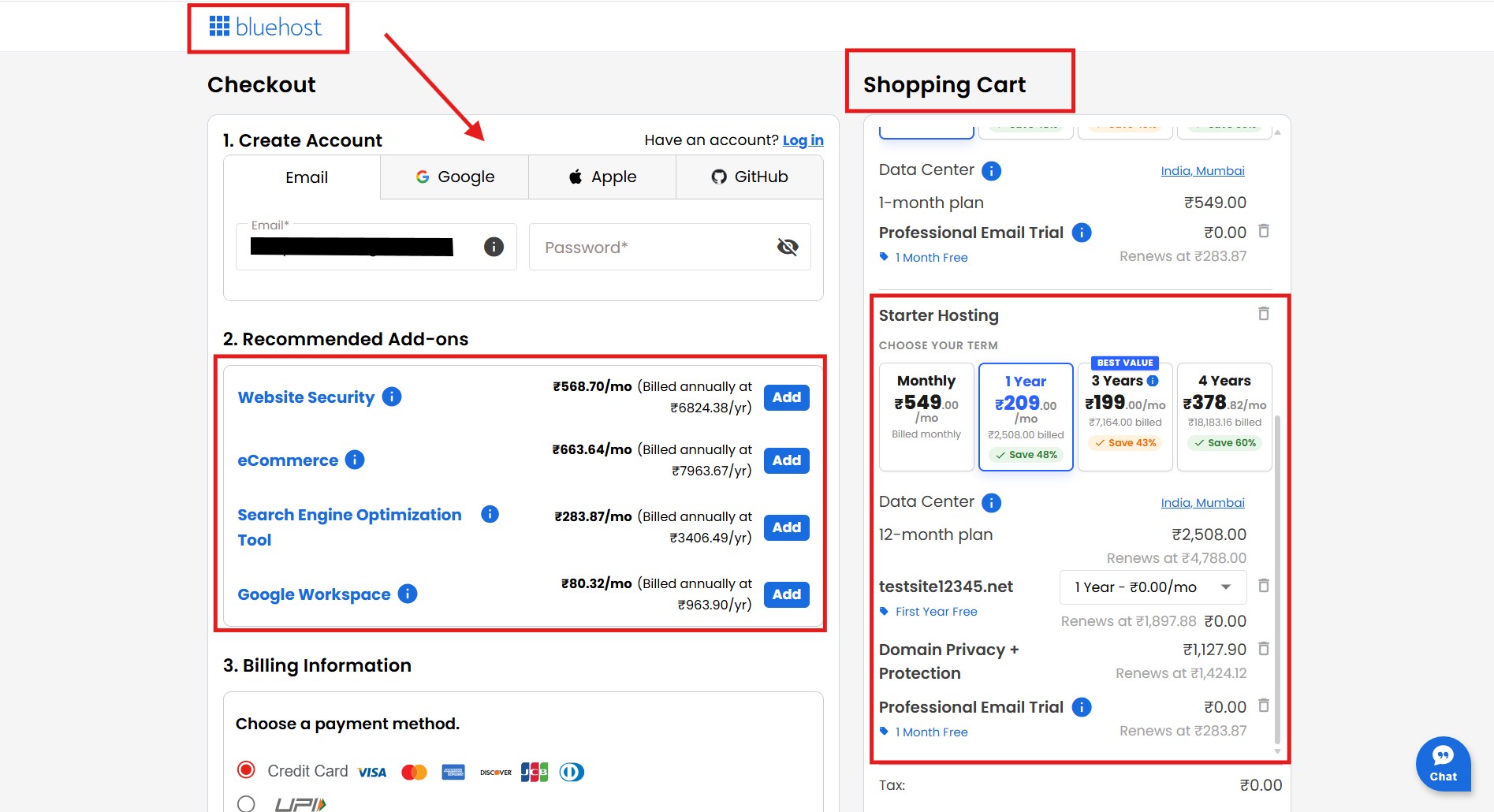
Checkout extras and email trials can still inflate the bill if you do not review them carefully.
Support quality declined after the 2021 Newfold acquisition per Capterra/Trustpilot.
An independent, commission-disclosed review answering is Bluehost good for beginners · Last verified May 2026.
The ad says $3.99 a month. It doesn’t say what it costs in year two.
You’re setting up your first website. You’ve got a domain name picked, a topic you’re excited about, and a WordPress theme saved in a tab. You just need hosting. Every search you run comes back to the same three names — and Bluehost sits at the top with that $3.99 price tag. WordPress.org recommends it. Your friend used it. The YouTube tutorial you watched used it. It feels like the obvious choice.
The problem isn’t that Bluehost is bad for beginners. The problem is that most of the reviews telling you to buy it earn $65 to $130 every time you sign up — and they have no reason to mention that the $3.99 plan renews at $9.99 on a 36-month renewal term, while Business renews at $13.99/month.
We earn commission from Bluehost too. That’s stated upfront. But we’ll also tell you about the renewal price, which plan is actually worth choosing, what to untick at checkout, and exactly when Bluehost stops being the right answer. By the end, you’ll know whether the honest answer to is Bluehost good for beginners in your specific case — or whether to look elsewhere.
Bluehost’s Basic plan starts at $3.99/month on a 36-month term and renews at $9.99/month after the first cycle — Source: Bluehost Renewal Price FAQ, 2026.
The old Basic/Plus/Choice Plus names are no longer the main web hosting plan names. Current relevant plans are Starter, Business, Pro, and eCommerce Essentials.
Starter now supports up to 10 websites, but it is limited by 10GB NVMe storage, about 40K visits/month positioning, and no phone support.
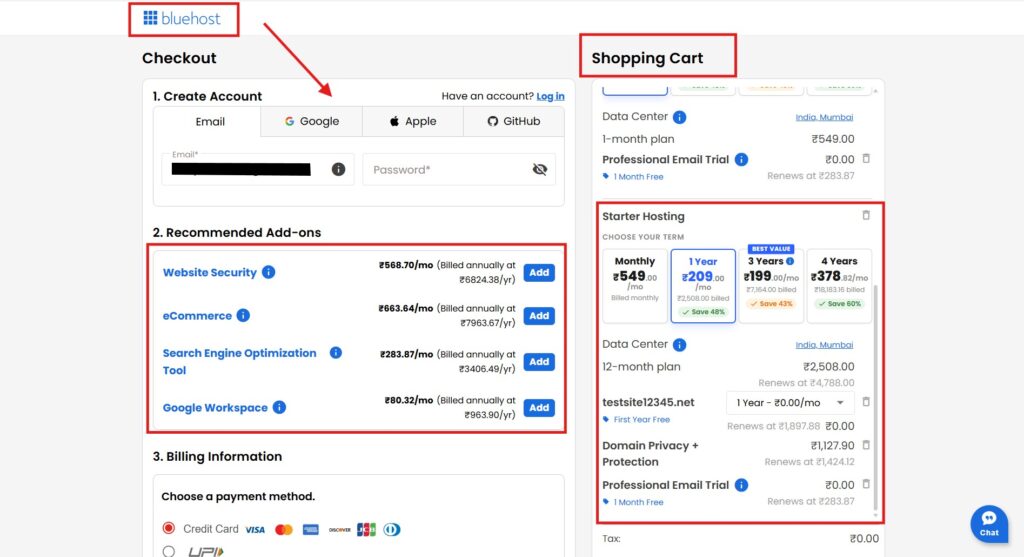
Bluehost add-ons and checkout options should still be reviewed carefully; Professional Email currently auto-renews at $2.99/month after its free trial.
WordPress.org officially recommends Bluehost — a verified compatibility endorsement, not a paid placement.
Bluehost’s current web hosting page lists Global Data Centers, so the old US-only warning should be removed or softened.
Business ($6.99/month promo, $13.99 renewal on 36-month term) is now the safer default for serious blogs because it adds 50 websites, 50GB NVMe storage, phone support, and domain privacy for the first year.
Disclaimer : I strongly believe in transparency. Some links on this website are affiliate links, which means I may earn a small commission if you purchase through them — at no extra cost to you. This helps support the work I do and allows me to continue creating honest reviews, tutorials, and creator-focused content.
The Hosting WordPress Officially Endorses — and What That Means for You
Bluehost is a US-based web hosting company that WordPress.org has officially recommended since 2005 — not as a paid partnership, but as a verified environment where WordPress installs and runs correctly without technical friction.
Bluehost launched in 2003, runs US data centres, and has been owned by Newfold Digital since 2021. It sells shared, WordPress, VPS, dedicated, and cloud hosting. Beginners almost always buy shared hosting, so that is what this review focuses on current Starter, Business, and eCommerce Essentials plans — especially the $3.99 Starter plan many beginners see first.
Here is what the endorsement actually means. WordPress.org recommends Bluehost alongside SiteGround and DreamHost — meaning it meets the platform’s verified standards for performance and compatibility, not that it paid for the recommendation. For a first-time builder, that lowers the risk that your install breaks for reasons you cannot diagnose. So if you are asking is Bluehost good for beginners on technical grounds, the WordPress.org endorsement is a genuine point in its favour.
Why $3.99/Month Is Only True for 36 Months — and What It Jumps To
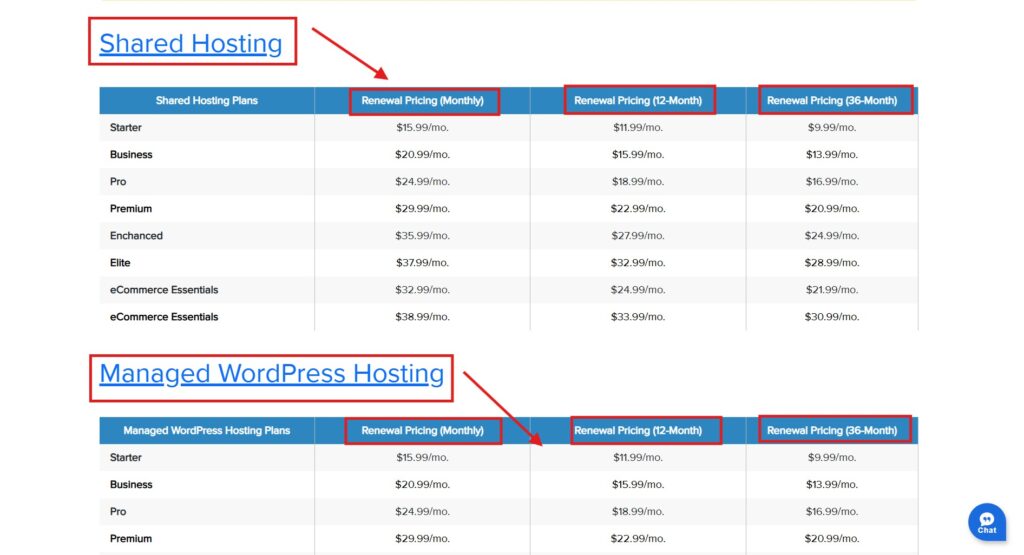
Bluehost’s $3.99/month price is a promotional rate that requires paying for 36 months upfront, after which the Basic plan renews at $9.99/month on the 36-month renewal term — an increase of about 150%.
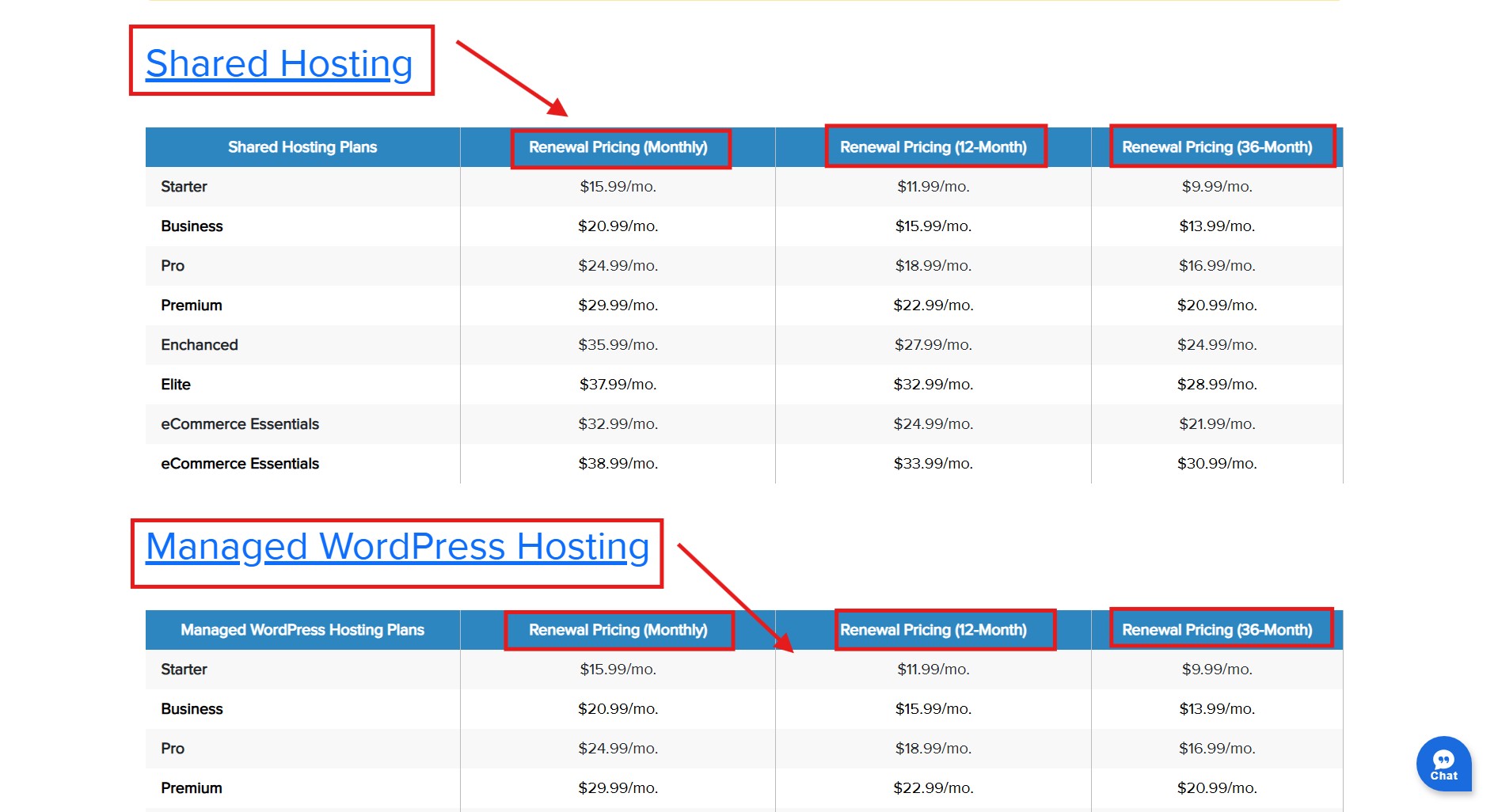
This is the most important section of any honest Bluehost review, and almost none of them explain it clearly. Here is the verified bluehost renewal price 2026 across every shared plan.
What the promo term means in practice: you pay all 36 months upfront at signup — roughly $143.64 for Starter before taxes and optional add-ons. After 36 months, auto-renewal kicks in at the standard rate unless you cancel first. The low monthly number is real, but only for that first commitment.
At renewal, the picture changes. Bluehost Starter at $9.99/month is no longer the ultra-cheap deal the $3.99 ad suggests. It may still be acceptable for a beginner site, but the renewal comparison is now closer: Hostinger’s Premium plan starts lower at $2.99/month but renews at $10.99/month on the current 48-month offer
Run the three-year math and the picture sharpens. On Basic you pay about $143.64 upfront for 36 months, then the next 36-month renewal cycle at $9.99/month would cost about $359.64 before taxes. Anyone asking is Bluehost good for beginners on price needs that number, because it is the part the $3.99 ad does not show. What to do about it: set a calendar reminder 45 days before renewal. Your options are to renegotiate a new promo term (Bluehost sometimes offers retention deals), migrate to a cheaper host, or accept the renewal rate if you are happy.
The bluehost renewal price 2026 is not a reason to avoid Bluehost — it is a reason to use it deliberately. Bluehost’s Starter plan renewal price in 2026 is $9.99/month on a 36-month renewal term, up from the $3.99 introductory rate — Source: Bluehost Renewal Price FAQ, 2026.
What Each Current Bluehost Plan Gives You — and the One Limit That Trips Beginners
Bluehost’s Starter plan now supports up to 10 websites, not one. The real beginner limit is different: Starter gives 10GB NVMe storage, is positioned for about 40K visits/month, and does not include phone support.
That means the old bluehost starter plan limits angle has changed. The current bluehost starter plan limits are mainly storage, traffic fit, support level, and security/privacy extras — not a one-site cap. Plan choice is where the answer to is Bluehost good for beginners gets specific to your goals. Here is how the current plans differ on the things that matter
Feature
Starter
Business (best for serious beginners)
eCommerce Essentials
Websites
10
50
100
Storage
10GB NVMe
50GB NVMe
100GB NVMe
Domain privacy
Not highlighted as included
Free 1st year
Free 1st year
Support
24/7 chat; phone not included
24/7 chat + phone support
24/7 chat + phone support
Promo price
$3.99/mo
$6.99/mo
$14.99/mo
*”Unmetered” does not mean unlimited. Per Bluehost’s Terms of Service, accounts using significantly more resources than average can be throttled or suspended. There is no published threshold — standard shared-hosting language, but worth knowing if you run a media-heavy site.
The recommendation is now more balanced: choose Starter if you are launching a simple first site and want the lowest upfront cost. Choose Business if you want more room for growth — 50 websites, 50GB NVMe storage, phone support, and domain privacy for the first year. Business is the better default for a serious blog or affiliate project; Starter is the budget starter plan.
What Bluehost Doesn’t Mention: 4 Things to Know Before You Click Buy
Before checkout, four things deserve your attention: pre-ticked add-ons, the real meaning of “unmetered,” how the free domain renews, and the decline in support quality since 2021.
What Nobody Tells You
1. The plan names changed. The old Basic, Plus, and Choice Plus wording in many reviews is outdated for the current Bluehost web hosting page. The main current web hosting names to check are Starter, Business, eCommerce Essentials, and the high-performance plans such as Pro.
2. The Starter plan is not one-site-only anymore. It currently supports up to 10 websites, but it still has beginner-level limits: 10GB NVMe storage, about 40K visits/month positioning, and no phone support.
3. The free domain renews at Bluehost’s price, not market rate. Year one is genuinely free. From year two, compare renewal prices with Namecheap charges $8–$11 and Cloudflare sells at cost. Transfer your domain after year one to cut the cost.
4. Professional Email currently appears as a free trial on web hosting plans and auto-renews at $2.99/month after the first billing cycle unless cancelled. Review checkout carefully before payment
5. Support is good for basic issues, slower for complex ones. Since Newfold Digital acquired Bluehost in 2021, Capterra and Trustpilot reviews cite longer waits and more escalations. A broken plugin gets handled fine; a migration or performance issue means waiting — Source: Capterra and Trustpilot, 2025–2026.
How Fast Is Bluehost Actually? Speed Data for a Beginner Site
Bluehost’s average TTFB sits around 400–600ms for US visitors in 2026 — acceptable for a beginner blog, but slower than Hostinger’s sub-400ms global average.
Uptime holds at a 99.9% SLA, in line with independent monitoring — Source: ToolTester, 2026. For a simple WordPress blog, a 400–600ms time-to-first-byte is fine and your readers will not notice. On speed alone, is Bluehost good for beginners? For a US-focused blog, comfortably yes.
It becomes a problem for affiliate sites, where Core Web Vitals feed SEO rankings. A visitor in India or the UK adds 100–200ms of latency versus a host with a local data centre, because Bluehost runs US-only servers. For a US-focused blog that is irrelevant; for a global audience it is a measurable disadvantage. One mitigation: Bluehost includes Cloudflare CDN on all plans, which caches static content closer to your visitors. Bluehost’s US-based hosting delivers adequate speed for a beginner WordPress site targeting US visitors, but affiliate marketers building for a global audience should factor in the extra latency from a single US data centre.
Bluehost vs Hostinger for WordPress: The Honest Side-by-Side
Bluehost and Hostinger are the two most-recommended beginner hosts in 2026, and they suit different situations — which most affiliate reviews won’t tell you directly.
Here is the bluehost vs hostinger for wordpress comparison on the factors that actually decide it.
Factor
Bluehost
Hostinger
Winner
Entry promo
$3.99/mo
$2.99/mo
Hostinger
Renewal
$9.99
$10.99
Bluehost by $1/mo
Data centres
Global Data Centers listed
Global data-center network
Tie
Speed (TTFB)
~400–600ms
~200ms
Hostinger
WordPress ease
WP.org endorsed + guided setup
AI site builder / AI Agent
Bluehost
Entry sites
10 sites on Starter
3 sites on Premium
Bluehost
Support
24/7 chat; phone starts above Starter
24/7 live chat
Depends
Best use case
Beginner WP site, guided setup
Low upfront cost, creator/affiliate stack
Depends
When Bluehost wins: for a US-based beginner building a first WordPress site who wants the most hand-held setup, the answer to is Bluehost good for beginners is a clear yes — its guided dashboard and WordPress.org endorsement make it the easier choice. The $3.99/month Starter promo is genuinely useful for year one if you understand the renewal.
When Hostinger wins: for affiliate marketers, global audiences, or anyone planning more than one site at renewal pricing, Hostinger delivers better speed, cheaper long-term rates, and global data centres. If that is you, read our ‘hostinger for affiliate marketing‘ before deciding.
The two are not enemies — they are tools for different jobs. A US blogger who wants the smoothest possible first launch is well served by Bluehost; a marketer building several fast, global sites may prefer Hostinger or cloud hosting. Our full ‘hostinger review 2026‘ runs the same honest numbers on the alternative, so you can compare like for like rather than trusting a single review.
Is Bluehost Good for Beginners? Who It Fits and Who Should Skip
Bluehost is right for first-time WordPress builders who want guided setup and can commit to a 36-month promo term; it is the wrong choice for users who need the cheapest renewal math without checking alternatives, heavy traffic from day one, or advanced developer control.
The clearest way to answer is Bluehost good for beginners is to match it against your actual situation, not a generic recommendation. For the right profile, is Bluehost good for beginners? Yes. For the wrong one, no amount of easy setup fixes it.
There is also a bigger-picture point. Hosting is only step one — most beginners also need pages, email capture, and a way to sell. If that is your path, pair your host with a funnel tool and read our ‘systeme.io review’ to see how hosting and funnels fit together. Bluehost handles the website; something like Systeme.io handles what the website is for.
✅ Bluehost IS right if…
❌ Bluehost is NOT right if…
You’re building your first WordPress site and want the easiest guided setup.
You need heavy traffic, advanced developer control, or cheapest renewal without comparing alternatives.
Your primary audience is in the US.
You want to choose server location and performance stack very precisely — verify Bluehost data-center options at checkout.
You value the WordPress.org endorsement as a trust signal.
You need the fastest load speed — test Bluehost vs Hostinger in your actual target region before deciding.
You can commit 36 months upfront for the promo rate.
You want the lowest total 3–6 year cost — renewal math must be compared before buying.
A simple blog, portfolio, or brochure site is all you need.
You will run high-traffic sites or client projects — compare Business, Pro, cloud, VPS, Hostinger, SiteGround, or Cloudways.
How to Sign Up with Bluehost Without Paying More Than You Should
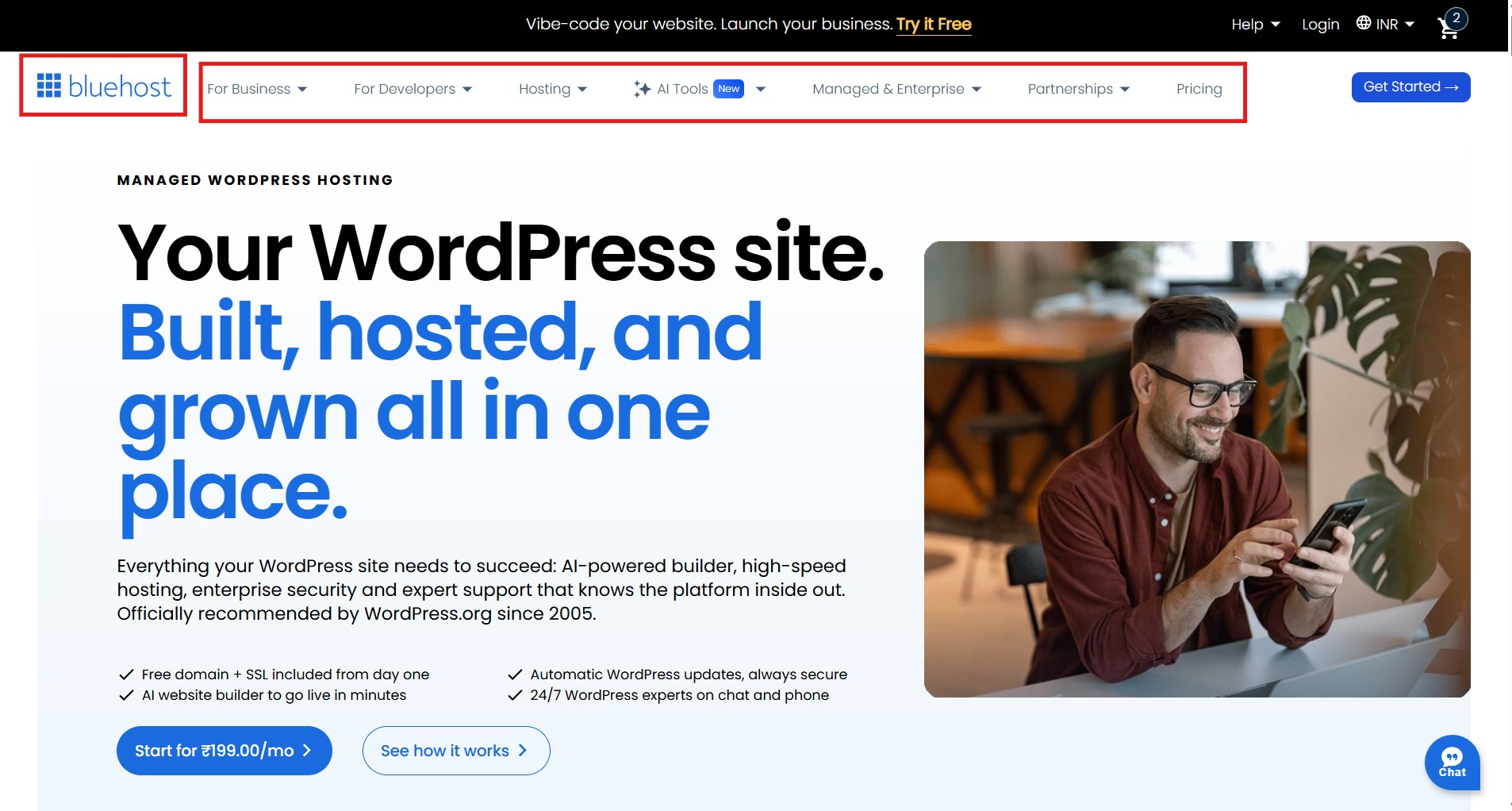
To sign up with Bluehost without overpaying, choose Starter for the lowest-cost simple site or Business for a serious blog, claim your free domain, and check every optional add-on at checkout before you pay.
These are the exact bluehost checkout fees to avoid and the steps that keep your first bill clean. Setup is the strongest part of the case for is Bluehost good for beginners — it is genuinely hard to get wrong.
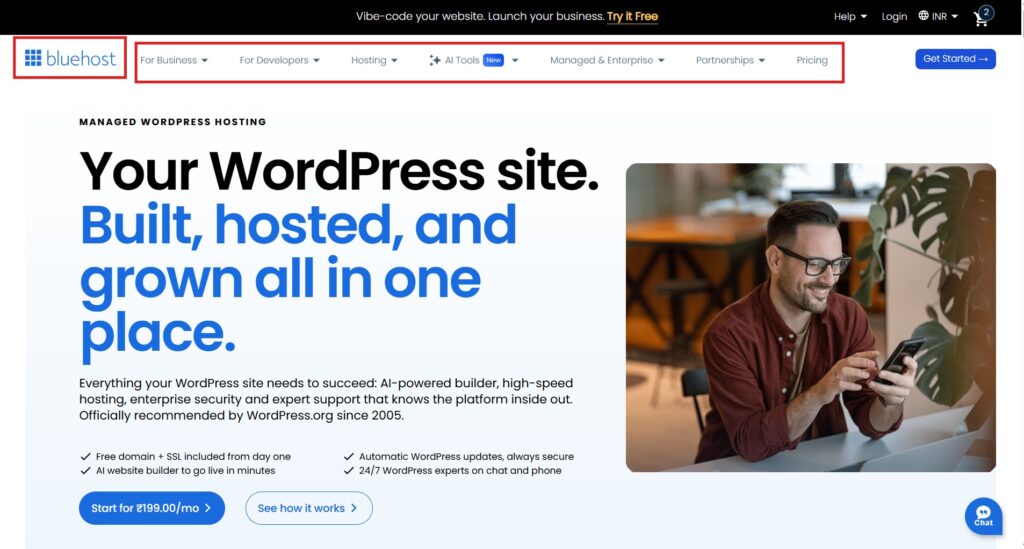
1. Go to bluehost.com and click “Get Started.”
2. Choose Starter if you only need a simple first website at the lowest upfront cost. Choose Business if you want the safer default: 50 websites, 50GB NVMe storage, phone support, and domain privacy for the first year.
3. Enter or claim your free domain. If you already own one, select “I have a domain” to skip registering a new one.
4. At checkout, untick SiteLock, CodeGuard Basic, and Professional Email — all pre-ticked, adding $7–$10/month. You don’t need them to run a basic WordPress site.
5. Complete payment. WordPress installs automatically. Log in at my.bluehost.com → My Sites → Manage Site to reach WordPress admin.
6. Set a calendar reminder 45 days before your plan expires — your window to renegotiate, switch hosts, or accept the renewal with full awareness.
Is Bluehost Good for Beginners? My Honest Answer After the Renewal Math
After running the numbers, the answer to is Bluehost good for beginners is yes for a first WordPress site in the first 36-month term — and only a maybe as a long-term home once the renewal rate lands.
Picture the reader Bluehost genuinely serves: building a first site and wanting it easy. In year one Bluehost delivers — smooth setup, fair price, free domain for the first year, and the WordPress.org endorsement for confidence. That is a real outcome worth $3.99/month on the current Starter term.
The caveat matters and is worth restating. If you’re still on Bluehost after the first term at $9.99/month on Starter, your next 36-month cycle costs far more than the first. At that point, compare Bluehost Business, Hostinger, cloud hosting, or another host based on your actual traffic and site count.
So here is the execution, and the final word on is Bluehost good for beginners. If Bluehost fits: choose Starter for a simple low-cost launch or Business for the safer serious-site default, check the add-ons, set a renewal reminder for 45 days out, and focus on building. If you’re an affiliate marketer running multiple high-traffic sites, the bluehost vs hostinger for wordpress answer may point to Hostinger, cloud hosting, or VPS as the better starting point — and our Hostinger review covers that directly.
If there is one sentence to carry away on is Bluehost good for beginners, it is this: treat it as an excellent first-term starter, not a blind forever home. Launch on Starter or Business while the price is low, build your site, and make a deliberate decision at renewal instead of sleepwalking into the higher rate. Used that way, Bluehost still earns its place for a first-timer — and you keep the option to move the moment the math stops working.
Buy / Try / Switch — by Reader Type
Reader profile
Verdict
Reason
First WordPress site, simple launch
BUY — STARTER
Lowest current web hosting promo: $3.99/month on 36-month term; supports 10 websites and includes free domain first year.
Blogger targeting global readers
BUY – BUSINESS
Better default: 50 websites, 50GB NVMe storage, phone support, and domain privacy first year.
Affiliate marketer, multiple high-traffic sites
COMPARE — BUSINESS / PRO / HOSTINGER
Starter is no longer 1-site only, but storage and visit positioning can still become limiting.
Small business brochure site
BUY — STARTER OR BUSINESS
Starter is enough for a basic site; Business is safer if phone support and growth room matter.
Developer building client sites
WRONG HOST FOR ADVANCED WORK
Shared hosting may feel limiting; compare Pro, cloud, VPS, SiteGround, or Cloudways.
Yes — Bluehost is one of the most beginner-friendly hosts in 2026, with guided setup, one-click WordPress, and a clean dashboard that needs no technical knowledge. The key caveat is the renewal: Starter is currently $3.99/month for 36 months and renews at $9.99/month on the 36-month renewal term. As a first-term host for a simple WordPress site, it delivers strong value.
Q2: What is the real Bluehost renewal price in 2026?
The bluehost renewal price 2026 for the Starter plan is $9.99/month on a 36-month renewal term, up from the current $3.99 36-month promo — about a 150% increase. Business renews at $13.99/month, Pro at $16.99/month, and eCommerce Essentials at $21.99/month on the 36-month renewal term. Bluehost also lists monthly and 12-month renewal options that are higher. Verify before relying on them, as pricing can change.
Q3: Can I host more than one website on Bluehost Starter?
Yes. The Starter plan currently supports up to 10 websites, so the old one-site Bluehost basic plan limitations no longer applies. The current Starter limits are mainly 10GB NVMe storage, about 40K visits/month positioning, no phone support, and fewer growth/security extras than Business. Start on Business if there is any chance you will build a serious content site or multiple projects.
Q4: Does Bluehost offer a free trial?
No. Bluehost does not offer a free trial. It offers a 30-day money-back guarantee — you pay upfront and can request a full refund within 30 days. Newly registered domain fees are non-refundable even if you cancel.
Q5: Is Bluehost or Hostinger better for WordPress in 2026?
For bluehost vs hostinger for wordpress, Bluehost suits beginners who want the most guided setup, while Hostinger suits creators who want a lower upfront price and more WordPress-specific performance features. Current pricing is closer than the old comparison: Bluehost Starter is $3.99/month and renews at $9.99/month, while Hostinger Premium is $2.99/month and renews at $10.99/month. The choice comes down to setup preference, storage, visitor targets, and how many sites you will run.
Q6: What add-ons should I skip at Bluehost checkout?
Untick SiteLock ($2.99/mo), CodeGuard Basic ($2.99/mo), and Professional Email ($1.99/mo) — all pre-selected, totalling $7.97/month. These are the main bluehost checkout fees to avoid. Deselect all three unless you have a specific reason to keep them.
Q7: Is Bluehost still recommended by WordPress.org in 2026?
Yes. Bluehost remains one of three hosts officially recommended by WordPress.org as of 2026, alongside SiteGround and DreamHost. It’s a technical endorsement based on performance and compatibility — not a paid sponsorship.
Q8: What happens to my site if I cancel Bluehost at renewal?
Your site goes offline when the subscription expires. Before cancelling, export your WordPress files and database, or use a migration plugin to move hosts first. Bluehost keeps account data for 30 days after cancellation — contact support to retrieve it.
Sangeetha Vishnu is a Digital Product Reviewer and Affiliate Marketer with 4 years of experience exploring affiliate marketing, digital products, AI tools, and software across multiple platforms and affiliate programs.
I research, purchase, and test the products I review before sharing my honest experience. My goal is to help entrepreneurs, marketers, creators, and beginners understand what a product actually does, who it’s for, and whether it’s worth investing in.
I also share practical insights on affiliate marketing, AI tools, SEO, and online business. My guiding principle is simple: “Authority, Built On Clarity.” I believe honest reviews and transparent recommendations build lasting trust.