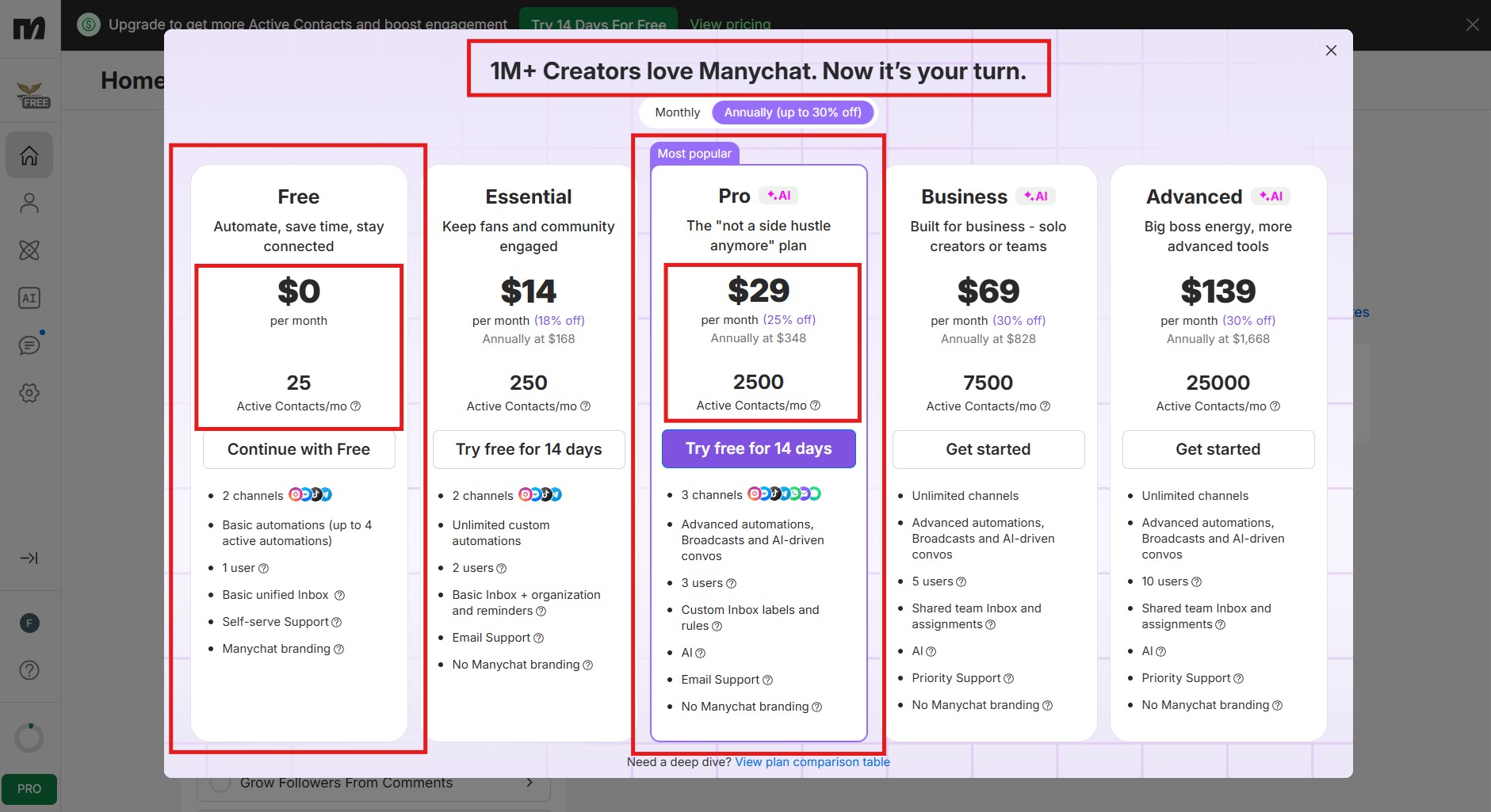
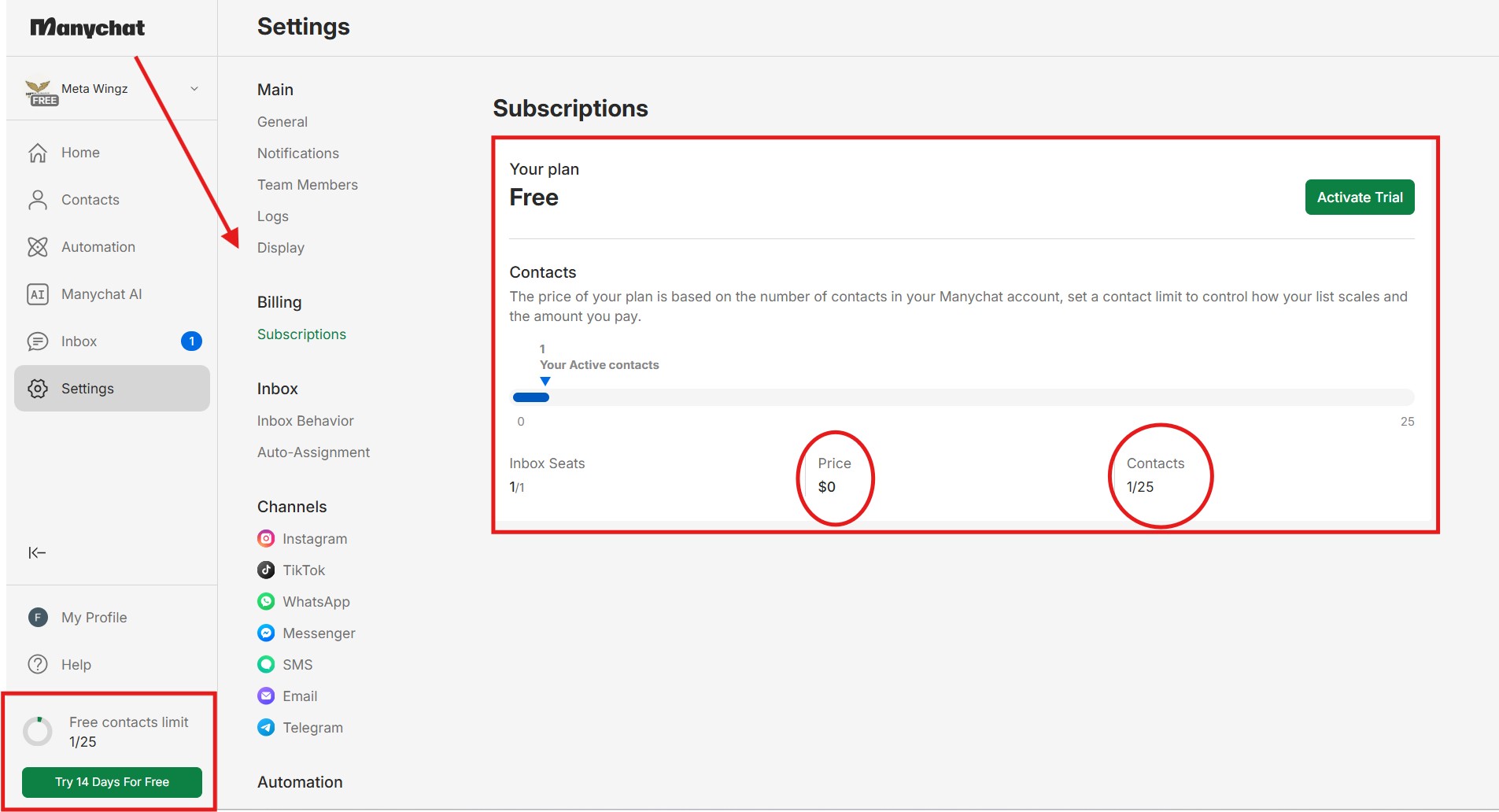
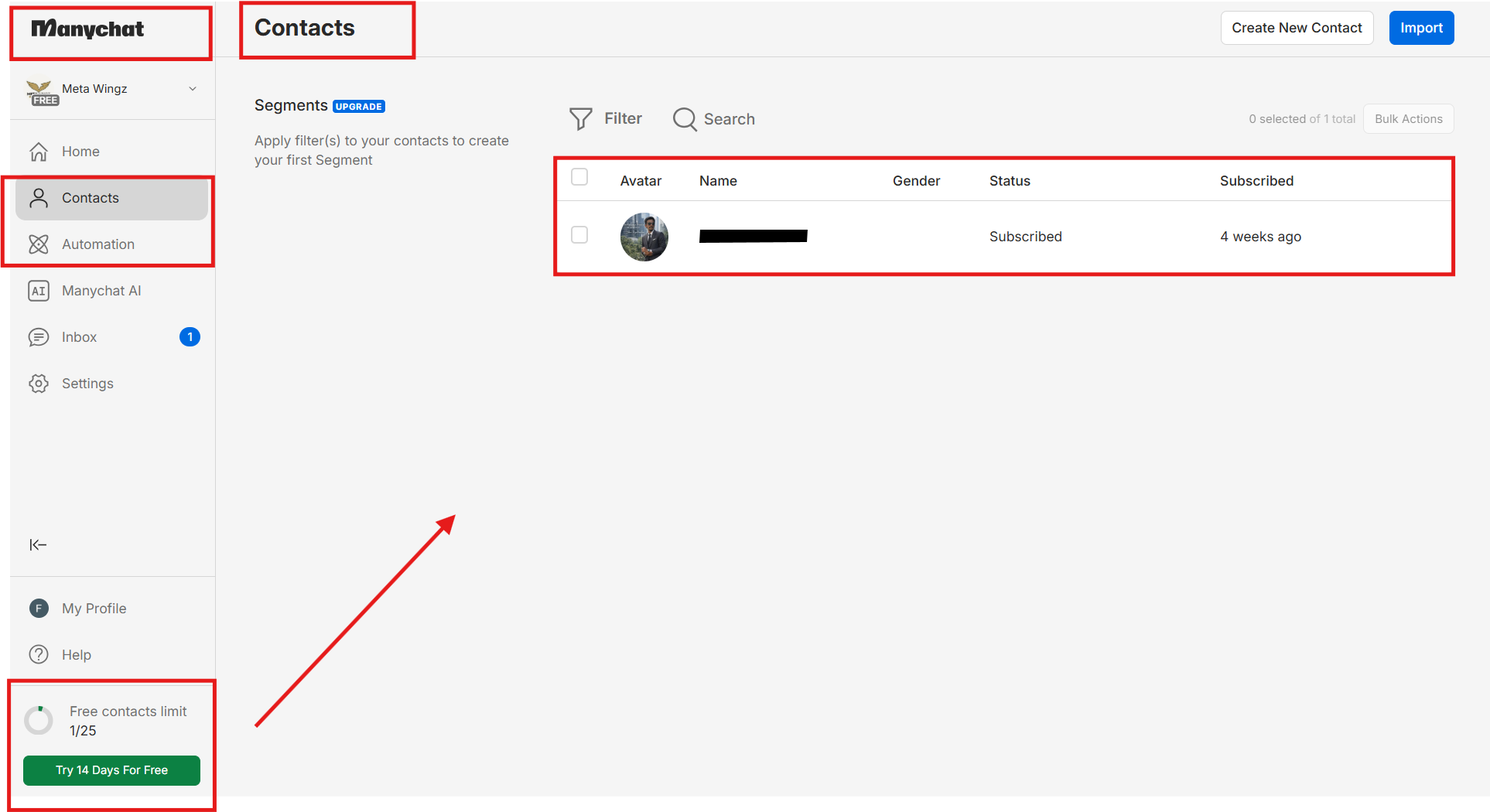
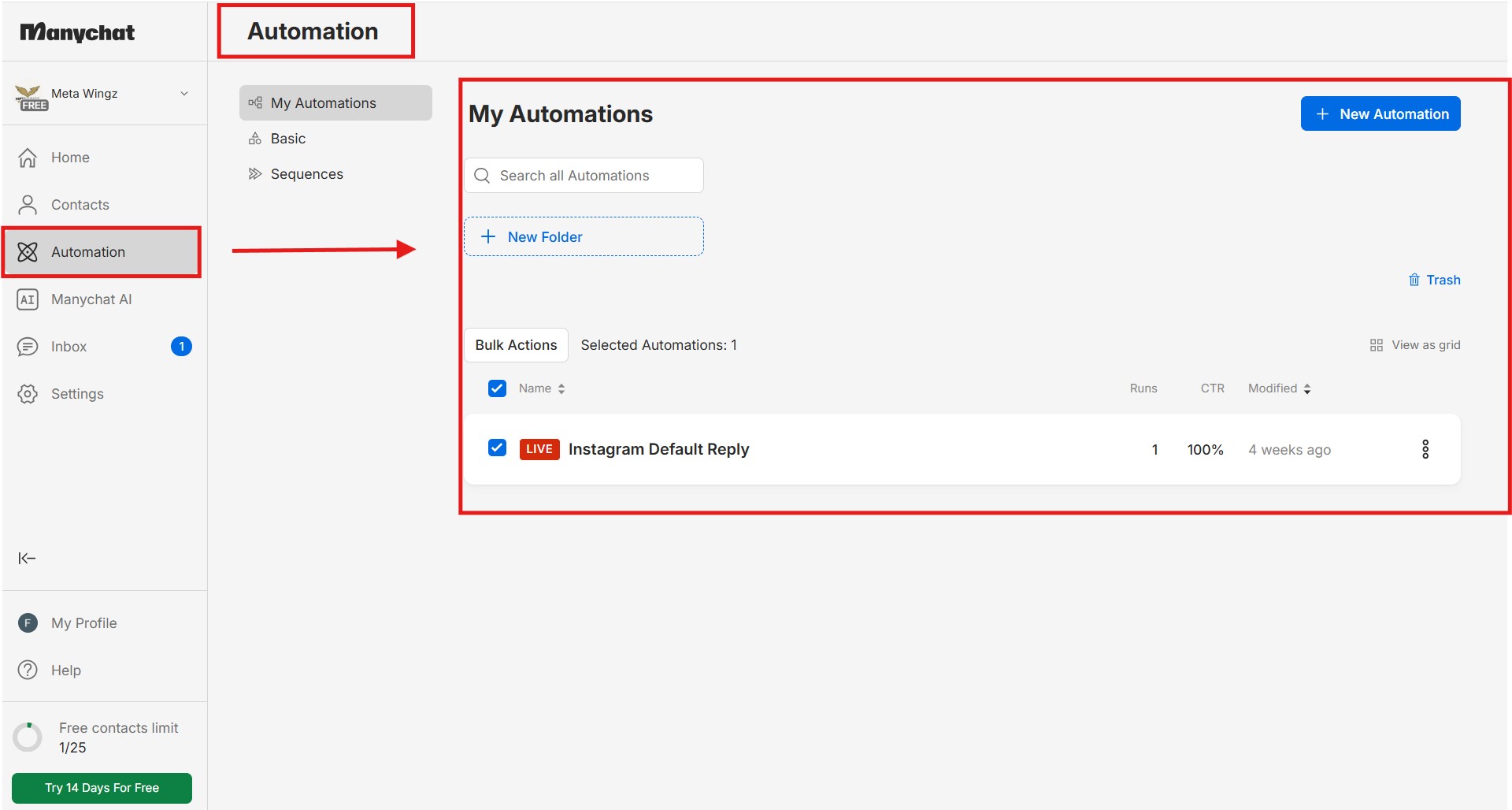
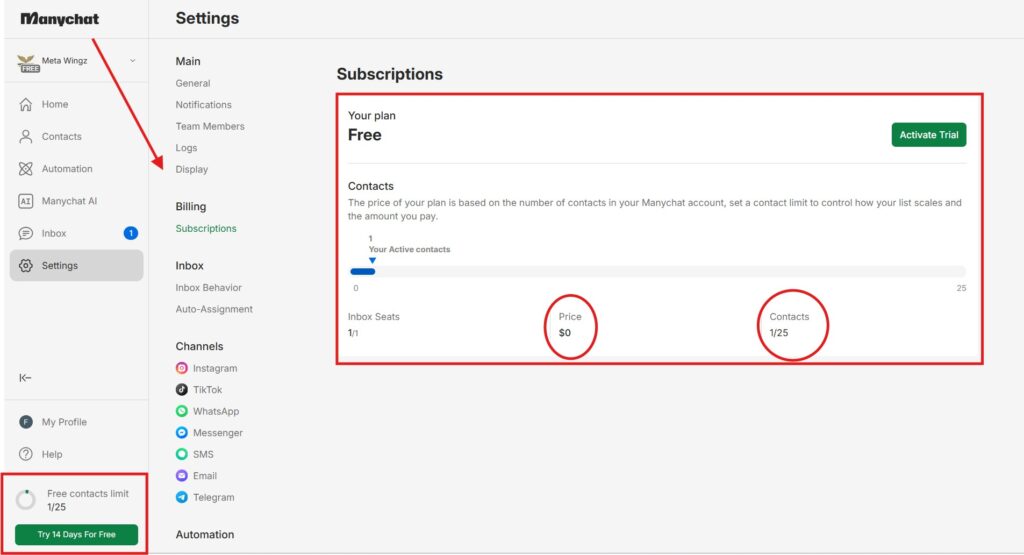
What changed in 2026: On March 2, 2026 Manychat cut the free plan from 1,000 active contacts/month to 25. A 97.5% reduction. Existing free accounts were grandfathered for a brief window, then migrated. Anyone signing up after March 2 lands directly on the new 25-contact reality.
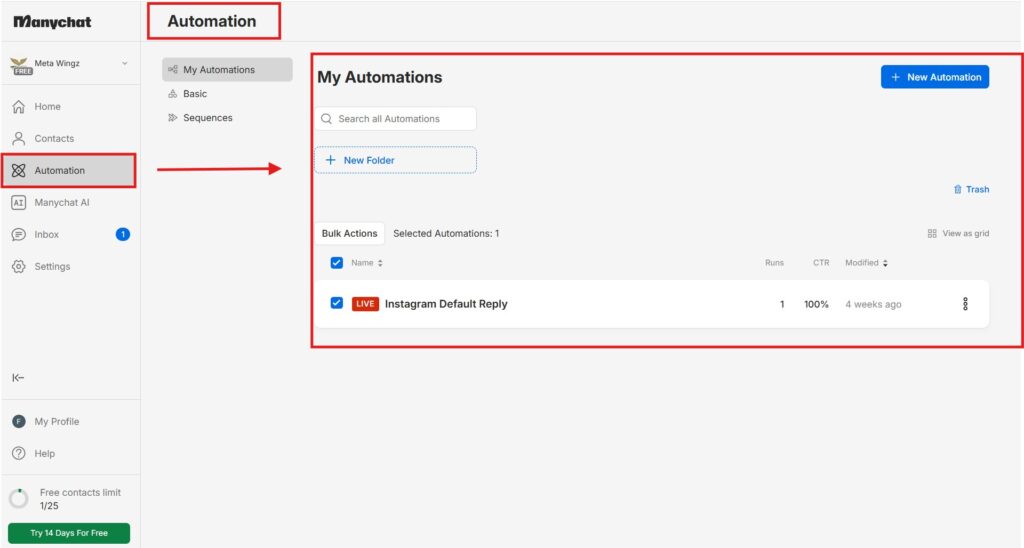
What 25 contacts actually gets you: 25 active contacts per month · 4 live automations max · 1 account user · 1 inbox seat · Instagram DM + Facebook Messenger channels only. WhatsApp is NOT on the free plan. The manychat 25 contacts limit resets on the 1st of every calendar month (not 30 days from signup).
Best free-plan use case: Test the platform interface for 1–2 weeks, run one keyword DM trigger on warm-audience posts only, and decide whether you actually need automation at scale. The manychat free plan 2026 is now a sandbox, not a working production tier — and that is exactly how Manychat now positions it.
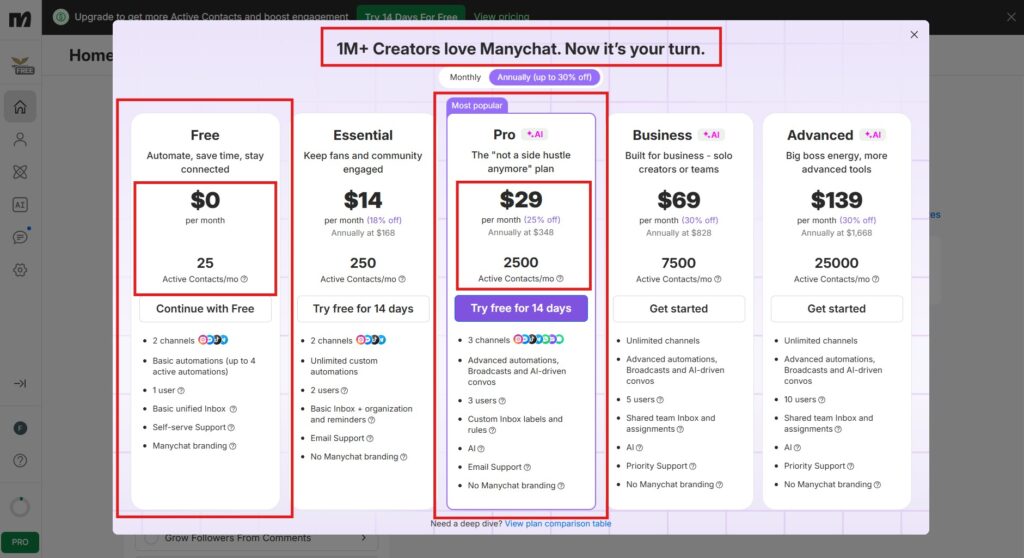
Pro plan (the real entry point): $29/month for 2,500 contacts, 3 channels (Instagram + Facebook + WhatsApp), basic AI features. The is manychat free worth it question flips to no the moment your account crosses ~20 monthly automated conversations — Pro becomes mandatory, not optional.
Pros
Real Instagram DM automation works on free — most competitors charge for any automation
4 live automations is enough to fully test a keyword + Story reply funnel before paying
credit card required to start — zero risk to explore the interface and build flows
Cons
25 contacts/month is not a production tier — one viral Reel burns the entire monthly limit in hours
WhatsApp is completely locked behind Pro — not accessible on free at all
No notification when the 25-contact limit is hit — automations just silently stop mid-campaign
Manychat’s free plan limits users to 25 active contacts per calendar month as of March 2026 — a 97.5% reduction from the previous 1,000-contact limit — making it one of the most restricted free tiers of any Instagram automation tool available today.
It is 8:47 PM on a Wednesday, your latest Reel just crossed 47,000 views in 9 hours, you open the Manychat dashboard expecting to see 200 new contacts captured from the comment-to-DM trigger you set up last quarter — and the count reads 25. That number is not a glitch — you have just slammed into the manychat 25 contacts limit, and Manychat never sent a single warning that it was coming.
You built this funnel last summer. Comment LINK on a Reel, get an automated DM with the lead magnet. The free Manychat plan you signed up for in 2025 came with 1,000 contacts a month — more than generous for a creator running one comment trigger. It worked. Through last winter, through the spring, through last week. Then on March 2, 2026 Manychat quietly cut the free plan from 1,000 active contacts a month to 25. A 97.5% cut. No email warning. No banner on your dashboard. Your automation just kept running — until it stopped, mid-Reel, on contact number 25. This single moment is the manychat 25 contacts limit in action — invisible until it costs you leads.
The 47,000-view Reel pulled 213 commenters. The first 25 got the DM. The other 188 got nothing. You did not know until tonight. Your sales page got 25 visitors instead of the 213 you should have had. The lead magnet downloaded 11 times. By tomorrow morning, the engagement is gone — your audience moves on, the algorithm moves on, the moment is dead.
And here is the actual question every Instagram creator, affiliate marketer, and small business owner researching the manychat free plan 2026 should be asking — not the marketing question Manychat wants you asking, the real one. Is 25 active contacts a month still useful for any serious creator, or is the free plan now a 30-minute demo before the paywall? Is the manychat free plan 2026 still the right starting point, or should you skip free entirely and start on Pro at $29/month? And what about the keyword-DM trigger, the Story-reply trigger, and the 4-automation cap — what does each one actually look like on the new 25-contact reality?
This manychat free plan 2026 guide answers that question with the actual numbers from the new pricing model — verified live on manychat.com/pricing — the contact-burn maths for every common Instagram trigger type, the 3 free-plan automation patterns that still genuinely work after the 97.5% cut, the WhatsApp-is-NOT-free trap that catches every second buyer, and the decisive upgrade-vs-stay-vs-switch verdict for your specific creator profile. No defending Manychat (most reviews you have read are written by Manychat-promoting agencies).
No dismissing it (most that are not Manychat-promoting are written by competitor tools). This is the only guide from a site with nothing to lose either way. The Manychat pricing page is open in a tab if you want to verify every number as you read. By the end of the next ten minutes, you will know whether the manychat free plan 2026 is the smart pick for your account, or whether it is time to stop and upgrade.
Disclaimer : I strongly believe in transparency. Some links on this website are affiliate links, which means I may earn a small commission if you purchase through them — at no extra cost to you. This helps support the work I do and allows me to continue creating honest reviews, tutorials, and creator-focused content.
What The Manychat Free Plan Actually Includes In 2026
Manychat cut its free plan from 1,000 contacts to 25 in March 2026. That is a 97.5% reduction. If you set up your free account before that date, your automations likely stopped working mid-month without warning the first time your account migrated to the new model. If you are setting up Manychat for the first time in 2026, you are starting directly on the new 25-contact reality. This is what the manychat free plan 2026 actually includes today — the verified feature list every reader of this manychat free plan 2026 guide needs before deciding whether to sign up or skip to Pro:
So what do the manychat free plan limits 2026 actually look like in practice? 25 contacts per month. 4 automations. Instagram DM and Facebook Messenger only — no WhatsApp. One user seat. Manychat is honest about this: the free plan is a demo tier, not a production tool. That changed in March 2026 and has not changed back. — Source: Manychat Help Centre, 2026.
25 active contacts per month — the manychat 25 contacts limit resets on the 1st of every calendar month, not 30 days from signup
4 live automations maximum — you can build more, only 4 can be active at any moment
1 account user — no team seats, no agency client management on free
1 inbox seat — for manual conversation handling alongside automation
Instagram DM + Facebook Messenger only — WhatsApp is NOT included on the free plan despite being listed on the pricing page as a channel
Basic keyword and comment triggers — no advanced flow logic, no AI assistant, no advanced segmentation
Every bullet above exists because of one number: the manychat 25 contacts limit, the ceiling that defines this entire tier. The manychat free plan features 2026 are narrower than most tutorials suggest: you get comment-to-DM triggers, keyword DM replies, and Story reply automation. That is it. And manychat free plan instagram automation 2026 only stays functional while you stay under 25 total contacts. Post one Reel with a CTA and most accounts burn that entire budget in a few hours.
What “25 Active Contacts” Actually Means
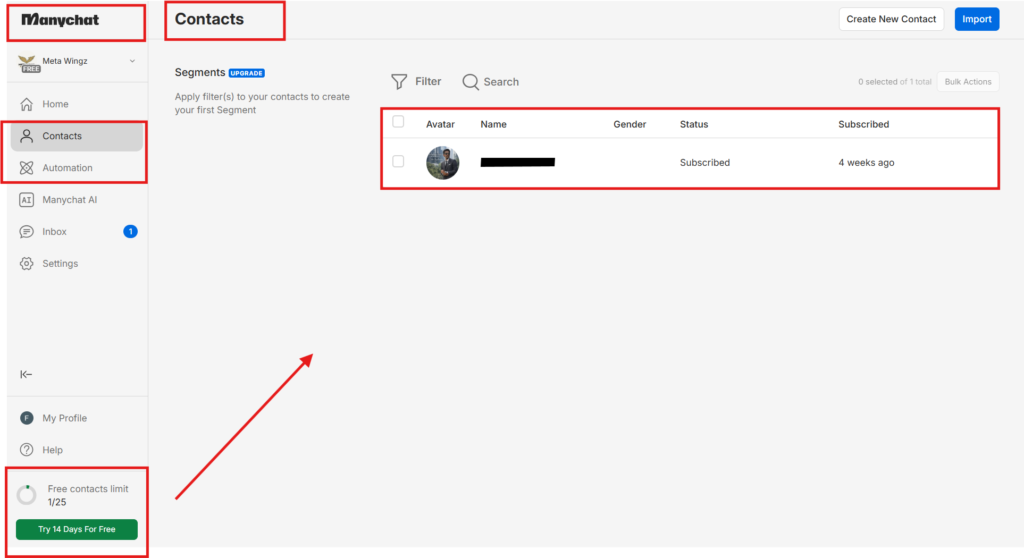
An active contact is any person who sends you a message, replies to a Story, or comments on a post that triggers one of your automations in that calendar month. The manychat 25 contacts limit applies to unique contacts — if the same person triggers two different automations in the same month, they count as one contact (the merciful part of the new pricing model).
The contact counter resets on the 1st of every calendar month — NOT 30 days from your signup date. Sign up on the 28th and you get 3 days of the month before the counter resets. Most creators do not realise this until they burn through 25 contacts on Day 2 of their first “month” — except that month is actually 3 days long. Plan your first campaign to launch on the 1st or 2nd of the month, not whenever you happen to sign up.
One thing that confuses a lot of creators: the manychat free plan contact limit 2026 is account-wide, not per automation. If the same person triggers three of your flows in one month, they count as a single contact. That is the good news. The bad news is the cap is still 25 — and that number goes fast the moment anyone posts actively.
Hit the manychat 25 contacts limit and the effect is immediate, not gradual. Critical and counter-intuitive: if you go over 25 contacts, your automations pause immediately — not at the end of the month. No warning email is sent. The automation simply stops responding. The person who triggered it gets nothing. You find out only when you check the dashboard or someone complains. The manychat free plan 2026 has no soft warning system, no proactive notification, no “you are at 80% of your limit” banner. It just stops.
The 4-Automation Limit — What You Can Run Simultaneously
4 live automations active at once on the free plan. For a beginner with one Instagram account, this is actually enough — comment trigger + Story reply + keyword DM + welcome message = 4 slots filled. That covers the standard new-follower onboarding flow. The 4-automation cap works alongside the manychat 25 contacts limit to define exactly how much the free plan can handle.
Where the 4-automation cap becomes painful: A/B testing or seasonal campaigns. You cannot run “version A” of your lead magnet trigger alongside “version B” without deactivating an existing automation. If you run a Black Friday-specific Story trigger in November, one of your evergreen automations has to come down. The free plan does not support multi-version experimentation — which is exactly the kind of testing serious creators need before committing to a campaign at scale.
WhatsApp Is NOT On The Free Plan (The Most Confusing Part)
Manychat’s pricing page lists WhatsApp as a channel. It is NOT available on the manychat free plan 2026. This is the single most common setup mistake new users make in 2026: spending an evening building a full WhatsApp Business flow on free, then hitting a paywall the moment they try to connect their WhatsApp Business account. The manychat 25 contacts limit applies here too — every failed WhatsApp setup attempt that DMs a contact still counts against your 25.
If you want WhatsApp automation, you need the Pro plan from day one. There is no workaround. The is manychat free worth it question for WhatsApp creators answers itself — free is irrelevant if WhatsApp is your primary channel. For Instagram-first or Facebook-first creators, free is at least worth testing before upgrading.
The Real-World Math — How Fast Do You Burn 25 Contacts?
Here is the problem nobody tells you when they sell you on the manychat free plan 2026: 25 contacts is not a slow monthly cap. For any active Instagram account posting Reels with a call-to-action, it is effectively a daily cap. This section walks the maths on the three most common Manychat trigger types so you can predict your own burn rate on the manychat free plan 2026 before you launch a single automation. Every scenario below ends at the same wall: the manychat 25 contacts limit
Comment Trigger On A Reel — The Contact Killer
Scenario: you post a Reel and the caption says “Comment LINK to get the guide.” 30 people comment. Result: you have used 30 contacts on a single post. You have just hit the manychat 25 contacts limit. Your automation stopped at contact 25. The other 5 people got nothing. You did not know — no warning, no banner, no email.
This is not an edge case. Comment-to-DM is the single most commonly taught Instagram automation strategy across YouTube tutorials, paid courses, and Manychat’s own marketing. The free plan is structurally not built for it. If you plan to run comment triggers on Reels with any real audience, the manychat free plan 2026 is the wrong tier. Period.
Story Reply Trigger — Safer, But Not Risk-Free
Stories rarely push you anywhere near the manychat 25 contacts limit, which is exactly why this trigger is the safer choice. Story replies typically drive fewer triggered contacts than Reel comments. A Story shown to 1,000 viewers typically pulls 2–8 replies. That is well within the 25-contact monthly budget if you only run one or two such Stories per month.
Risk: if you run a quiz Story or ask a direct question to a warm audience (“Reply YES if you want the new training”), you can burn through 25 contacts in one Story alone. Plan Story-reply triggers for low-volume questions, not engagement-bait.
Keyword DM Trigger — The Safest Use Of The Free Plan
Trigger: someone DMs you a specific word (“INFO”, “PRICE”, “LINK”) and gets an automated reply. This only counts contacts when someone proactively messages you — not your entire audience, only people who already want something from you.
Recommendation for serious creators on the manychat free plan instagram setup: use the free plan exclusively for keyword DM triggers. Avoid comment-trigger automations entirely until you upgrade to Pro. The keyword-DM-only strategy is the only one that reliably stays under 25 contacts a month for any account with more than ~500 followers.
What You Can Actually Build On The Manychat Free Plan (3 Honest Scenarios)
This is the section where this manychat free plan 2026 guide gets specific. Three real-world creator profiles, three actual setups that stay within the 25-contact and 4-automation caps of the manychat free plan 2026. If your profile is not on this list, the free plan is probably not the right starting point for you.
Creator Profile
Setup That Works
Why It Stays Under 25
Small Instagram account · 1k–3k followers · 2 posts/week
Local audiences DM less frequently than Instagram creator audiences. Typical burn: 5–15 contacts/month for most local SMB pages.
Beginner testing the platform · evaluating before commitment
1 keyword DM + 1 welcome message — test for 2 weeks before deciding on Pro upgrade
Two automations + low traffic = predictable burn rate under 10 contacts. Use this profile to validate Manychat’s fit before paying for Pro.
What Nobody Tells You About The Manychat Free Plan (4 Things)
Four things this manychat free plan 2026 guide surfaces that the official documentation, the Manychat-promoting agencies, and the competitor reviews all skip. These are the points that decide regret in either direction — staying on free when you should have upgraded, or upgrading when you should have walked away.
1. The 25-contact limit pauses your automations instantly, with no warning. You do not get a notification email. You do not get a dashboard banner at 20 of 25 contacts. The automation simply stops responding at contact 26. The person who triggered it gets nothing. You find out only when you check the dashboard — usually hours or days later. Set a calendar reminder to check your contact count weekly if you are running anything time-sensitive.
2. The “active contact” definition is more generous than it sounds. If the same person triggered two different automations in the same month, they still count as one contact. If they trigger the same automation twice, still one contact. The merciful part of the manychat free plan 2026 pricing — and the one detail that makes keyword DM triggers genuinely sustainable for warm-audience creators.
3. The reset is on the 1st of the calendar month — not 30 days from your signup. Sign up on the 28th and you get 3 days of “month one” before the counter resets. Plan your first campaign to launch on the 1st or 2nd of the next month, not the day you sign up. This single timing detail catches every new user.
4. WhatsApp is listed on the pricing page as a feature — it is NOT on the free plan. This has caught thousands of users who built an entire WhatsApp Business flow only to discover they need Pro to activate it. If WhatsApp is your primary channel, the manychat free vs pro decision is already made for you — Pro from day one, or pick a different platform.
When To Stay Free, When To Upgrade, When To Switch Tools
The decisive manychat free plan 2026 verdict by creator profile. Find the row that matches your situation hardest and act on it.
Your Situation
Verdict
Why
Testing Manychat for the first time · evaluating fit
STAY FREE
Use the free plan exactly as Manychat now positions it — a 1–2 week sandbox. Two automations, light traffic, decide on Pro at end of the test.
Solo Instagram creator · <500 followers · learning automation
STAY FREE
Keyword DM triggers stay well under 25 contacts at this account size. The manychat free plan 2026 actually works for you.
Active Instagram creator · 1k+ followers · 2+ posts/week with CTAs
The 3 Free-Plan Automations Worth Building Right Now
If after reading this manychat free plan 2026 guide you have decided to stay on free for now, these are the only three automation patterns worth your time on the manychat free plan 2026. Anything else risks burning contacts faster than you can earn them back.
Automation 1 — Keyword DM Reply (Best For Free Plan)
Trigger: someone DMs you a specific keyword (e.g. “LINK”, “INFO”, “GUIDE”). Response: an automated reply that delivers a resource, price list, or booking link. Why this is best for the manychat free plan instagram setup: it only counts contacts when someone proactively messages you — not your entire audience, only warm leads who already want something specific.
Setup tip: write into every post caption — “Type INFO and I will send you the details directly.” This trains your audience to use the keyword instead of commenting publicly, which keeps your contact usage predictable and concentrates engagement in your DMs (which Instagram’s algorithm also rewards).
Automation 2 — Story Reply Auto-Response
Trigger: someone replies to your Instagram Story. Response: an automated first message that opens a conversation and delivers your link or resource. Why this is safe for the manychat free plan 2026:
Stories drive fewer replies than feed posts. A Story shown to 500 viewers averages 2–6 replies — well within the 25-contact monthly budget.
Best use cases: product announcements, FAQ Stories, behind-the-scenes content that invites a reply, low-volume polls. Avoid running quiz-style Stories or direct questions to large warm audiences — those can spike replies past the cap.
Automation 3 — Comment Trigger (Use Carefully Or Skip)
Trigger: someone comments a specific word on your post. Response: Manychat sends them an automated DM. This is the strategy every Instagram automation tutorial teaches. It is also the strategy that the manychat 25 contacts limit breaks fastest.
FREE-PLAN WARNING: Only use comment triggers on posts with a small, predictable audience. NEVER run comment triggers on Reels designed for growth or on giveaways. If your Reel gets 100 comments, you exceed 25 contacts on the first day. Best use of comment triggers on free: a pinned post on your profile aimed at returning followers, not viral discovery content. If your strategy depends on comment-to-DM at scale, the manychat free vs pro decision answers itself — upgrade.
My Honest Take On The Manychat Free Plan 2026 — Useful Or Just A Demo?
If this manychat free plan 2026 guide had to be reduced to three paragraphs, these would be them. The free plan as it existed in 2025 — 1,000 contacts a month, 4 automations, full Instagram + Facebook integration — was a genuinely usable tier for new creators. The free plan as it exists from March 2026 onward — 25 contacts a month — is a sandbox. That is a meaningful change, not a marketing reposition.
What the manychat free plan 2026 still does well: it lets you test the platform interface, build and trigger your first automation, and validate whether Manychat’s flow builder feels right for your brain before you commit to $29/month. The keyword DM trigger pattern is genuinely sustainable at warm-audience scale. For a creator with under 500 followers running one keyword trigger and one Story reply, the free plan can run for months without hitting the cap.
What it no longer does: serve as a production tier for any serious creator. Comment-to-DM on Reels, multi-automation campaigns, WhatsApp, team management — all of these now require Pro from day one. The is manychat free worth it answer for anyone running real automation at any scale is: free is the test, Pro is the tool. The honest framing is not “Manychat made free worse” but “Manychat repositioned free as a demo and built Pro as the actual product.” The right plan at the right stage is what matters.
Manychat Free Plan 2026 — The Final Verdict
The closing call of this manychat free plan 2026 guide: for testing, learning, and validating fit, the free plan is still the smart pick. The manychat 25 contacts limit is the deciding factor for almost every creator profile in this guide. For any creator producing weekly Reels with CTAs, the manychat free plan 2026 is no longer a production tier — you will stop at 25 contacts before your first viral post finishes its first day. Upgrade to Pro ($29/month) is the right move at exactly that moment, not a moment later. The break-even is one converted lead per month — most Instagram creators clear that threshold inside week one of running Pro automations.
For the majority of readers finishing this manychat free plan 2026 guide after the March 2026 price reset surprised them, the right next step is the Manychat Pro 7-day free trial. Seven days is enough to migrate your existing automations, set up the comment triggers you couldn’t safely run on free, connect WhatsApp Business if you need it, and decide whether $29/month is worth the upgrade. If at the end of 7 days your automations have captured more leads than the free plan would have allowed, switch to annual billing. If not, downgrade back to free and keep using it as a sandbox.
Either way, the manychat free plan 2026 stops being a question the moment you test it on your own audience. The numbers tell you immediately. 25 contacts is either enough — or it is not. The right answer for your account is the one you can verify in week one.
FAQs About The Manychat Free Plan 2026
Q1: Is the Manychat free plan 2026 still worth using?
Conditionally yes. For a brand-new creator with under 500 followers running keyword DM triggers on warm-audience posts only, the manychat free plan 2026 still works as a sandbox to learn the platform. For anyone with 1,000+ followers posting Reels with CTAs, the manychat free plan 2026 does not — you will exceed 25 contacts in week one. The is manychat free worth it answer depends entirely on your traffic, your audience size, and which automation patterns you plan to run. Either way, the manychat 25 contacts limit is what ultimately decides the answer.
Q2: What happens when you hit the manychat 25 contacts limit?
Your automations pause instantly. The 26th contact who triggers your automation gets nothing — no DM, no auto-reply, no error message. You receive no email warning, no dashboard alert. The pause lasts until the 1st of the next calendar month (when the counter resets) or until you upgrade to Pro. There is no overage option on the free plan — you cannot “pay $0.02 for one more contact” the way you can on Pro.
Q3: What is the difference between Manychat free and Pro?
The manychat 25 contacts limit is the single biggest practical difference between the two tiers free vs pro comparison: free gives you 25 active contacts/month, 4 live automations, 1 user, 1 inbox seat, Instagram DM + Facebook Messenger channels only. Pro at $29/month gives you 2,500 active contacts/month (100x), unlimited automations, 3 channels including WhatsApp Business, basic AI features, and email + SMS as paid add-ons. The biggest practical difference is WhatsApp (gated to Pro) and the contact cap that scales from 25 to 2,500.
Q4: Can I use Manychat free plan for Instagram comment-to-DM automation?
Technically yes, practically no. The manychat free plan instagram setup supports comment triggers — but the moment you run a comment trigger on any post that gets meaningful engagement, you will exceed 25 contacts. A single Reel that gets 30 comments burns the entire monthly limit. For comment-to-DM at any scale, Pro is mandatory.
Q5: Does WhatsApp work on the Manychat free plan?
No. WhatsApp Business automation requires the Pro plan ($29/month) or higher. The Manychat pricing page lists WhatsApp as a supported channel, which causes confusion — but WhatsApp is gated to Pro+ tiers only. If WhatsApp is your primary channel, skip the free plan entirely and start on Pro. There is no grey area here. The manychat free plan whatsapp limitations 2026 are absolute — no trial access, no partial connection, no workaround. The moment you try to connect WhatsApp, Manychat asks you to upgrade to Pro. That is $29/month minimum before you send a single WhatsApp message.
Q6: When does the manychat free plan 25 contact limit reset?
On the 1st of every calendar month, not 30 days from your signup. Sign up on the 28th and you get 3 days of “month one” before the counter resets to zero on the 1st. Plan major campaign launches for the 1st or 2nd of the month to maximise your monthly contact budget.
Q7: Is Manychat free or Pro better for Instagram creators?
For Instagram creators with under 500 followers or who run only keyword-DM and Story-reply automations, free is sufficient. For Instagram creators with 1,000+ followers running Reel comment triggers, multiple campaigns, or planning to grow above 25 monthly automated conversations, Pro at $29/month is the right starting point. The break-even on Pro is roughly one converted lead per month — a single sale, a single booking, a single client paid back.
Q8: What is the cheapest way to use Manychat seriously?
After the March 2026 free-plan cut, the cheapest serious-use tier is Pro at $29/month with annual billing applied (which Manychat sometimes offers at $24/month effective rate). Below that, the manychat free plan 2026 is a sandbox only — not a production tier. Alternatives exist (covered in Article 5 of this cluster) but most charge in the $19–$49/month range for comparable functionality.
Q9: Does Manychat have a free version in 2026?
Yes — does manychat have a free version? It does. The free plan is real, it works, and it has no time limit. You stay on it indefinitely. The catch is the manychat 25 contacts limit., which most active Instagram creators hit on their very first post with a CTA. So the free plan exists, but for anyone posting consistently, Pro at $29/month is the real starting point.
How to set up manychat instagram free plan 25 contact budget 2026
Sangeetha Vishnu
Sangeetha Vishnu is a Digital Product Reviewer and Affiliate Marketer with 4 years of experience exploring affiliate marketing, digital products, AI tools, and software across multiple platforms and affiliate programs.
I research, purchase, and test the products I review before sharing my honest experience. My goal is to help entrepreneurs, marketers, creators, and beginners understand what a product actually does, who it’s for, and whether it’s worth investing in.
I also share practical insights on affiliate marketing, AI tools, SEO, and online business. My guiding principle is simple: “Authority, Built On Clarity.” I believe honest reviews and transparent recommendations build lasting trust.