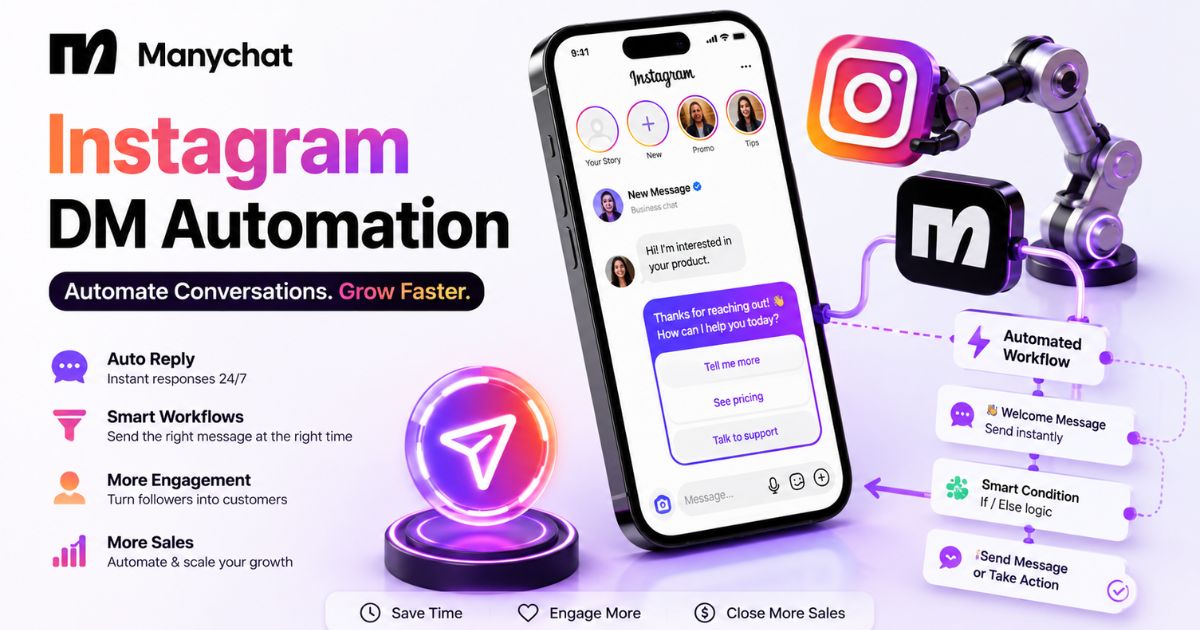
Manychat instagram dm automation is a Meta-official Graph API tool that automatically sends Instagram DMs triggered by comments, new follows, or story replies. It's best suited for creators and agencies running giveaway, lead-magnet, or new-follower welcome campaigns who want compliant automation without ban risk. Its standout strength is comment-to-DM automation — mature enough to handle multi-link giveaways in minutes.
Its biggest limitation is the 25-contact free-tier ceiling and Follow-to-DM's beta status. Pricing runs across 5 tiers: Free ($0), Essential ($17/month), Pro ($29/month — the tier that adds AI-assisted replies), Business ($69/month), and Advanced ($139/month).
Specs
Connection method: Via Facebook login, or Manychat's newer Unified Instagram Onboarding
Rate limit: 200 automated DMs per hour per account (Instagram platform limit)
Engagement window: 24 hours from the trigger event — resets per contact
Free plan: $0 — 25 active contacts/month, up to 4 automations
Essential plan: $17/month — 250 contacts, 2 users, no AI
Business plan: $69/month — 7,500 contacts, shared team inbox
Advanced plan: $139/month — 25,000 contacts, priority support
Compliance basis: Meta official Graph API — not browser automation or mimicked clicks
Pros
Built on Meta's official Graph API — no ban risk from mimicked clicking or unofficial bots.
Comment-to-DM supports up to 3 links per message — enough for multi-destination campaigns.
Same visual Flow Builder as Manychat's other channels — no new interface to learn.
Rate limits and the engagement window are enforced automatically — no manual policing needed.
Cons
Free plan caps at 25 active contacts/month — thin for any real campaign.
Follow-to-DM is still beta and requires reconnecting older-connected accounts.
200 DMs/hour cap can queue replies during a viral spike, delaying some sends
The 24-hour window resets per contact, which confuses new users expecting it to be persistent.
Instagram caps automated DMs at 200 per hour per account, and the moment you send one to someone who hasn’t engaged with you in the last 24 hours, you’re not automating anymore — you’re spamming, and Instagram treats it that way — Source: CreatorFlow, 2026. If you’re about to set up Manychat instagram dm automation for the first time, that one rule matters more than any feature list.
You’ve seen the comment-to-DM funnels — a creator posts “comment LINK and I’ll send it to you,” and within seconds a DM lands with exactly what was promised. It looks effortless. What you don’t see is the setup behind it: the trigger keyword, the opt-in tap, the 24-hour messaging window that governs everything that happens after.
The actual problem most people run into isn’t figuring out which automation to build — it’s not knowing which parts of Instagram’s rules are flexible and which ones will get an account flagged. Unofficial bots that mimic clicking and typing are the fastest route to a ban. Tools built on Meta’s official Graph API, like Manychat, aren’t.
This guide walks through exactly how to set up Manychat instagram dm automation — comment-to-DM, follow-to-DM, and general flow building — the actual rate limits and rules involved, a full tier-by-tier pricing breakdown from Free through Advanced, and where Buffer’s free comment-reply tools genuinely fit as a lighter-weight alternative instead.
Instagram limits automated DMs to 200 per hour per account — Manychat and other official-API tools enforce this automatically.
Automated DMs are only allowed to users who engaged with your account in the last 24 hours — cold outreach outside that window is what triggers spam reports.
Comment-to-DM automation replies to a keyword left on a post or Reel with a private message, commonly used for giveaways, lead magnets, and link delivery.
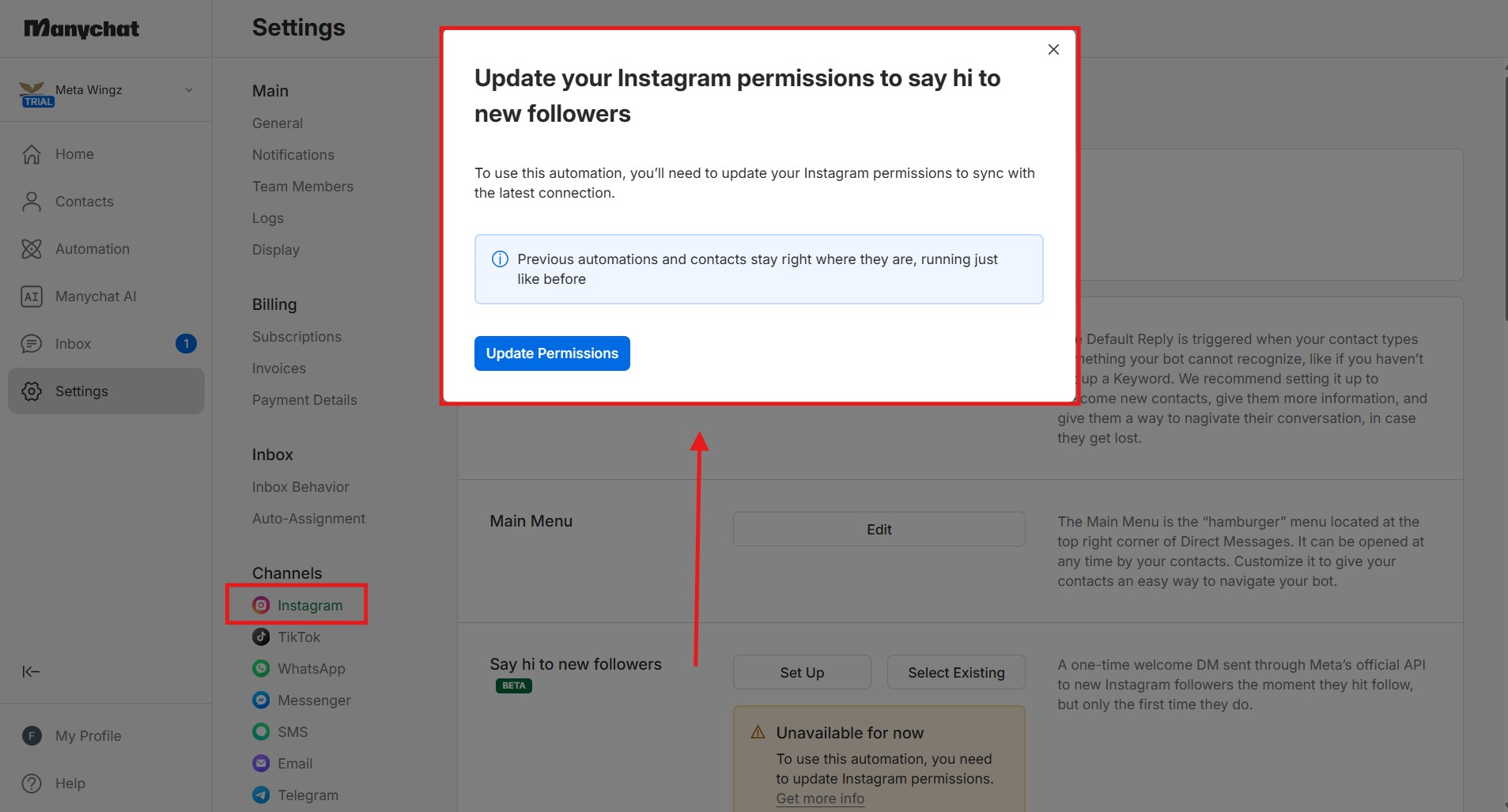
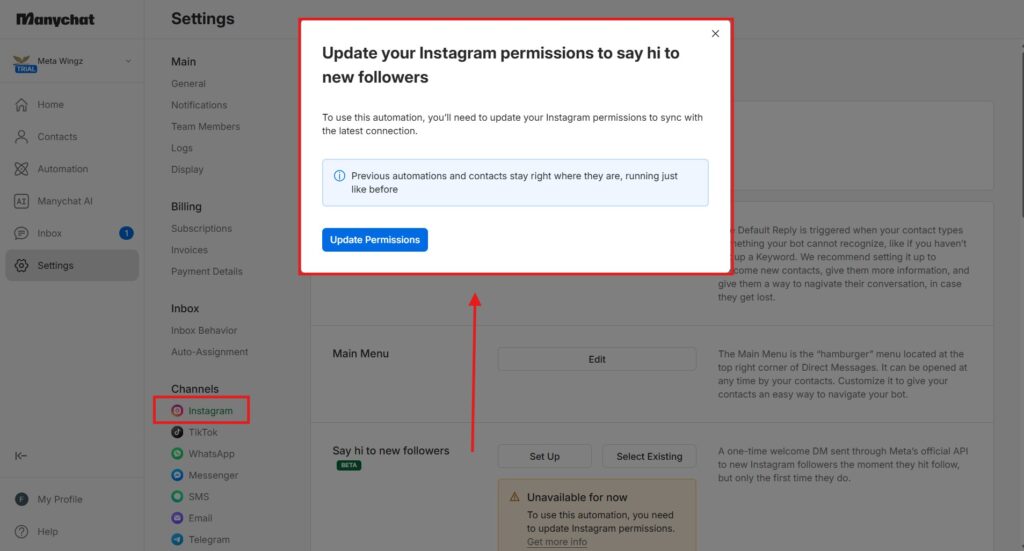
Follow-to-DM automation sends a welcome message to new followers, currently in beta and requires Manychat’s Unified Instagram Onboarding connection method.
Unauthorized browser bots that mimic human clicking are the leading cause of Instagram account bans — official Graph API tools like Manychat are explicitly permitted under Instagram’s terms.
Manychat’s free plan caps at 25 active contacts per month as of March 2026 — enough to test automation, not enough for an active campaign.
Manychat’s Instagram pricing spans 5 tiers, Free to Advanced — Free ($0), Essential ($17/mo), Pro ($29/mo, the tier that unlocks AI-assisted replies), Business ($69/mo), and Advanced ($139/mo).
For creators under 5,000 followers who outgrow the free plan without needing Manychat’s full feature set, cheaper or free alternatives exist.
Disclaimer : I strongly believe in transparency. Some links on this website are affiliate links, which means I may earn a small commission if you purchase through them — at no extra cost to you. This helps support the work I do and allows me to continue creating honest reviews, tutorials, and creator-focused content.
What Is Manychat Instagram DM Automation, And What Should You Know First?
Manychat instagram dm automation is a Meta-official Graph API integration that sends automatic DMs triggered by comments, new follows, or story replies. It’s free to start (25 active contacts/month) and its standout strength is compliant comment-to-DM automation; its biggest limitation is that 25-contact free-tier ceiling and Follow-to-DM’s beta status.
What Is Instagram DM Automation and How Does It Actually Work?
Instagram DM automation is software that sends pre-built private messages automatically, triggered by a specific action — a comment, a new follow, or a story reply. Manychat and similar tools connect through Meta’s official Graph API, reading the trigger event and sending the matching message without a person typing it manually each time.
Manychat instagram dm automation is software that watches for a specific trigger — someone commenting a keyword, someone following your account, someone replying to a story — and sends a pre-written direct message in response, without you typing it manually each time. Manychat instagram dm automation is the most widely used setup for this specifically on Instagram.
The mechanic is simple in concept: you build a “flow” (a sequence of messages and conditions), connect it to a trigger, and Instagram’s own systems fire the message when that trigger happens. What most beginners don’t realize is that this only works within Instagram’s messaging permissions — the automation can’t just message anyone at any time.
As an instagram automation tool, Manychat handles the trigger-listening and message-sending mechanics for you — you never touch Meta’s Graph API directly, you just build the flow inside Manychat’s visual editor and it manages the technical connection behind the scenes.
“Instagram DM automation only works within a 24-hour engagement window — the trigger event itself is what grants permission to message that specific person.”
That permission window is the single most important mechanic to understand before building anything, and it directly shapes every automation covered in this guide. For the free-tier contact math in full, Manychat Free Plan 2026 breaks down every tier’s exact contact allowance. If Telegram is also on your radar as a second channel,Manychat Telegram 2026 covers that setup using the same Flow Builder.
How Do Manychat’s 5 Pricing Tiers Compare For Instagram DM Automation, Tier By Tier?
Manychat’s 5 tiers for Instagram DM automation differ mainly in contact volume, automation limits, and AI access — not in whether comment-to-DM and follow-to-DM work at all, since both are available from Free upward. The real upgrade decision points are Free-to-Essential (automation limit) and Essential-to-Pro (AI access).
Every tier below is confirmed directly against Manychat’s own live pricing page, with the specific Instagram-relevant detail called out for each — not just the generic plan description.
Tier
Price
Contacts
Automations
Instagram-Relevant Extras
Free
$0
25/mo
Up to 4 active
Comment-to-DM + Follow-to-DM both work; 1 user
Essential
$17/mo
250/mo
Unlimited
Same automation types, no cap on number built; 2 users
Pro
$29/mo
2,500/mo
Unlimited + AI convos
AI-assisted DM/comment replies unlocked; 3 users, API access
Business
$69/mo
7,500/mo
Unlimited + AI convos
Same Instagram capability as Pro, higher contact ceiling; 5 users
Advanced
$139/mo
25,000/mo
Unlimited + AI convos
Same Instagram capability as Pro, highest ceiling; 10 users
Free — $0/Month: What You Get For Instagram DM Automation
Manychat’s Free plan gives you full comment-to-DM and follow-to-DM functionality on Instagram — the automation logic itself isn’t restricted.
The real ceiling is contact volume (25/month) and a 4-automation limit, not feature access. This is enough to build and test one giveaway flow and one welcome flow, but not enough to run both simultaneously at any real scale — a single viral comment thread can burn through 25 contacts in hours.
Essential — $17/Month: What Changes For Instagram Automation
Essential removes the 4-automation cap entirely and raises the contact ceiling to 250/month, but adds no new Instagram-specific capability beyond that.
Upgrade from Free to Essential specifically when you want to run more than 4 flows at once — for example, separate comment-to-DM automations on multiple posts plus a follow-to-DM welcome sequence — not because any Instagram feature itself was locked on Free.
Pro — $29/Month: The AI Upgrade For Instagram DMs
Pro is the first tier where Manychat’s AI feature applies directly to Instagram — replying to DMs and comments using your brand’s tone and FAQ content, instead of only fixed keyword-triggered messages.
This is the tier most creators and small businesses actually need once comment volume gets unpredictable, because AI-assisted replies handle variation in wording that a rigid comment-to-DM keyword trigger can’t.
Instagram has its own separate mechanism instead, called Instagram DM Lists (formerly Recurring Notifications) — see Manychat’s own broadcast guide. It works differently from a standard broadcast — subscribers must explicitly opt into a named list (via a keyword, comment, Story reply, Live comment, ad click-to-Instagram-Direct, or a DM link) before you can message them again outside Meta’s 24-hour window, and each broadcast is capped at 3 content blocks (for example, 2 messages and 1 image) — Source: Manychat Blog, “How to Broadcast with Instagram,“
Instagram re-engagement beyond 24 hours is genuinely possible on Manychat, it just requires building the opt-in step into your funnel first (typically inside the Welcome Message or comment-to-DM flow) rather than broadcasting to your full contact list the way Messenger allows.
Business — $69/Month: Built For Instagram At Scale
Business doesn’t add a new Instagram-specific feature over Pro — it raises the contact ceiling to 7,500/month and adds a shared team inbox with 3 seats.
Upgrade from Pro to Business specifically when contact volume, not capability, is the constraint — agencies running Instagram automation for multiple accounts, or a single account with genuinely high comment/DM volume, are the realistic use case here, not solo creators.
Advanced — $139/Month: Instagram Automation For High-Volume Teams
Advanced is Business with a higher ceiling — 25,000 contacts/month, 10 users, and Manychat’s fastest priority support tier.
There is no Instagram-specific capability unlocked at Advanced that Business and Pro don’t already have — this tier exists purely for contact volume and team size, and most single-account Instagram creators will never need it.
“Every Manychat tier above Essential gives Instagram the same core capability — the only things that change from Pro upward are contact volume and team size, not what the automation itself can do.”
The honest upgrade path for Instagram specifically: Free to test, Essential once you need more than 4 automations running, Pro once AI-assisted replies genuinely save time over rigid keyword triggers, and Business or Advanced only once contact volume — not capability — is the actual bottleneck.
Is Instagram DM Automation Against Instagram’s Rules?
Instagram DM automation is allowed when it runs through Meta’s official Graph API and respects the 24-hour engagement window and 200-messages-per-hour rate limit. It becomes a bans risk specifically when it uses unauthorized browser bots or messages people who never engaged with the account.
No — Instagram DM automation is not against the rules, as long as it’s built on Meta’s official Graph API and follows Instagram’s engagement and rate-limit requirements. Manychat, CreatorFlow, and LinkDM all connect this way, and Instagram’s own terms of service explicitly permit it.
What actually gets accounts banned is a narrower set of behaviors: unofficial Chrome extensions or desktop apps that mimic human clicking and typing to control Instagram directly, exceeding the 200-automated-DM-per-hour rate limit, and sending cold outreach to people who never interacted with your account in the prior 24 hours.
Cold outreach is the fastest route to a spam report, and even a single report can trigger a review of the entire account. This is exactly why the 24-hour engagement window exists as a hard rule inside Manychat’s own automation logic — it’s not an arbitrary restriction, it’s the mechanism that keeps the tool compliant.
How Do You Set Up DM Automation on Instagram With Manychat?
Setting up Manychat instagram dm automation starts with connecting your Instagram account through Facebook, then building a flow with a trigger and message sequence inside the Flow Builder. The full basic setup takes about 5-10 minutes for a simple flow, and no coding knowledge is required at any step of the process.
Here’s exactly how to set up Manychat instagram dm automation for general comment and follow triggers:
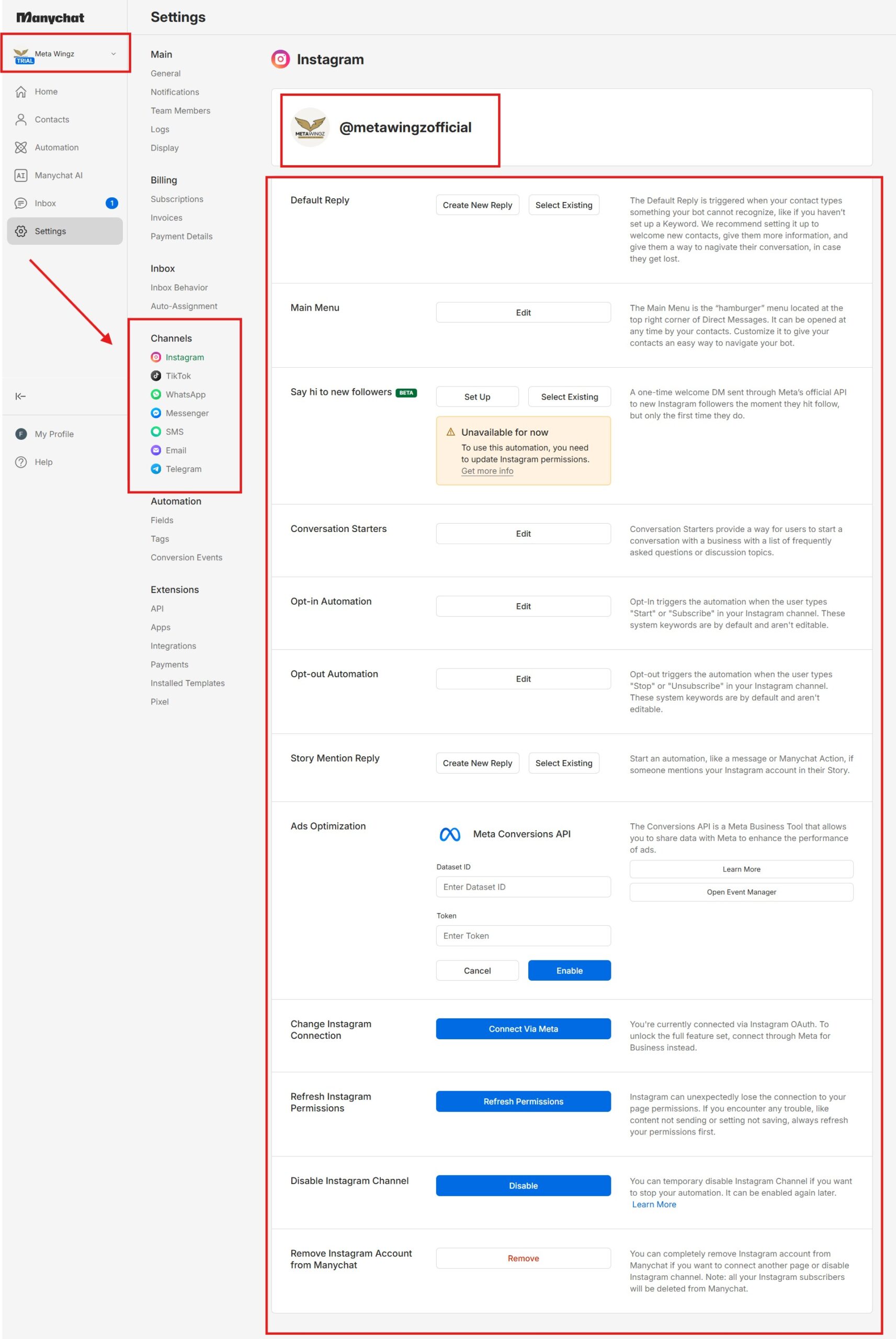
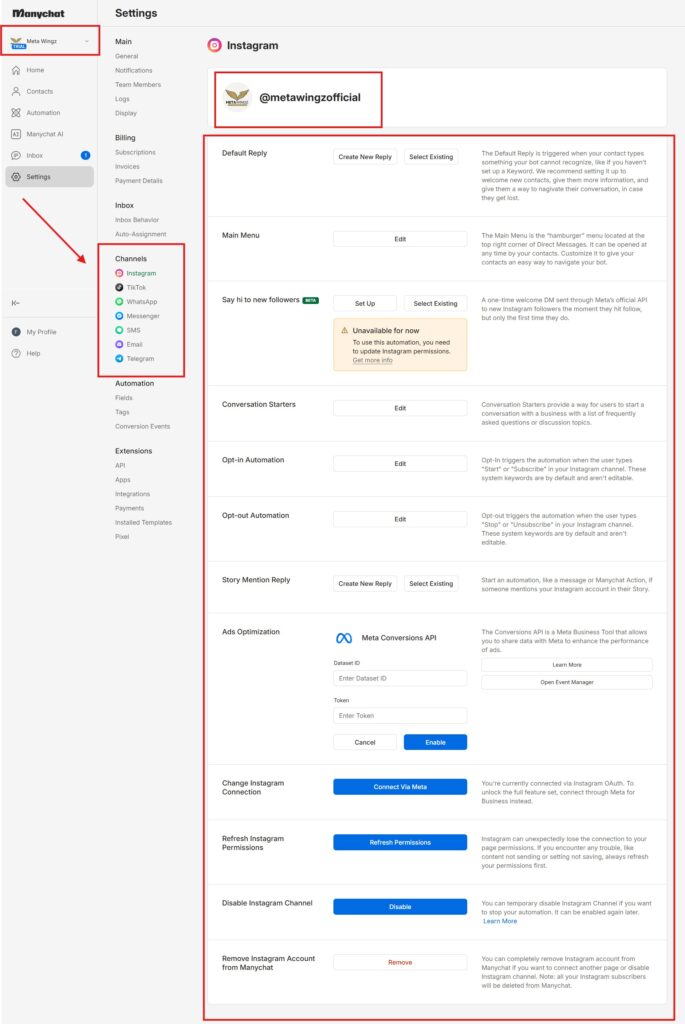
Log in through Facebook and select the Instagram account you want to connect
Grant the requested permissions — this step takes about 2-3 minutes
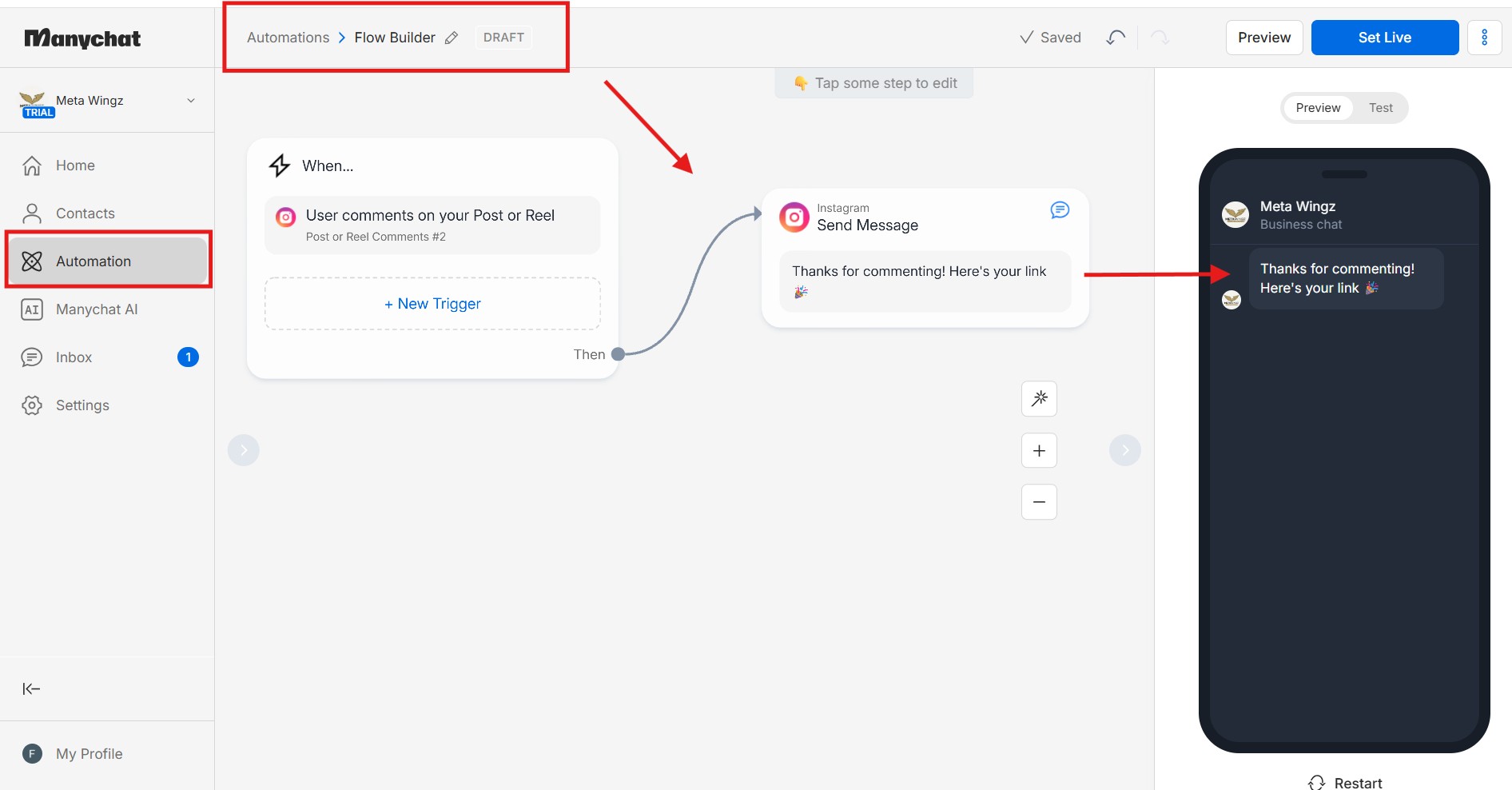
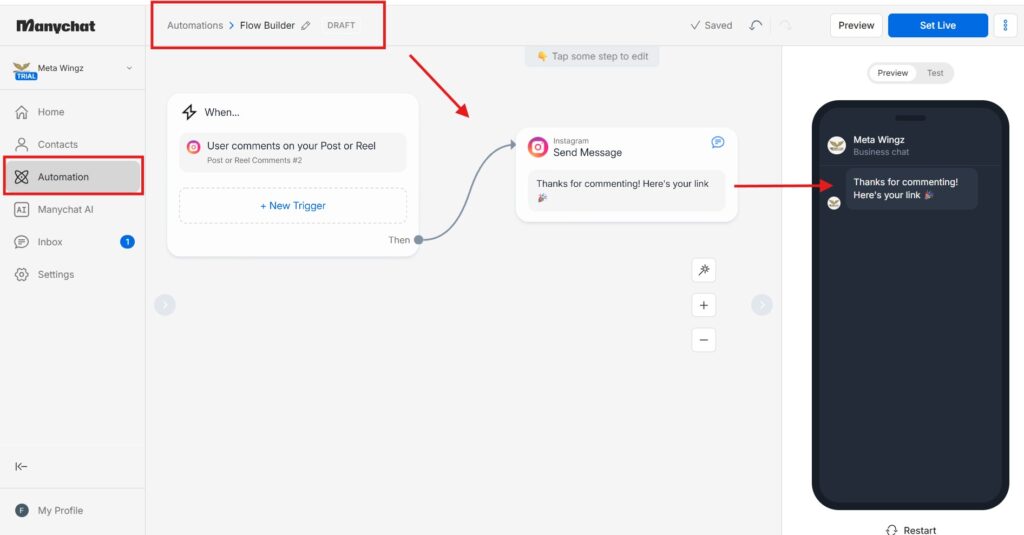
Open the Flow Builder and choose either the visual or basic builder
Add a trigger node (comment, follow, or story reply) and connect it to a message node
Write the message content, including any buttons or links you want the contact to tap
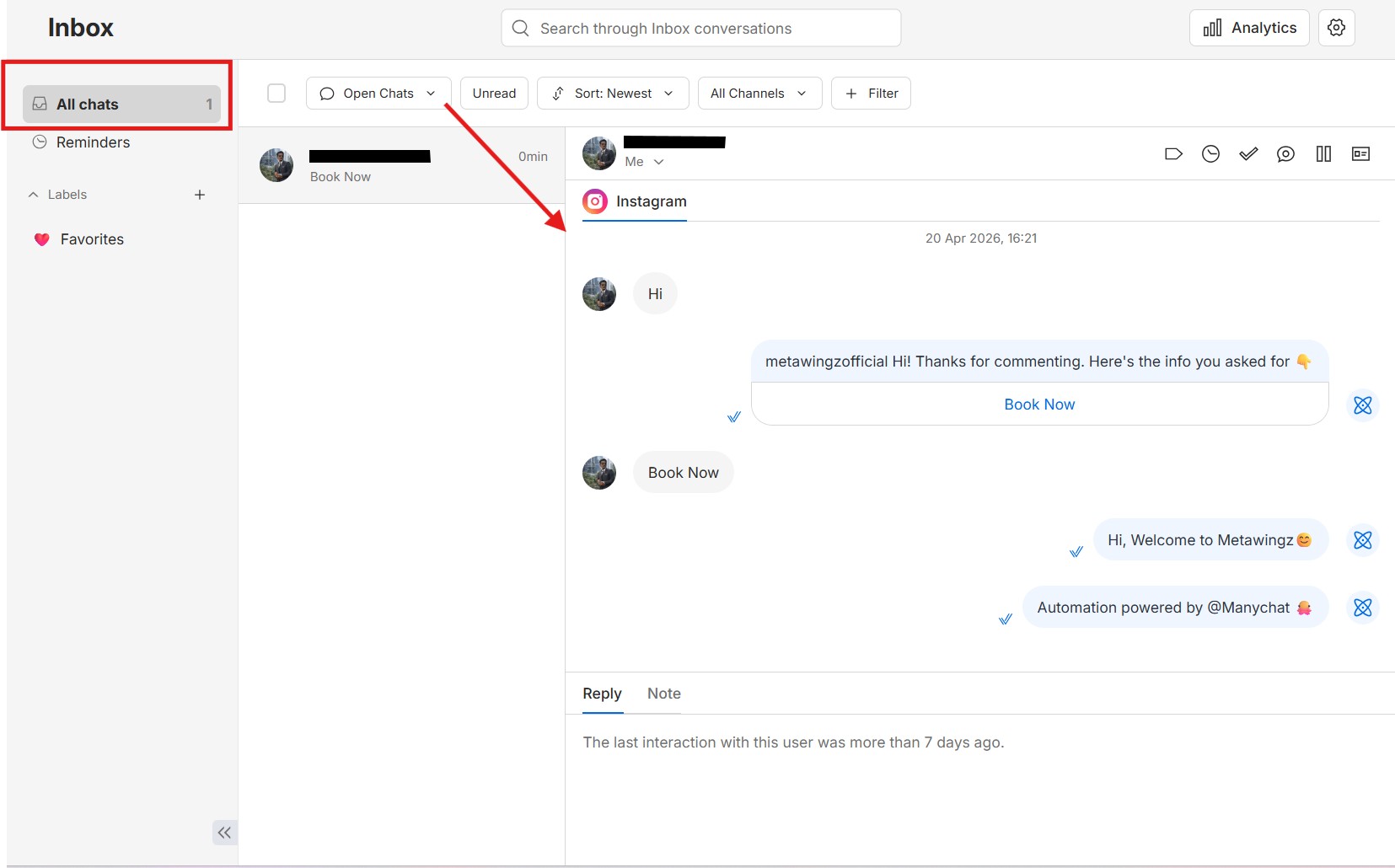
Send a test comment or interaction from a personal account to confirm the flow fires correctly
Activate the automation once the test message arrives as expected
If you can post on Instagram, you already have the skills to build Manychat instagram dm automation — the setup itself doesn’t require any code or technical background, just the patience to test the flow once before turning it on for real visitors.
How Do You Set Up Comment-to-DM Automation on Instagram?
Comment-to-DM automation sends a private message when someone comments a specific keyword on a post or Reel, as part of Manychat instagram dm automation. It’s commonly used for giveaways, lead magnets, and link delivery, and takes only minutes to configure once you know which post to attach it to.
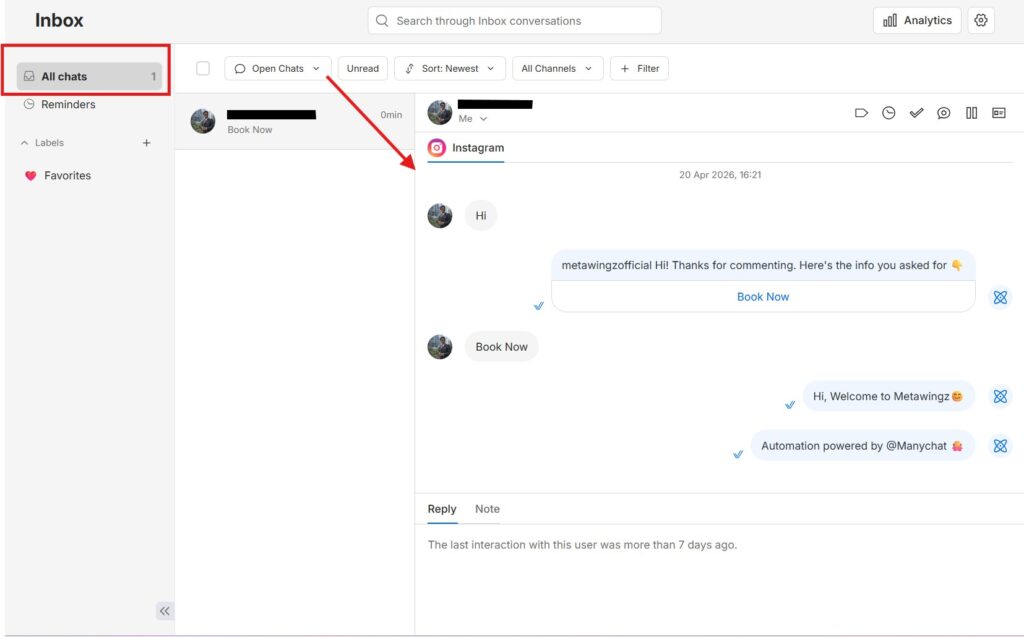
Comment-to-DM automation, the core building block of Manychat instagram dm automation, replies to a keyword left in the comments of a specific post or Reel with a private message — the setup people are describing when they say “comment LINK below and I’ll send it to you.“
To set it up in Manychat:
Select the specific post or Reel you want to attach the automation to
Choose “Comments” as the trigger type inside the Flow Builder
Set the keyword that triggers the automation — for example“LINK” or “SEND”
Write the automated reply comment (optional) and the private DM that follows
Add up to 3 links inside the DM if you want to direct people to multiple destinations
Test with a comment from a separate account before publishing the post publicly
The link limit — up to three per message — is a specific Manychat feature worth knowing about if you’re trying to route people to a product page, an email signup, and a booking link all from one automation.
How Do You Send an Automated DM to New Followers on Instagram?
Sending an automated DM to new followers is done through Manychat instagram dm automation’s Follow-to-DM feature, currently in beta. It requires the Unified Instagram Onboarding connection and sends an opening message after an optional 5-10 minute delay, with a tappable button that opens the conversation.
To automatically message new followers, Manychat’s Follow-to-DM automation (currently in beta) sends a welcome message the moment someone follows your account — or after a short delay you control.
Choose a delay — anywhere from immediate to 5-10 minutes feels more natural than an instant reply
Write your Opening DM, the first private message new followers receive
Add a tappable button inside the Opening DM — tapping it is what opts the follower into further messaging
Create a follow-up DM containing your link, sent automatically once the button is tapped
Activate the automation once tested — setup works from both desktop and the Manychat mobile app
One requirement worth flagging before you start Manychat instagram dm automation this way: this beta feature only works if your Instagram account is connected through Manychat’s newer Unified Instagram Onboarding flow. If you connected years ago through the older Instagram OAuth or Meta Business Suite method, you’ll need to reconnect first — Source: Manychat Help Centre, 2026.
The tap-to-opt-in button isn’t a design choice — it’s the mechanic that satisfies Instagram’s permission requirement. Without that tap, the 24-hour messaging window never technically opens for that contact.
What Are the Real Limitations Nobody Mentions About Instagram DM Automation?
Instagram DM automation is bound by a hard 200-messages-per-hour cap and a 24-hour engagement window that resets per contact, regardless of which tool is used. Follow-to-DM specifically requires the newer Unified Instagram Onboarding connection, which older-connected accounts don’t have by default and must reconnect to access.
Every flow covered in this Manychat instagram dm automation guide shares the same ceiling: 200 automated DMs per hour, per account, no exceptions for larger creators or paid plans. If a giveaway post goes viral and pulls in more engagement than that in an hour, some replies simply queue or delay rather than firing instantly.
The 24-hour engagement window is stricter than most people expect. It’s not 24 hours from any interaction ever — it resets, meaning a contact who tapped a button three days ago and hasn’t engaged since is outside the window again, and a fresh trigger is needed to reopen it.
Follow-to-DM’s beta status is also a real constraint, not a formality — accounts connected through older methods are locked out until they reconnect, and Manychat can change or restrict beta features with less notice than a fully released one.
None of this makes Manychat instagram dm automation unreliable — it makes it bound by the same platform rules every Instagram automation tool has to work inside. The limitations are Instagram’s, not Manychat’s specifically, which is worth remembering before assuming a different tool would remove them.
Can You Build an Instagram DM Bot Without Manychat?
Buffer is a genuine free alternative worth checking for Manychat instagram dm automation, but it solves a different problem than Manychat — Buffer manages and replies to comments with AI-suggested responses; it does not send automated trigger-based DMs the way Manychat’s comment-to-DM and Follow-to-DM flows do.
Buffer is the tool most often searched as a manychat cheaper alternative for comment management specifically, and it does have a genuinely free plan — but it’s important to be precise about what it actually replaces before switching, because it isn’t a like-for-like swap. Most people typing “free alternative to Manychat for Instagram DM automation 2026” into Google are looking for exactly this comparison.
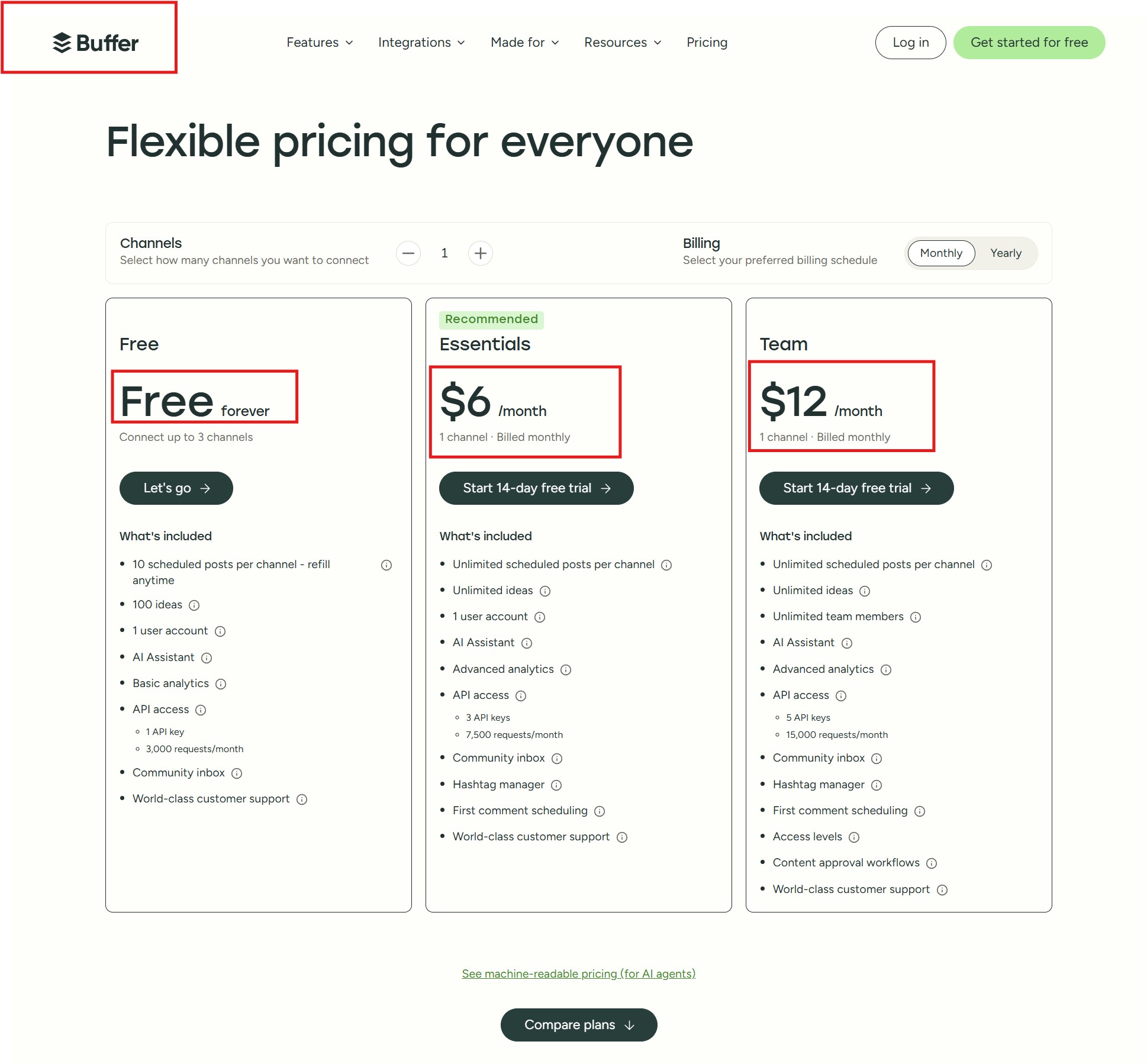
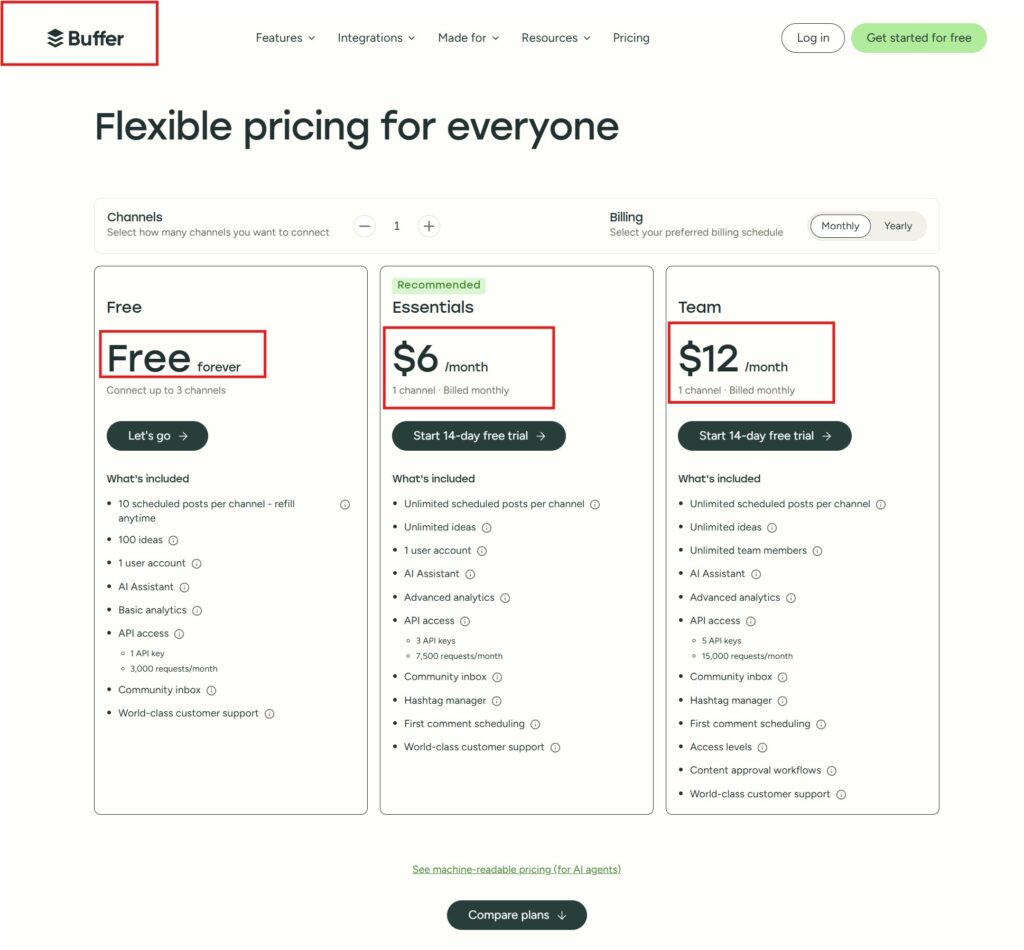
Buffer’s free plan connects up to 3 channels and includes a “Community” inbox: reply to comments, AI-suggested replies (5 per week on free, unlimited on paid plans), comment insights, and the ability to turn a comment into a new post — confirmed directly on Buffer’s pricing page. Buffer’s Essentials plan runs $5/month per channel ($60/year), and Team runs $10/month per channel ($120/year), both with unlimited AI-suggested replies and first-comment scheduling.
“Buffer’s Community inbox lets you reply to comments and get AI-suggested responses — it does not build a trigger-based flow that automatically DMs someone the moment they comment a keyword, the way Manychat’s comment-to-DM does.”
That distinction matters: if what you actually want is “anyone who comments LINK gets an automatic DM with no manual step,” Buffer doesn’t build that flow — a human (or Buffer’s AI suggestion) is still involved in the reply. If what you want is a faster, AI-assisted way to keep up with comment volume across scheduled posts, Buffer’s free plan genuinely covers that at zero cost, which Manychat’s free plan — capped at 25 active contacts per month as of March 2026 — does not offer at the same price point.
The honest verdict: choose Buffer if scheduling posts and managing comment replies is your actual bottleneck, and you don’t need messages to fire automatically without you seeing them first. Choose Manychat instagram dm automation if you specifically need unattended, trigger-based DM automation — the comment-to-DM and follow-to-DM flows this guide walks through — and are willing to pay once you outgrow the 25-contact free tier. If Messenger is also part of your channel mix Manychat Messenger 2026covers that setup using the same underlying Flow Builder logic.
Who Should Set Up Manychat Instagram DM Automation, and Who Should Skip It
Set up Manychat instagram dm automation if:
✅ You run giveaways, lead magnets, or link-delivery campaigns where comment-to-DM saves real manual time.
✅ You want new followers greeted automatically without checking DMs constantly.
✅ Your monthly active contacts realistically stay under 25, or you’re ready to pay for a paid tier.
Consider an alternative or skip automation for now if:
❌ You need more than 25 active contacts a month and don’t want to pay $17/month (Essential) or $29/month (Pro, for AI-assisted replies) yet — check the alternatives comparison first.
❌ You’re tempted by unofficial “unlimited DM” bots — the ban risk isn’t worth the shortcut.
❌ Your audience mostly engages outside the 24-hour window pattern (e.g., very infrequent posting) — automation value drops without regular engagement to trigger it.
In short, Manychat instagram dm automation earns its cost once comment volume or follower growth makes manual replies impractical — not before.
My Honest Take on Manychat Instagram DM Automation
Manychat instagram dm automation is worth setting up once comment or follow volume becomes hard to keep up with manually. Its comment-to-DM and follow-to-DM flows both do exactly what they promise, and the setup is genuinely simple once you understand the 24-hour engagement rule underneath it. Most of the “is this against the rules” anxiety disappears once you see that the restriction is built into the tool’s own logic, not something you have to police yourself.
Where I’d pump the brakes: don’t build an elaborate multi-step flow before testing a simple one first. The 200-per-hour cap and the engagement-window reset both behave in ways that are easy to misjudge until you’ve watched a real flow run for a week.
The verdict on Manychat instagram dm automation: it’s straightforward to set up and fully compliant with Instagram’s rules when built the way this guide walks through — the 24-hour engagement window and 200-per-hour cap aren’t obstacles to work around, they’re the built-in guardrails that keep the automation safe to run.
Start Manychat instagram dm automation with one simple flow — comment-to-DM on a single post is the easiest first build — before layering in follow-to-DM or more complex sequences. If the 25-contact free plan turns out to be the real limitation rather than the automation logic itself, that’s the moment to weigh Manychat’s paid tiers against Buffer’s free comment-reply tools — just be clear on which problem each one actually solves before switching. Manychat Free vs Pro 2026 breaks down exactly which paid tier fits once you outgrow Free, and Manychat WhatsApp API 2026 is worth a look if you want to run the same trigger-based logic on a second channel.
Q1: What is Instagram DM automation and how does it work?
Instagram DM automation is software that sends a pre-written direct message automatically when a specific trigger happens — a comment, a new follow, or a story reply. Manychat is the most widely used tool for this, connecting through Meta’s official Graph API rather than mimicking manual clicks. The automation only works within a 24-hour window after the trigger event, which is the permission mechanic that keeps it compliant with Instagram’s rules.
Q2: How to set up DM automation on Instagram?
To set up Manychat instagram dm automation on Instagram, create a Manychat account, connect your Instagram through Facebook, and build a flow using the Flow Builder with a trigger and a message node. Test the flow with a comment or interaction from a separate account before activating it live. The full basic setup takes about 5-10 minutes, and no coding is required at any step.
Q3: How to set up comment to DM automation on Instagram?
To set up comment-to-DM automation, select the specific post or Reel, choose “Comments” as the trigger in Manychat’s Flow Builder, set a keyword like “LINK,” and write the private message that gets sent when someone comments that word. You can include up to 3 links inside the automated DM. Test with a separate account before making the post public to confirm the flow fires correctly.
Q4: How to send an automated DM to new followers on Instagram?
To automatically DM new followers, use Manychat’s Follow-to-DM feature (currently in beta), set an optional delay of 5-10 minutes, write an Opening DM with a tappable button, and add a follow-up message that sends once the button is tapped. This requires your account to be connected through Manychat’s newer Unified Instagram Onboarding flow — older-connected accounts need to reconnect first to access the feature.
Q5: Is Instagram DM automation against Instagram’s rules?
Instagram DM automation is not against the rules when it’s built on Meta’s official Graph API and respects the platform’s engagement and rate-limit requirements. What actually violates the rules is using unauthorized browser bots that mimic human clicking, exceeding 200 automated DMs per hour, or messaging people outside the 24-hour engagement window. Official-API tools like Manychat enforce these limits automatically, which is what keeps compliant automation safe.
Q6: What is the best free alternative to Manychat for Instagram?
Buffer is the best free alternative to manychat for instagram dm automation 2026 searches turn up if you’re hitting Manychat’s 25-contact free plan ceiling, but it solves a different problem — Buffer’s free plan (3 channels) includes an AI-assisted comment-reply inbox, not automated trigger-based DM flows. If you specifically need messages to send automatically without you seeing them first, Manychat’s paid tiers remain the more direct fit — as a manychat cheaper alternative for scaling comment volume, Buffer only wins if your bottleneck is reply speed, not automation. If managing comment replies faster is the actual need, Buffer’s free plan covers that at no cost.
Q7: How to make an Instagram DM bot without Manychat?
Building an Instagram DM bot without Manychat instagram dm automation means choosing a different tool that also connects through Meta’s official Graph API — the same compliance rules (200 DMs/hour, 24-hour engagement window) apply regardless of which platform you use. The setup process is similar across compliant tools: connect your Instagram account, build a trigger-based flow, and test before activating. Avoid any tool that requires browser automation or mimicked clicks instead of the official API — that’s the difference between a safe bot and a bannable one.
Sangeetha Vishnu is a Digital Product Reviewer and Affiliate Marketer with 4 years of experience exploring affiliate marketing, digital products, AI tools, and software across multiple platforms and affiliate programs.
I research, purchase, and test the products I review before sharing my honest experience. My goal is to help entrepreneurs, marketers, creators, and beginners understand what a product actually does, who it’s for, and whether it’s worth investing in.
I also share practical insights on affiliate marketing, AI tools, SEO, and online business. My guiding principle is simple: “Authority, Built On Clarity.” I believe honest reviews and transparent recommendations build lasting trust.