Manychat messenger is Manychat's Facebook Messenger automation product, connecting for free up to 25 active contacts a month. Its standout strength is the Comments Growth Tool for comment-to-Messenger campaigns; its biggest limitation is button-driven flows that stall on free-typed text, and AI replies gated behind the $29/month Pro plan.
Specs
Connection method: Meta official Login/OAuth — never a Facebook password
Fallback-message requirement: Manual — must be configured or free-text input goes unanswered
Pros
Comments Growth Tool reliably turns post comments into private Messenger conversations, no manual reply needed.
Meta-official OAuth connection — Manychat never sees or asks for your Facebook password.
Same visual Flow Builder as Manychat's other channels — no new interface to learn
Button-driven flows guarantee the same accurate answer every time for predictable use cases.
Cons
AI Step is single-turn keyword-matching, not true conversational AI, and gated behind the $29/month Pro plan.
Free plan caps at 25 active contacts/month — easy to exceed with even one active ad or post.
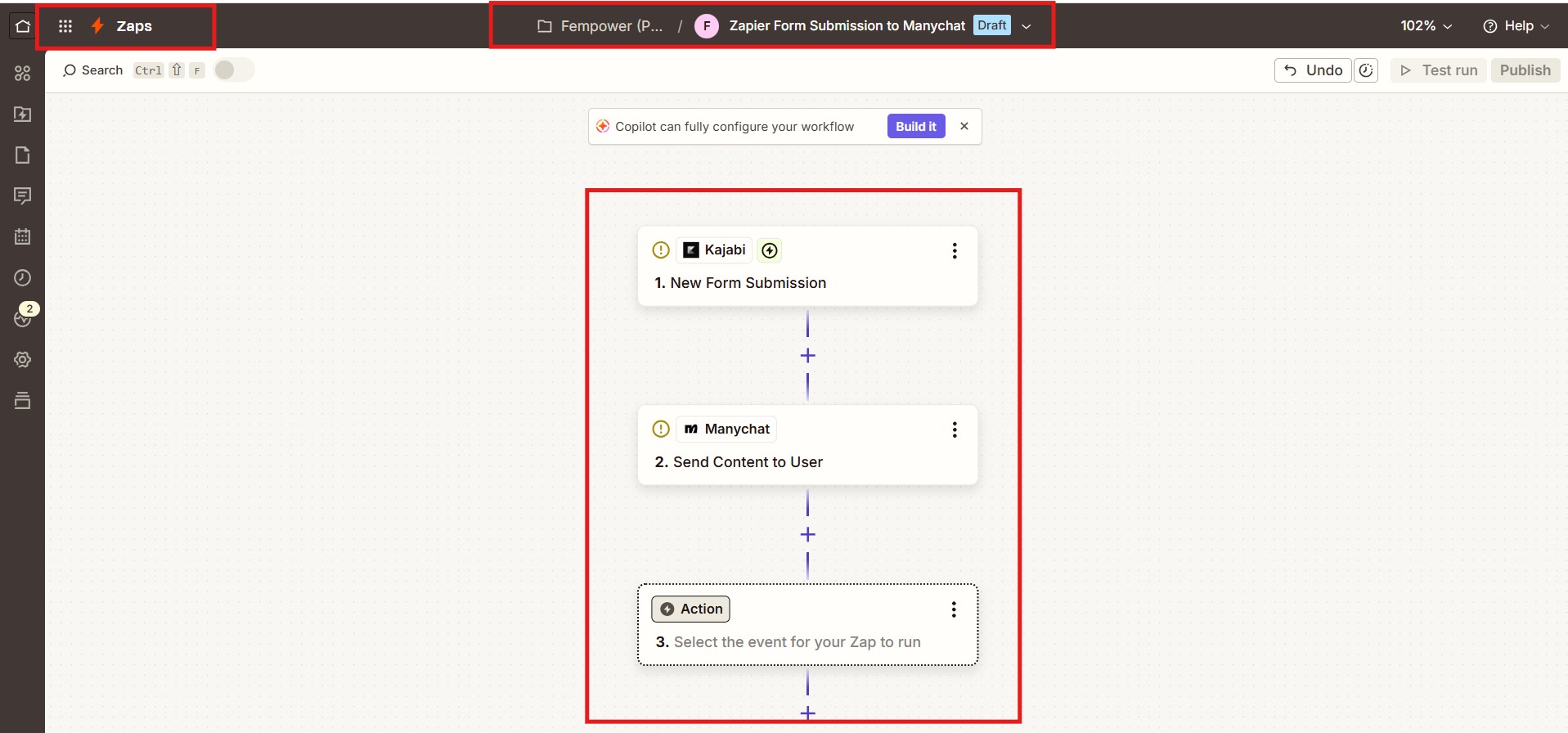
No native Kajabi integration — Zapier or an equivalent tool is a required extra cost and step.
Flows stall or send a generic fallback the moment someone types free text instead of clicking.
Facebook Messenger has an 80% open rate and a 25% click-through rate on marketing messages — Source: Manychat, 2026. Most businesses running Facebook ads never see those numbers because their Messenger presence is a single unmonitored inbox, not a working manychat messenger setup with flows, triggers, and follow-ups already built.
You’ve run a Facebook ad or two, and every so often a comment turns into a real sale — if you catch it in time and reply before the person moves on. You’ve seen bigger pages reply to every single comment within seconds, seemingly around the clock, and wondered how they do it without a full-time person glued to the inbox.
The honest problem isn’t that Messenger automation is complicated to set up — it genuinely isn’t. The problem is knowing exactly what Manychat’s free plan covers, where the free AI reply actually stops being “AI” and starts being keyword-matching, and why a flow sometimes fires a message that leaves the reader confused about who sent it.
This guide walks through manychat messenger setup end to end — connecting the channel, building a comment-to-Messenger flow, testing it safely, and the real limitations (including the $29/month AI Step catch) before you build anything.
Manychat messenger connects to Facebook Messenger for free on Manychat’s Free plan, capped at 25 active contacts per month as of March 2026
Comment-to-Messenger automation (Manychat’s “Comments Growth Tool”) replies to Facebook post comments with an automatic Messenger DM — the same trigger-based mechanic as Instagram comment-to-DM
AI-powered conversations are gated behind the Pro plan at $29/month billed annually — Free and Essential do not include Manychat AI at all
Manychat’s Messenger flows are button-driven — when a contact types free text instead of clicking a button, standard flows fall back to a generic message rather than understanding the request
Kajabi integration is Zapier-based, not native — there is no direct Manychat-to-Kajabi connection; Zapier, Make.com, or Pabbly Connect are required as the middle layer
Unexpected automated messages are usually caused by Facebook’s own Instant Reply autoresponder conflicting with Manychat, or a second chatbot tool still connected to the same Page
For businesses running Facebook ads or high comment volume, testing a simple flow first (before building a multi-step sequence) avoids most setup mistakes
Disclaimer : I strongly believe in transparency. Some links on this website are affiliate links, which means I may earn a small commission if you purchase through them — at no extra cost to you. This helps support the work I do and allows me to continue creating honest reviews, tutorials, and creator-focused content.
What Is Manychat for Facebook Messenger, and How Does It Work?
Manychat messenger is Manychat’s chatbot and automation product built specifically for Facebook Messenger — it replies to comments, DMs, and ad clicks automatically through Meta’s official Messenger Platform API. It connects through OAuth, not a password, and every automated reply respects Meta’s messaging window rules.
Manychat messenger works by connecting your Facebook Page to Manychat through Meta’s official Messenger Platform — the same API Meta itself documents for approved chatbot builders. Once connected, Manychat can see comments on your posts, DMs sent to your Page, and clicks on Click-to-Messenger ads, and respond to each using a “flow” you build once and reuse indefinitely.
A flow is a sequence of messages and conditions: a trigger (comment, DM, ad click, or typed keyword) starts it, and a chain of messages, buttons, and branches carries the conversation forward. Manychat’s own Messenger product page states an 80% open rate and 25% click-through rate for Messenger messages — Source: Manychat, 2026 — figures far above typical email open rates, which is the core reason businesses build a manychat messenger setup at all.
“A Messenger flow only starts when a real trigger fires — a comment, a DM, an ad click, or a typed keyword. Nothing sends to someone who hasn’t interacted with the Page first.”
That trigger-first mechanic is what keeps Manychat compliant with Meta’s Messenger Platform policies — it is not possible to build a flow that cold-messages people who never engaged with the Page.
Is Manychat Free for Facebook Messenger?
Manychat is free for Facebook Messenger up to 25 active contacts per month on the Free plan, as of March 2026, covering 2 connected channels and up to 4 automations. Beyond that cap, or for AI-powered replies, a paid plan starting at $14/month is required.
Yes — Manychat messenger has a genuine permanent free tier, not just a trial. The Free plan connects any 2 channels (Instagram, Facebook Messenger, TikTok, or Telegram), includes up to 4 active automations, and covers 25 active contacts per calendar month.
Notice WhatsApp isn’t on that free-channel list — it’s the one channel Manychat gates behind a paid plan no matter what. Manychat WhatsApp API 2026 breaks down exactly why, and what it costs to add.
That 25-contact cap replaced a much larger free allowance in March 2026, and it’s easy to blow through in a single day: if a Facebook post gets 30 comments and your comment-to-Messenger flow is live, you’ve already exceeded the free tier before the post is even 24 hours old.
Some third-party review sites still quote a “1,000 free contacts” figure for Manychat — that’s the pre-March-2026 number and is no longer accurate for any new or existing Free-tier account. Always check manychat.com/pricing directly rather than trust a cached comparison table. For the full plan-by-plan breakdown beyond Messenger specifically, Manychat Free vs Pro 2026 compares every tier side by side.
“Manychat’s Free plan covers 25 active contacts a month — not the 1,000 several third-party sites still quote from before the March 2026 pricing change.”
How Do You Connect Manychat to Facebook Messenger?
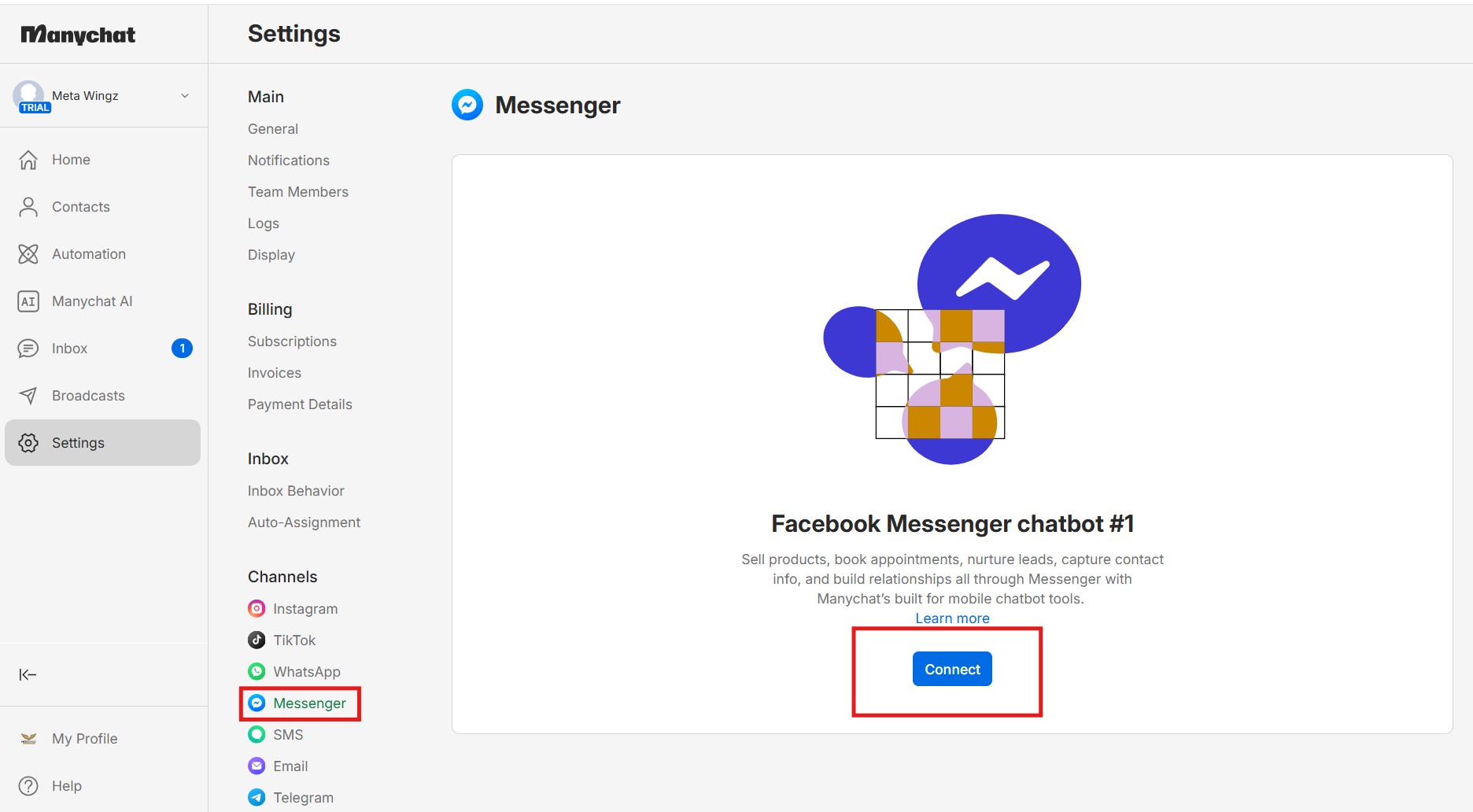
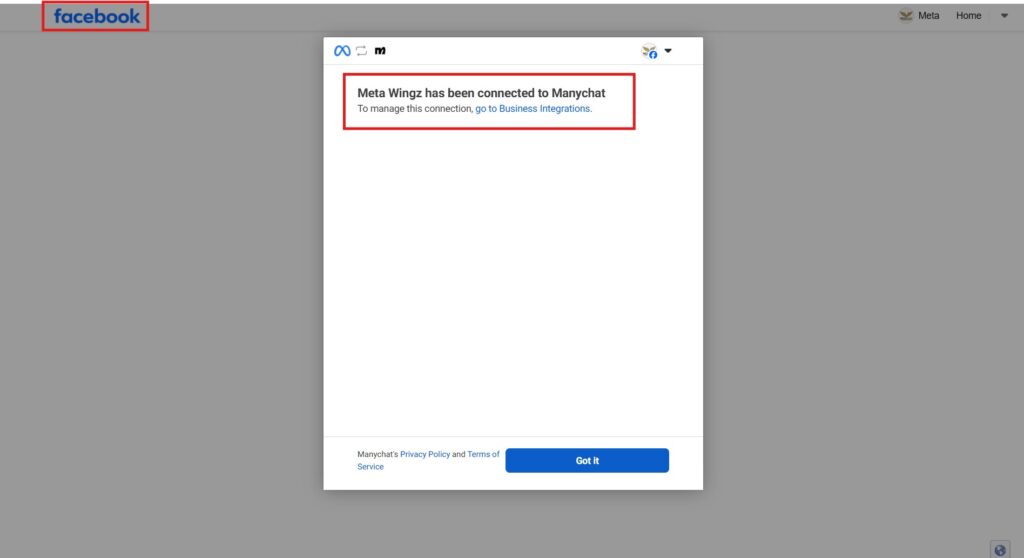
Connecting Manychat to Facebook Messenger takes about 5 minutes and requires admin access to the Facebook Page, plus a Manychat account with Messenger selected as the channel. Manychat connects through Meta’s official Login flow — it never asks for your Facebook password directly.
Here’s exactly how to connect manychat messenger to an existing Facebook Page:
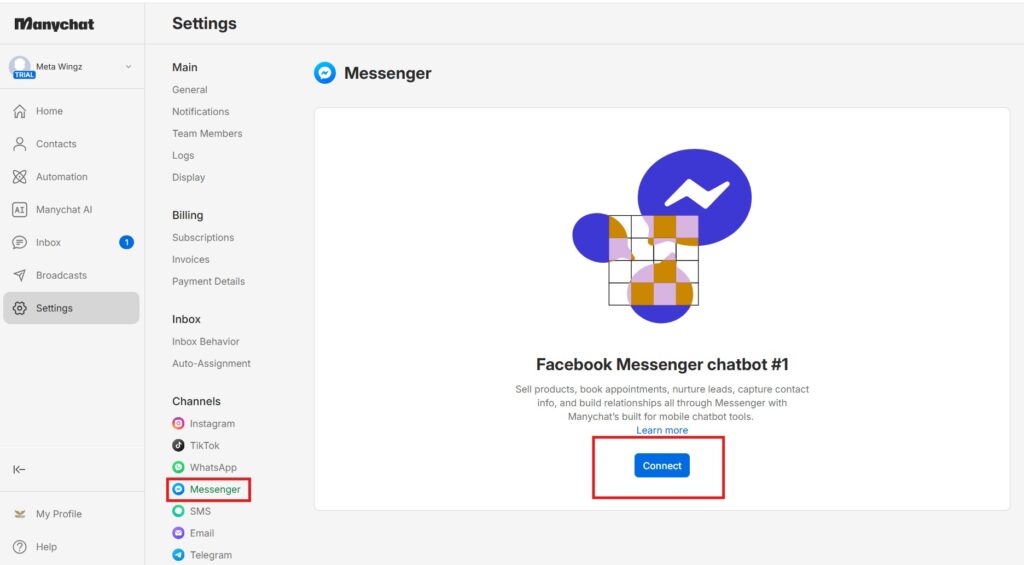
Create a free Manychat account at manychat.com and choose “Facebook Messenger” as the channel
Click “Continue with Facebook” and log in with the account that manages your Page
Select the specific Facebook Page you want to connect — you must be an admin or have Messenger access on that Page
Grant the requested permissions (messaging, Page content access) — this is OAuth-based, so Manychat never sees your Facebook password
Confirm the connection inside Manychat’s dashboard — the Page name should now appear under Settings → Messenger
Turn off Facebook’s own Instant Reply / away-message autoresponder in Meta Business Suite → Inbox → Automations, so it doesn’t conflict with Manychat
That last step is the one most setup guides skip, and it’s the single most common cause of the “why did I get two different automated replies” problem covered later in this guide.
How Do You Build a Messenger Chatbot Using Manychat?
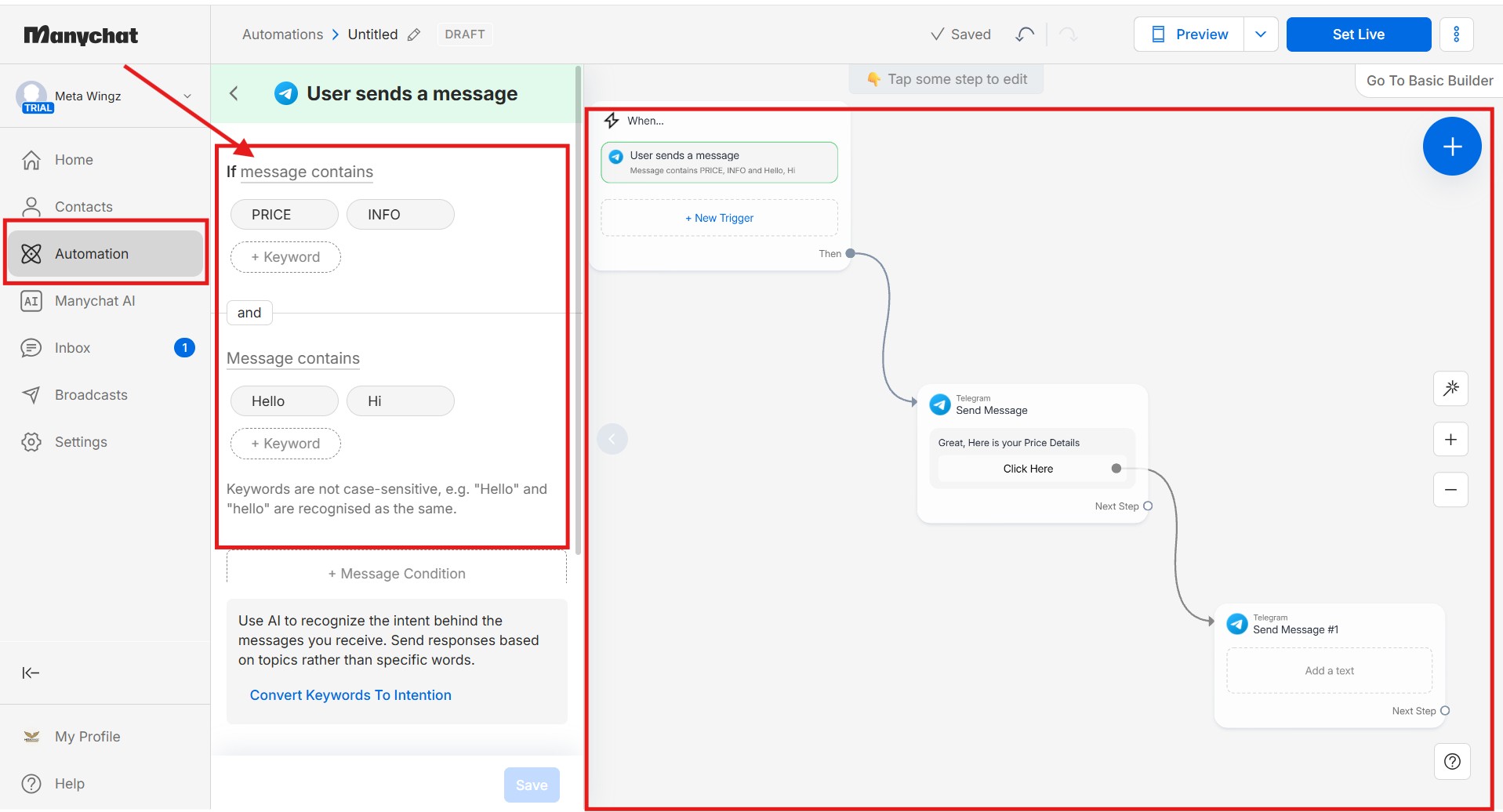
Building a Messenger chatbot in Manychat means creating a flow inside the Flow Builder — a trigger, a sequence of messages, and optional Quick Reply buttons that branch the conversation. No coding is required, and a simple FAQ-style bot takes under 15 minutes to build.
To build a facebook messenger chatbot as part of your manychat messenger setup:
Open the Flow Builder and choose “New Flow”
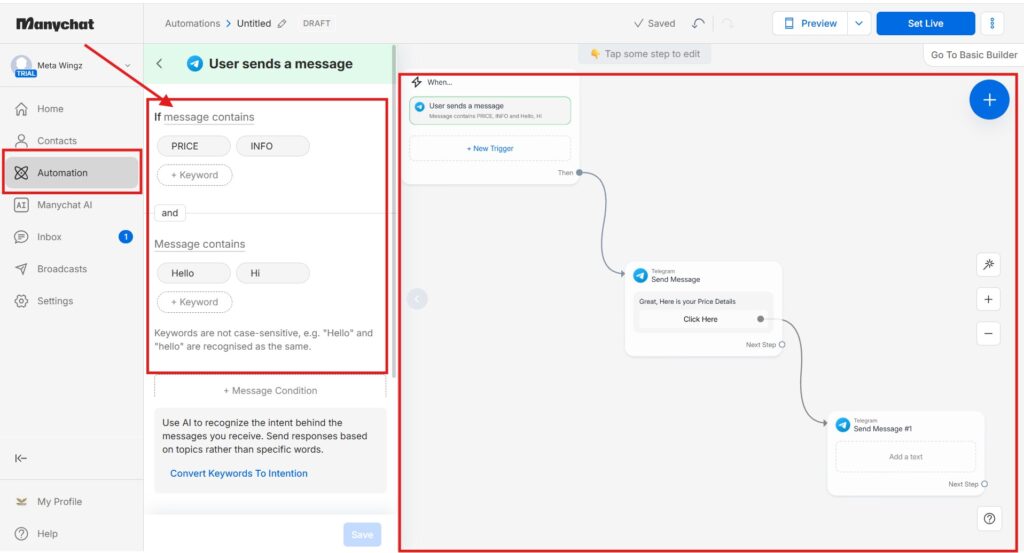
Add a trigger — a keyword typed in Messenger, a comment on a specific post, or an ad click
Add your first message node with the opening reply text
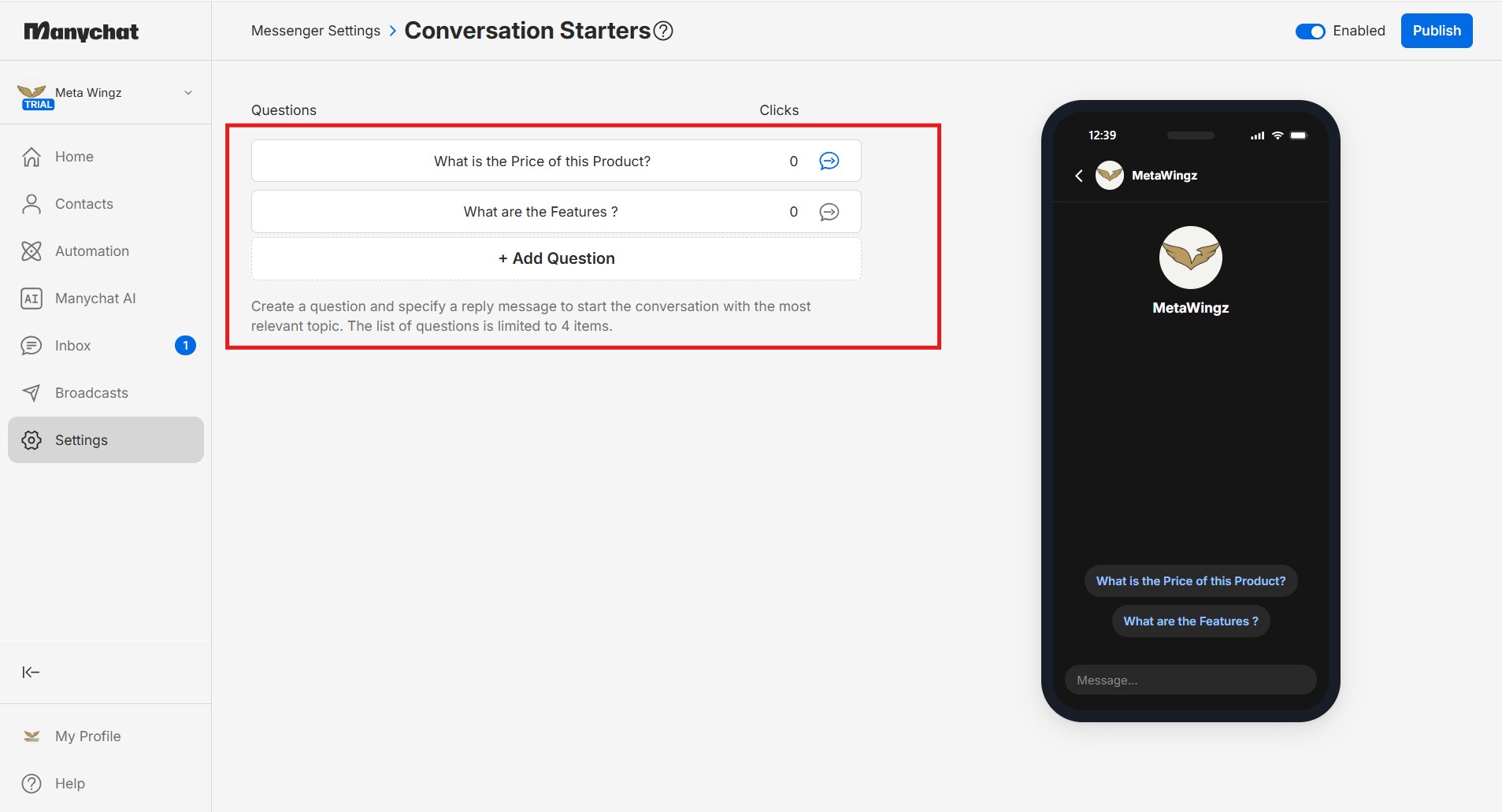
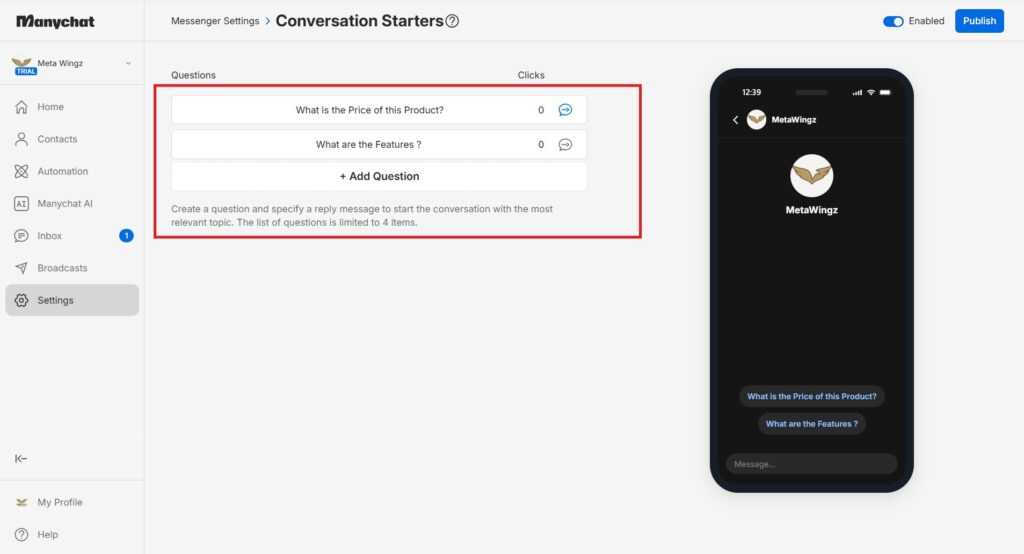
Add Quick Reply buttons if you want the contact to choose a path (e.g. “Pricing,” “Support,” “Book a call”)
Branch the flow based on which button was clicked — each button can lead to a different message sequence
Add a fallback message for anyone who types free text instead of clicking a button (see the limitations section below — this step is easy to skip and shouldn’t be)
Test the flow yourself by messaging the Page from a personal account before publishing it live
The fallback-message step is the one genuine skill gap in an otherwise drag-and-drop process — Manychat’s flows are built for button clicks, and a bot with no fallback message simply goes silent when someone types instead of clicking.
How Do You Trigger Messenger From a Facebook Post Comment?
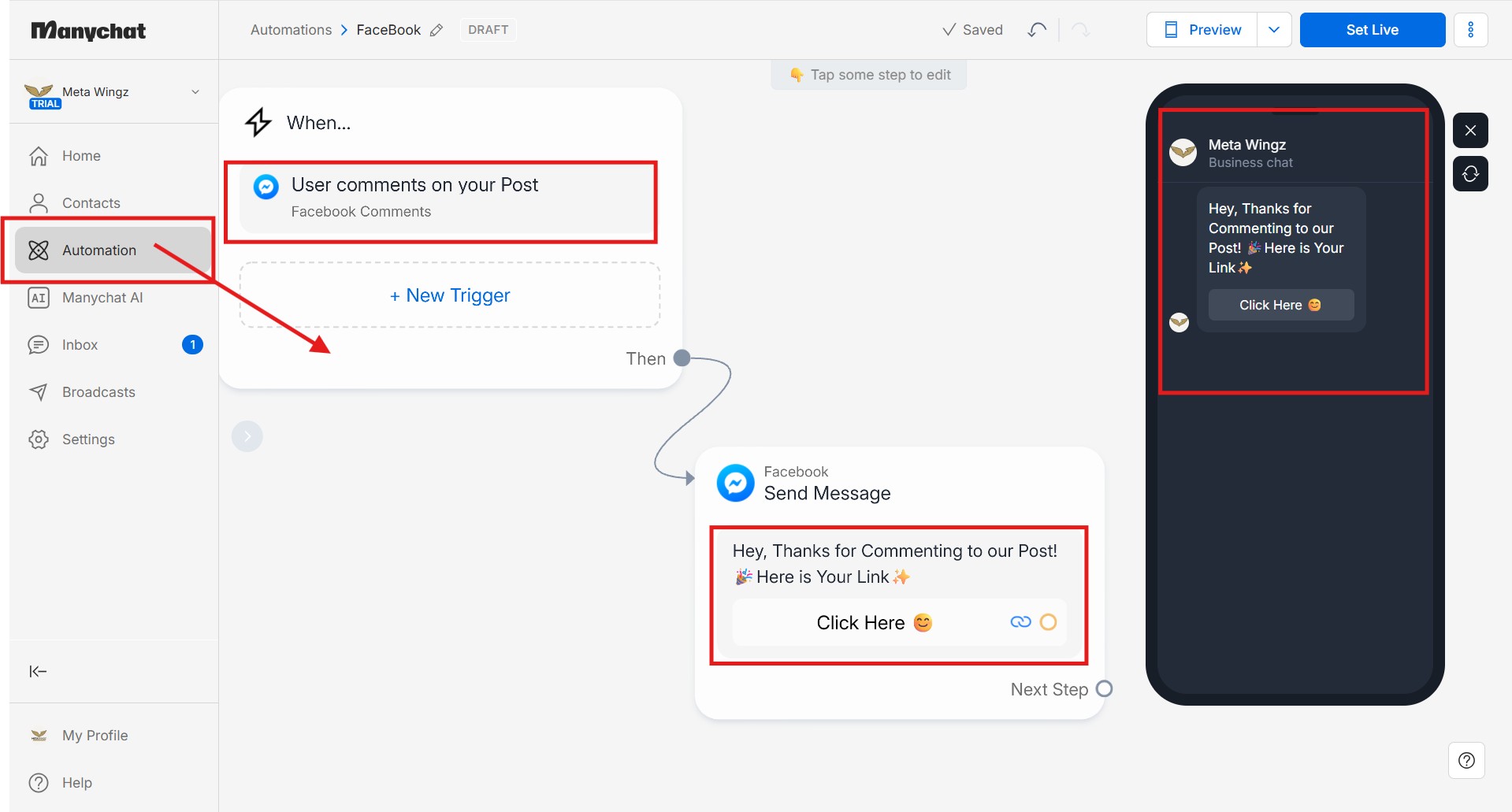
Manychat’s Comments Growth Tool triggers a private Messenger reply whenever someone comments a specific keyword on a Facebook post or ad, without any manual reply from the business. This is the same comment-to-DM mechanic Manychat runs on Instagram, applied to Facebook posts instead.
This is the feature most businesses actually want when they set up manychat messenger for comment-to-DM — a comment on a Facebook post automatically triggers a private Messenger DM, without anyone manually replying.
Publish the Facebook post or boost the ad you want to attach the automation to
In Manychat, open the Comments Growth Tool and select that specific post
Set the trigger keyword — for example, commenting “INFO” or “PRICE”
Write the automatic public comment reply (optional) and the private Messenger message that follows
Add a button or link inside the Messenger message to continue the conversation
Test by commenting from a separate personal account before the post goes live to a real audience
One manychat messenger detail worth knowing: the automatic public comment reply is optional — many businesses skip it and let only the private Messenger message send, which keeps the public comment section from looking automated. If you’re running the same play on Instagram too,Manychat Instagram DM Automationwalks through the comment-to-DM setup on that channel specifically — the logic is nearly identical.
What Happens When Someone Types Instead of Clicking a Button?
Manychat’s Messenger flows are built around buttons, not open conversation — when a contact types free text instead of clicking, the flow either sends a generic fallback message or stalls with no reply at all. This is the single most-cited limitation across independent 2026 Manychat reviews.
This is the honest limitation most sales-page copy for Manychat glosses over. A Messenger flow advances when someone clicks a Quick Reply button — the flow knows exactly which button was pressed and what to send next. The moment a person types a full sentence instead of clicking, the flow has no built-in way to understand it.
Without a configured fallback message, that typed message simply goes unanswered inside the automation — the contact sees no response until either a human checks the inbox or the flow is rebuilt to catch free text explicitly. With a fallback message configured, the contact gets a generic “I didn’t quite catch that — try one of these options” reply, which is better than silence but still not a real answer to what they actually asked.
“Manychat’s AI Step is closer to keyword matching than conversational AI — per multiple independent 2026 reviews, it cannot hold context across a conversation the way a model like ChatGPT can.”
That distinction matters for Manychat’s AI Step specifically: it’s available only on the Pro plan at $29/month billed annually (confirmed on manychat.com/pricing), and it can generate a single reply using your brand’s tone and FAQ content — but it doesn’t remember earlier turns in the same conversation the way a general-purpose AI chat model does. It answers one message at a time, not a genuine back-and-forth. For the full breakdown of what each plan tier actually unlocks, Manychat Free vs Pro 2026 lays it out side by side.
The honest manychat messenger takeaway: if your business needs a bot that handles unpredictable, open-ended questions well, its button-first design and single-step AI will feel restrictive. If your use case is mostly predictable — pricing, booking, order status, FAQs — the button-driven structure is actually a feature, not a limitation, because it guarantees the same accurate answer every time.
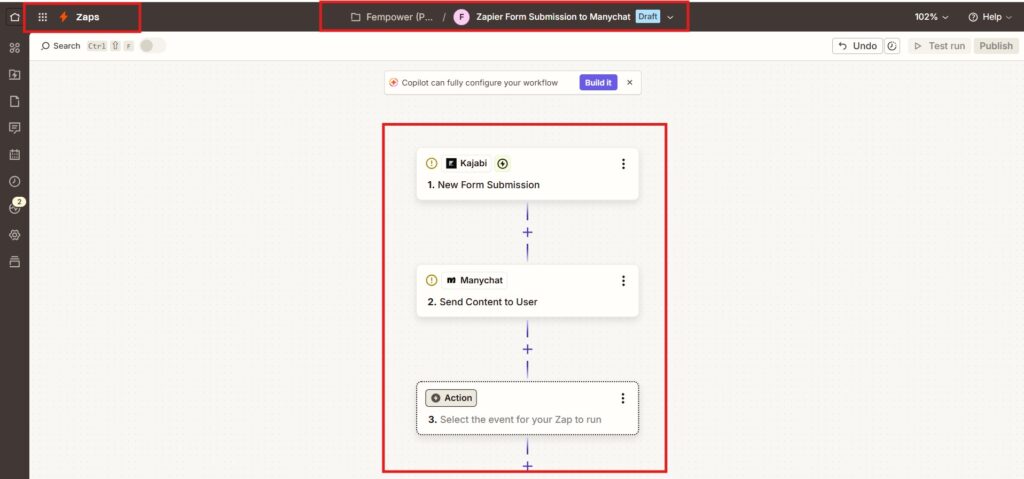
Manychat does not have a native, direct integration with Kajabi inside its own settings menu. The manychat kajabi integration works only through a third-party automation layer — Zapier, Make.com, or Pabbly Connect — sitting between the two platforms.
This is worth stating plainly because it’s easy to assume otherwise: there is no “Connect to Kajabi” button inside Manychat’s native integrations list. The manychat kajabi integration that does exist runs entirely through Zapier (or an equivalent automation platform) sitting between the two tools.
The practical setup: a Kajabi event — a new form submission, a new purchase, or a new subscription — acts as the Zapier trigger, and the corresponding Zapier action adds a tag to a contact inside Manychat, which can then fire a Messenger flow. This works reliably but adds Zapier’s own pricing and a small delay (typically under a minute) between the Kajabi event and the Manychat action.
If you’re a course creator or coach trying to notify new students the moment they enroll, this Zapier-based path is fully functional — it’s just not the one-click native connection some marketing pages might imply at first glance — Source: Zapier, 2026. And since this route already runs through Zapier, it’s worth checking your Free-tier contact math before you build it: Manychat Free Plan 2026covers exactly how those 25 monthly contacts get used up.
Why Do Manychat Flows Open on Messenger by Themselves?
Manychat flows that appear to fire unexpectedly are almost always triggered by a real, identifiable event — a comment, a typed keyword, or an ad click — not a random software glitch. The most common cause is Facebook’s own Instant Reply autoresponder running alongside Manychat and sending a second, separate message.
This is one of the most common troubleshooting questions Manychat users ask, and the cause is almost always one of four things, per Manychat’s own Help Centre and community forum.
Check whether Facebook’s built-in Instant Reply (away message) is still turned on in Meta Business Suite → Inbox → Automations — if it is, turn it off, since it can fire alongside Manychat and look like a duplicate or unexplained message
Check Business Integrations for any other chatbot tool still connected to the same Page — two automation tools on one Page can both respond to the same trigger
Open the Inbox conversation with the affected contact and review the activity log — this shows exactly which rule, sequence, or keyword trigger actually fired
Check Conversation Routing settings, which control whether Manychat or a human agent handles incoming messages by default
If using buttons, check whether contacts are typing an answer (like an email) instead of clicking — Manychat’s buttons need the click specifically, and typed text alone can leave a flow appearing stuck at that step
In nearly every reported case, the “unexplained” message traces back to a real trigger the business owner forgot they had configured, a second automation tool left active from an earlier setup attempt, or a contact typing an answer instead of clicking the required button, which stalls the flow at that exact step rather than sending a wrong message — Source: Manychat Community, 2026.
How Do You Test a Messenger Bot in Manychat Before Going Live?
Manychat lets you test a Messenger flow by messaging your own connected Page from a separate personal Facebook account before publishing the trigger to real visitors or a live audience. There is no separate sandbox mode — testing happens on the live Page, using a real account.
There’s no dedicated “test mode” separate from the live bot — testing any manychat messenger flow means triggering it for real, using an account that isn’t your business audience.
Open Messenger (or the Facebook app) on a personal account, separate from the Page’s own account
Send the exact trigger — the keyword, or comment on the specific test post — that you configured
Confirm each message and button in the flow arrives in the order and with the content you built
Click through every button path at least once, not just the first one, to confirm branching works
Type a free-text message mid-flow to confirm your fallback message actually fires (see the limitations section above)
Only then publish the trigger to the live post or make the keyword public
Skipping the free-text test specifically is the most common reason businesses discover a broken flow only after real customers hit it — testing the fallback path takes thirty extra seconds and prevents that.
Who Should Use Manychat Messenger, and Who Should Skip It
Set up manychat messenger if:
✅ You run Facebook ads or get regular post comments and want faster replies without a full-time inbox manager
✅ Your Messenger use case is mostly predictable — pricing, booking, FAQs, order status — where button-driven flows are actually a strength
✅ You’re comfortable adding Zapier as a middle layer if you need to connect Manychat to Kajabi or another platform without a native integration
Consider an alternative or skip automation for now if:
❌ You need a bot that handles genuinely open-ended, unpredictable questions well — Manychat’s single-step AI Step is not built for that
❌ You expect a native Kajabi connection out of the box — budget for Zapier (or Make.com) as a required extra step
❌ You already run a different chatbot tool on the same Page and haven’t disconnected it — conflicting automations are the top cause of the “unexplained message” problem
In short, manychat messenger earns its cost once comment or DM volume makes manual replies impractical — not before, and not for genuinely open-ended conversation needs. . If Telegram is part of the same decision Manychat Telegram 2026runs through the identical predictable-vs-open-ended framing for that channel.
The manychat messenger decision ultimately comes down to how predictable your Messenger conversations already are.
My Honest Take on Manychat Messenger
Manychat messenger does exactly what it promises for the use case it was built for: fast, reliable replies to predictable Messenger questions and comment triggers, at a genuinely accessible starting price. The Comments Growth Tool in particular is a well-built feature — the setup is simple and the trigger logic is transparent once you understand it.
One thing I’d tell you straight before you buy: don’t upgrade to Pro because you’re picturing a back-and-forth chat like ChatGPT. That’s not what the AI Step does. It’s genuinely handy for quick, single-turn replies — and that’s about where it stops. Go in expecting that, not the version the marketing page implies, and you won’t feel shortchanged.
The verdict on manychat messenger: it’s a genuinely capable, easy-to-set-up automation tool for Facebook Messenger, built around predictable button-driven conversations rather than open-ended AI chat. The free tier is real, the Comments Growth Tool works well for comment-to-Messenger campaigns, and the setup takes minutes, not hours.
Start your manychat messenger build with one simple flow — a comment-to-Messenger trigger on a single post is the easiest first build — test the fallback message specifically, and only upgrade to Pro for AI Step once you’ve confirmed the 25-contact free tier is the real bottleneck, not a workflow you haven’t built yet. If Telegram is also on your radar as a second channel,Manychat Telegram 2026 covers that setup using the same underlying Flow Builder.
Q1: How to connect Manychat to Facebook Messenger?
To connect Manychat to Facebook Messenger, create a free Manychat account, choose Facebook Messenger as the channel, and log in through Facebook using an account with admin access to the target Page. Grant the requested permissions — Manychat connects through OAuth and never asks for your Facebook password directly. The connection takes about 5 minutes, and it’s worth turning off Facebook’s own Instant Reply autoresponder afterward so it doesn’t conflict with your new Manychat automation.
Q2: How to use Manychat on Facebook Messenger?
Once connected, you use Manychat on Facebook Messenger by building flows inside the Flow Builder — a trigger (a typed keyword, a comment, or an ad click) starts a sequence of messages and buttons that reply automatically. Most businesses start with one simple flow, like an FAQ menu or a comment-to-Messenger trigger, test it themselves, then expand into more automations once the first one works reliably.
Q3: How to build a chatbot in Facebook Messenger using Manychat?
To build a Facebook Messenger chatbot in Manychat, open the Flow Builder, add a trigger, write your opening message, then add Quick Reply buttons so the contact can choose a path like “Pricing” or “Support.” Branch each button into its own message sequence, and always add a fallback message for anyone who types free text instead of clicking — without it, the flow goes silent on unexpected input. A simple FAQ-style bot takes under 15 minutes to build.
Q4: How to use Manychat comment to Messenger?
Manychat’s comment-to-Messenger feature is called the Comments Growth Tool. Select the specific Facebook post, set a trigger keyword like “INFO,” and write the private Messenger message that sends automatically when someone comments that word. You can also add an optional public reply, though many businesses skip it so the comment section doesn’t look automated. Test it from a separate personal account before the post reaches a real audience.
Q5: How to trigger Messenger with Manychat from a post comment?
To trigger Messenger from a post comment, use Manychat’s Comments Growth Tool: attach it to a specific published post, choose a keyword trigger, and connect it to a Messenger flow. When someone comments that keyword, Manychat automatically sends them a private Messenger message — the same trigger-based mechanic Manychat uses for Instagram comment-to-DM, applied to Facebook posts. This only works on posts the automation has been explicitly attached to.
Q6: Is Manychat free for Facebook Messenger?
Manychat is free for Facebook Messenger up to 25 active contacts per month on the Free plan, as of March 2026. That covers connecting 2 channels and up to 4 active automations, with no credit card required. Beyond 25 contacts, or to unlock AI-powered replies, a paid plan is required starting at Essential ($14/month) or Pro ($29/month) for AI Step access — confirmed directly on manychat.com/pricing.
Q7: How to test a Messenger bot on Manychat?
To test a Messenger bot on Manychat, message your own connected Page from a separate personal Facebook account using the exact trigger you configured — there’s no dedicated sandbox mode, so testing happens on the live Page. Click through every button path, not just the first one, and type a free-text message mid-flow to confirm your fallback message actually fires before you publish the trigger to a real audience.
Q8: Why do Manychat flows open on my Messenger?
Manychat flows that seem to open on their own almost always trace back to a real trigger, not a glitch — most commonly Facebook’s own Instant Reply autoresponder still running alongside Manychat and sending a second message. Other common causes include a second chatbot tool still connected to the same Page, or Conversation Routing settings sending messages somewhere unexpected. Check the contact’s activity log inside Manychat’s Inbox to see exactly which rule fired.
Sangeetha Vishnu is a Digital Product Reviewer and Affiliate Marketer with 4 years of experience exploring affiliate marketing, digital products, AI tools, and software across multiple platforms and affiliate programs.
I research, purchase, and test the products I review before sharing my honest experience. My goal is to help entrepreneurs, marketers, creators, and beginners understand what a product actually does, who it’s for, and whether it’s worth investing in.
I also share practical insights on affiliate marketing, AI tools, SEO, and online business. My guiding principle is simple: “Authority, Built On Clarity.” I believe honest reviews and transparent recommendations build lasting trust.