Manychat Telegram is a channel integration that lets you build automated Telegram conversations — welcome messages, keyword replies, broadcasts, drip sequences — using Manychat's visual builder instead of code. It's best suited for anyone already running Manychat on Instagram or Messenger who wants one dashboard for Telegram too, or anyone testing Manychat's automation model for free before paying. Its standout strength is free-plan eligibility — Telegram is one of only 2 channels selectable on the $0 plan. Its biggest limitation is that it does not support Telegram group chats at all — one-to-one conversations only.
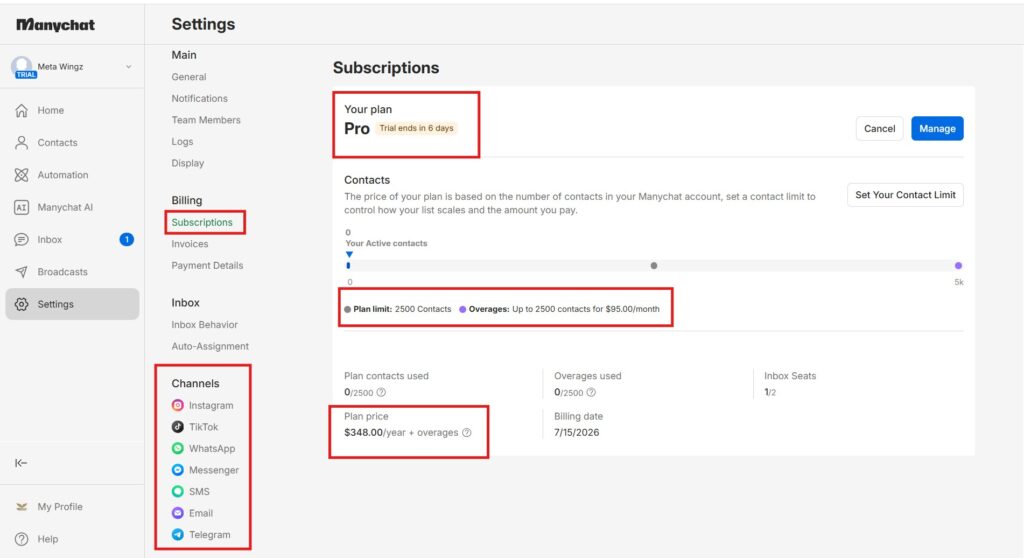
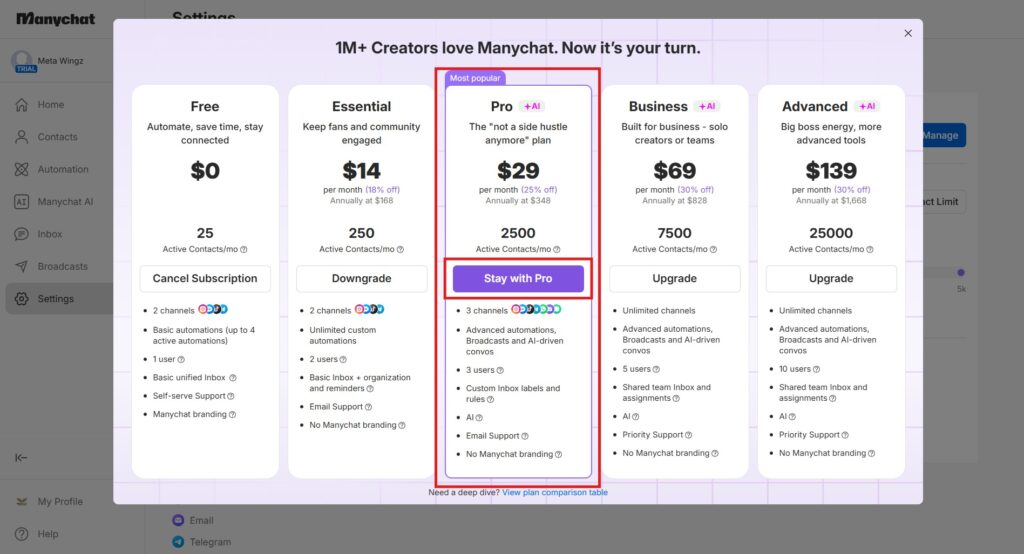
Pricing follows Manychat's standard 5-tier structure: Free ($0), Essential ($17/month), Pro ($29/month), Business ($69/month), and Advanced ($139/month) — Telegram carries no extra channel fee on any tier.
Specs
Free plan eligibility: Yes — Telegram is one of 2 channels selectable on the $0 plan (25 contacts/month)
Setup prerequisite: Bot token from Telegram's BotFather (external to Manychat)
Group chat support: Not supported — one-to-one conversations only
Shared builder: Same visual flow builder used for Instagram, Messenger, and TikTok
Telegram platform rate limit: ~20 messages/minute in groups, ~30 messages/second for broadcasts
Broadcasting by tier: Free & Essential: reactive automations only (keyword replies, welcome flows) — no proactive broadcast sending. Pro ($29/mo) and up: Broadcasts unlock, plus AI-powered conversations, both explicitly listed for Telegram.
Pros
Telegram is included on Manychat's free plan — no upgrade required to start testing.
Same visual flow builder as Instagram and Messenger — no new tool to learn
Image, file, and rich-message sending all work on Telegram, unlike Manychat's WhatsApp integration
Broadcasts and AI-powered convos, once unlocked, run on the same logic as every other channel — no separate learning curve for Telegram.
Cons
No group chat support at all — Manychat's Telegram bot only handles one-to-one conversations.
Setup requires a separate step through Telegram's BotFather, which Manychat's own onboarding doesn't fully explain.
For genuine Telegram community management, a dedicated group bot or bridge app is required instead.
Manychat lets you automate Telegram for free, on any plan, starting today. It also can’t do telegram bot automation the one way a lot of people assume it does the moment they hear “Telegram bot.“
If you’ve used Manychat for Instagram or Messenger and wonder whether the same builder works on Telegram — yes, and it’s one of only two channels still included on the free plan (pick any two of Instagram, Messenger, TikTok, Telegram). Worth a serious look before paying anything.
Here’s the part most setup guides skip: Manychat’s Telegram integration is built for one-to-one conversations, not group chats. If your plan involves a Telegram community, that changes what “automate Telegram with Manychat” actually means.
This article covers manychat telegram setup end to end — connecting your bot, what it costs, what it can and can’t do, and how it compares to building directly on BotFather. By the end, you’ll know whether it fits your use case, or whether groups need a different tool.
If you’re already automating other channels in Manychat Manychat Messenger 2026covers the same setup pattern for Messenger, and the two channels can run side by side in one account. For the free-tier contact caps that apply no matter which channel you pick Manychat Free Plan 2026 breaks those numbers down in full
Disclaimer : I strongly believe in transparency. Some links on this website are affiliate links, which means I may earn a small commission if you purchase through them — at no extra cost to you. This helps support the work I do and allows me to continue creating honest reviews, tutorials, and creator-focused content.
Manychat Telegram automation is included on the free plan — one of 2 selectable channels on the $0 plan — Source: Manychat Help Centre, 2026.
Setup requires Telegram’s own BotFather first: generate a bot token, then paste it into Manychat’s Settings — Manychat doesn’t create the bot itself.
Manychat’s Telegram bot does not support group chats — one-to-one only, confirmed via Manychat’s community forum, setup guides, and a group-notification bridge app in its own App Store.
Telegram caps bots at roughly 20 messages/minute in groups and 30/second for broadcasts — a platform-level limit, not something Manychat controls — Source: core.telegram.org/bots/faq, 2026.
BotFather and Manychat are not competitors — BotFather creates the bot and token; Manychat is the no-code layer on top.
Telegram uses the same visual builder as Manychat’s Instagram and Messenger automations, so existing Manychat users have no new interface to learn.
What Is Manychat Telegram Automation, And What Should You Know First?
Manychat Telegram is a channel integration that lets you build automated Telegram conversations — welcome messages, keyword replies, broadcasts, drip sequences — using Manychat’s visual builder instead of code. It requires a bot token from Telegram’s own BotFather to connect, and does not support Telegram group chats. Its strength is free-plan eligibility; its limit is one-to-one conversations only.
This manychat telegram breakdown covers setup, pricing, real capabilities, the group-chat limitation, and how it stacks up against BotFather directly. If WhatsApp is also part of your channel mix Manychat WhatsApp API 2026 covers that setup and pricing in full — including why WhatsApp, unlike Telegram, requires at least the Pro plan.
What Exactly Happens When You Add Telegram As A Manychat Channel?
Yes — Manychat works with Telegram, and it’s one of only 2 channels available on the free plan. It uses the same automation logic as Instagram and Messenger, applied to one-to-one Telegram conversations — Source: Manychat Help Centre, 2026.
Manychat’s Telegram integration is treated as a first-class channel, not an afterthought — same flow builder, same broadcast scheduler, same tagging system as Instagram and Messenger. The practical difference is entirely in setup, not capability.
Here’s the part that surprised me putting this together: you’re not getting a stripped-down version of Manychat just because it’s Telegram. It’s the exact same dashboard you’d use for Instagram, just pointed at a different app. The only extra step is generating a bot token before you flip the switch — and that happens over on Telegram’s side, not inside Manychat itself.
What Are The Exact Steps To Link A Telegram Bot Token To Manychat?
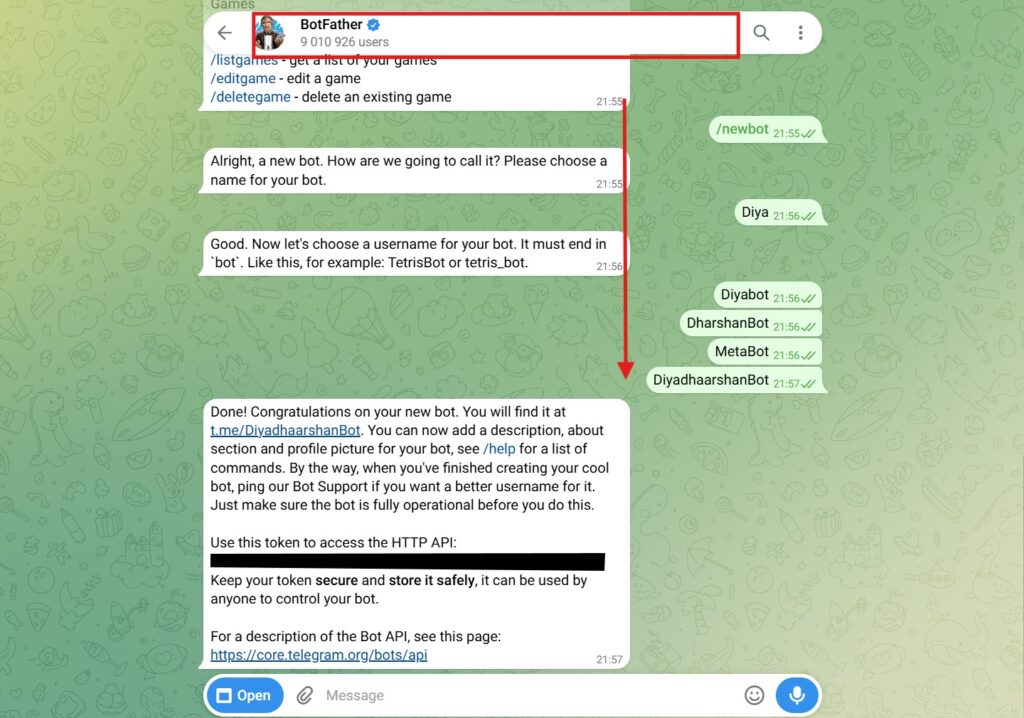
You connect Manychat to Telegram by generating a bot token through Telegram’s own BotFather, then pasting that token into Manychat’s settings. Manychat does not create the Telegram bot itself — Telegram does, through BotFather.
Open Telegram and start a chat with @BotFather
Send the /newbot command and choose a display name for your bot
Choose a username ending in “_bot” — BotFather requires this exact suffix
Copy the API token BotFather generates
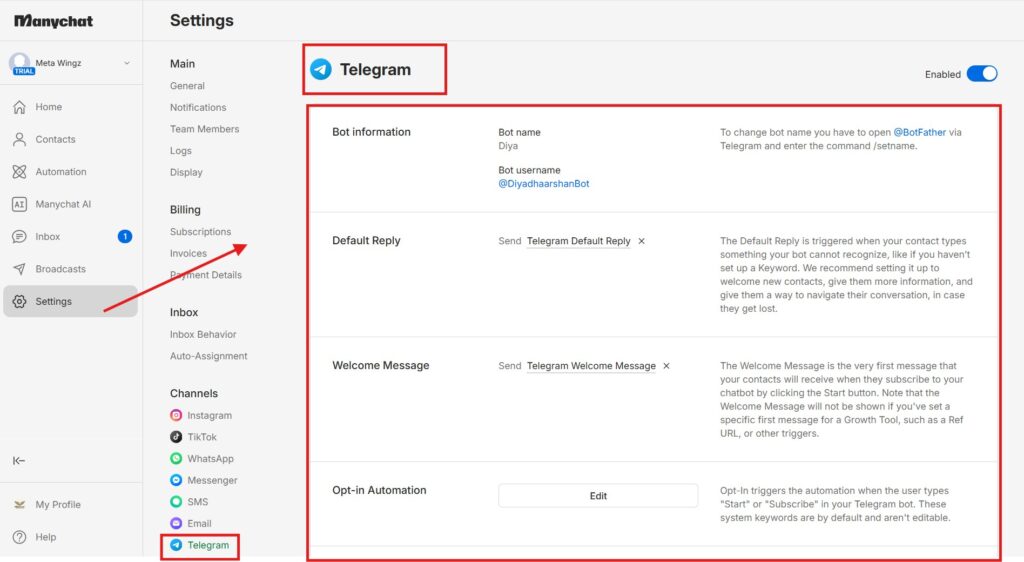
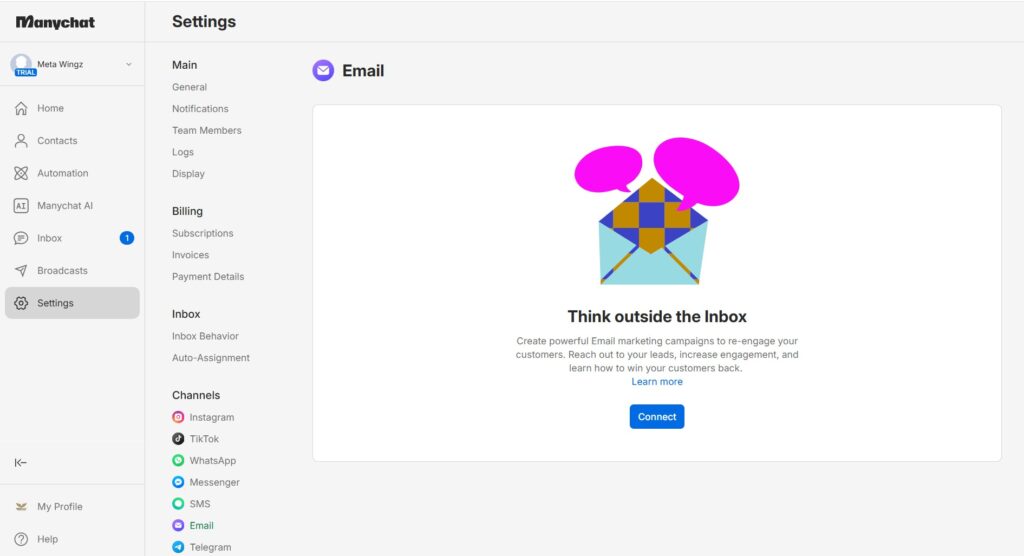
In Manychat, go to Settings → Telegram
Paste the token and click Connect
That’s how to set up a telegram bot with manychat from a blank start — no prior bot required. If something breaks after connecting, revoke the token in BotFather, generate a new one, and refresh it in Manychat’s Telegram settings.
Honestly, this step trips people up more than it should — mostly because it feels like you’re being sent away from Manychat to go do something in a completely different app. You are, but it’s a two-minute detour: one chat window, a couple of commands, one token you copy and paste. Once that’s done, you never have to open BotFather again unless the connection breaks.
How Much Of Manychat Telegram Actually Costs Nothing?
Yes — Manychat Telegram is free, because Telegram is one of the 2 channels selectable on Manychat’s $0 Free plan. The Free plan covers 25 active contacts per month with up to 4 automations.
Is manychat free depends on which channel you’re asking about — WhatsApp specifically requires at least the $29/month Pro plan, but Telegram does not carry that same restriction. On Free, you pick any 2 channels from Instagram, Facebook Messenger, TikTok, or Telegram, and Telegram counts as a completely valid choice.
The realistic ceiling on Free is contact volume, not channel access: 25 active contactsa month is enough to test the setup, but any real audience needs Essential ($17/month, 250 contacts)or higher within weeks. That’s the honest answer to is manychat free for anything beyond a small test run.
If you’re the type who reads a pricing page twice before trusting it, here’s the plain version: Telegram never gets treated like a premium add-on the way WhatsApp does. Nobody’s asking you to upgrade just to turn it on. The catch — because there’s always one — is that the Free plan’s contact cap runs out fast the moment your Telegram audience actually starts growing, not because Telegram itself costs extra.
For a side-by-side of exactly what changes between tiers,Manychat Free vs Pro 2026breaks down every plan in the lineup.
Which Telegram Automations Can You Actually Build Inside Manychat?
Manychat can automate welcome messages, keyword-triggered replies, drip sequences on every paid tier, and scheduled broadcasts from Pro up — the same core capabilities it offers on Instagram and Messenger. It supports images, files, and rich buttons on Telegram, unlike its WhatsApp integration.
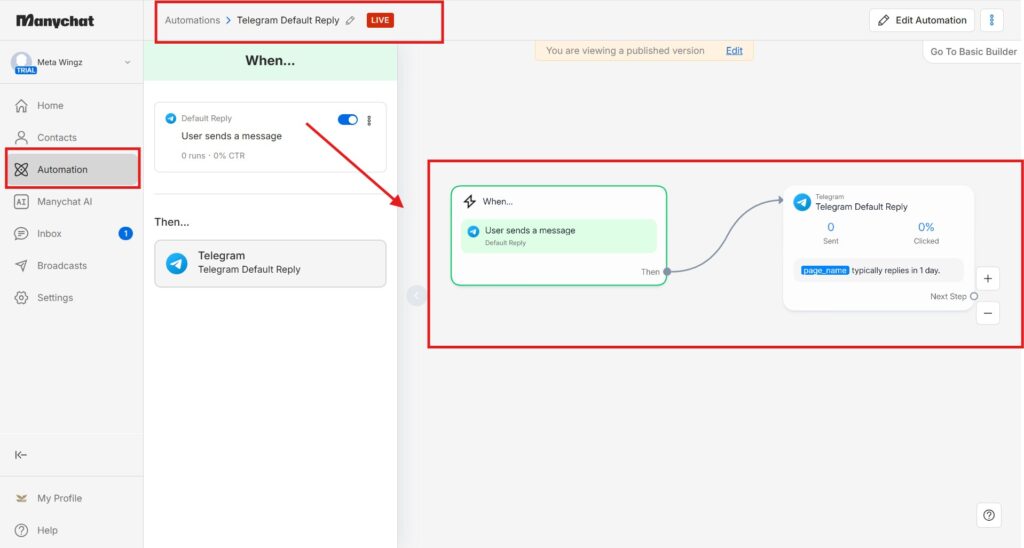
1. Welcome automation. Trigger an automatic first message the moment someone starts a chat with your telegram chatbot.
2. Keyword-triggered replies. Set specific words or phrases to fire a pre-built flow automatically.
3. Broadcasts and drip campaigns. Schedule one-time or multi-step message sequences to your Telegram contact list — this one’s Pro plan and up only, not something Free or Essential can do.
4. Tagging and segmentation. Organize Telegram contacts the same way you tag Instagram or Messenger contacts.
This is the telegram bot automation layer most people actually want: reply, qualify, and follow up without typing every message by hand. What a Manychat telegram chatbot isn’t built for is community-style group interaction — that gap is covered honestly below. If Instagram comment-to-DM automation is also on your radar, Manychat Instagram DM Automation 2026 walks through that exact same flow-builder logic applied to Instagram instead.
What actually surprised me building this out is how little Telegram automation differs from Instagram or Messenger once you’re inside the builder — same drag-and-drop steps, same trigger logic, just a different channel icon at the top of the flow. If you’ve already built one automation anywhere else in Manychat, you basically already know how to build this one too.
Manychat Or Raw BotFather Coding: Which One Do You Actually Need?
Manychat and BotFather aren’t really competitors — BotFather is Telegram’s own tool for creating a bot and generating its token; Manychat is the no-code automation layer built on top of that bot. You need BotFather first regardless of which automation tool you use afterward.
The honest framing: asking “is manychat better than botfather” is like asking whether a car is better than its own engine. BotFather is required infrastructure — every Telegram bot starts with a BotFather-generated token, regardless of automation platform.
What you’re really choosing between is Manychat’s visual builder versus writing your own bot logic directly against the Telegram Bot API. Manychat wins for drag-and-drop flows without code, especially alongside existing Instagram or Messenger automations. Coding directly against Telegram’s API wins only if you need capabilities Manychat doesn’t expose — including group chat support.
Put simply: nobody chooses BotFather instead of Manychat — they choose it in addition to Manychat, whether they realize it or not, because BotFather is the step that has to happen first no matter what. The real decision is what you build on top of that token: drag-and-drop flows because speed matters more than customization, or your own code because you need something Manychat’s builder can’t do yet, like deeper group handling.
What Does A Real Manychat Telegram Automation Workflow Look Like?
You automate Telegram messages with Manychat by building a flow in the visual builder, then attaching it to a trigger — a keyword, a button tap, or a new-contact event. Broadcasts can be scheduled in advance or sent immediately to a tagged segment, but only from Pro ($29/mo) up.
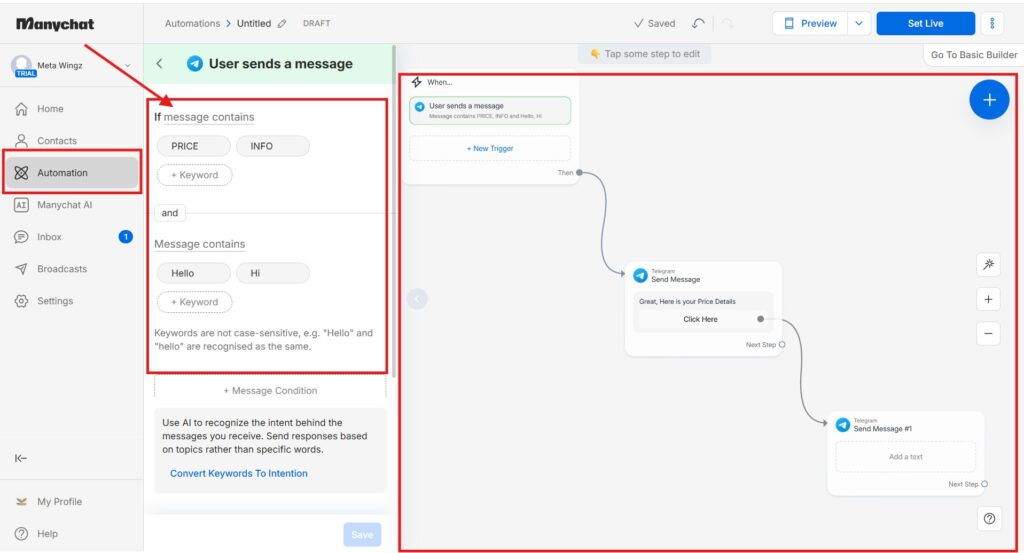
Open the Manychat flow builder and select Telegram as the channel
Add a trigger step: keyword, button click, or new subscriber
Add message, image, or button steps to build the response
Test the flow using your own Telegram account
Publish the flow, or schedule it as a broadcast
A full drip sequence or a single reply depends on the goal: lead qualification benefits from branching logic, while FAQ-style automation usually needs just one keyword-triggered reply. That last step — turning it into a broadcast — is the one place Free and Essential users hit a wall; everything before it works on any plan.
In practice, most people don’t need the whole five-step version above for their first flow. One trigger, one reply, tested on your own phone, published — that’s it for day one. Branching logic is worth learning eventually, and scheduled broadcasts even more so once you’re ready to pay for Pro, but neither is something to get stuck on before you’ve sent a single message.
Where Exactly Does Manychat Telegram Stop Working?
No — Manychat’s Telegram bot does not work in groups. It is built exclusively for one-to-one, private conversations, not group messaging — confirmed across Manychat’s community forum, independent setup guides, and a dedicated group-notification workaround app in Manychat’s own App Store.
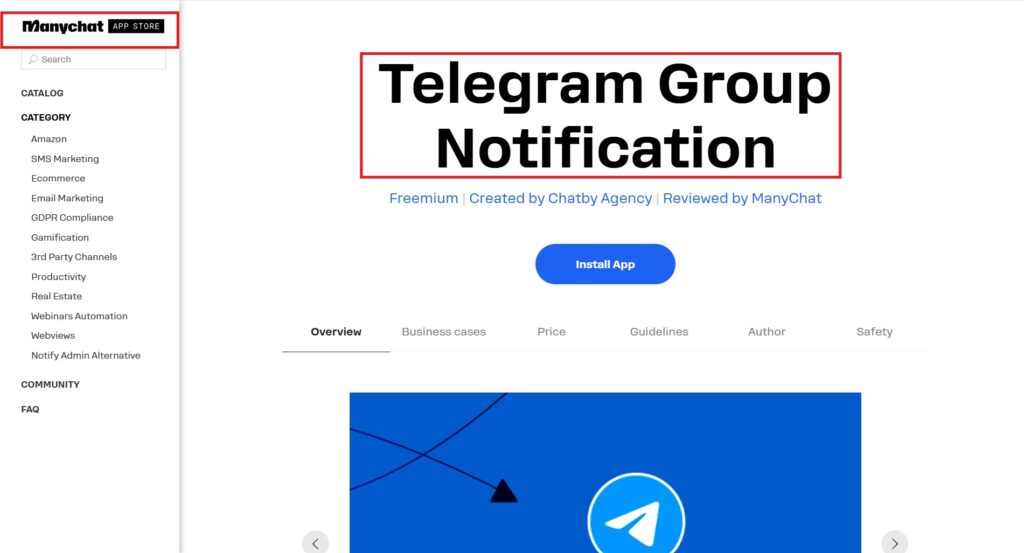
This is the honest limitation this article is built around: if your plan for manychat telegram involves a group or community, native Manychat automation isn’t the tool for that job. One piece of corroborating evidence: a third-party developer built a “Telegram Group Notification” app inside Manychat’s own App Store — it sends Telegram group alerts about Messenger bot events (like a user asking for a human), not a Telegram group chatbot itself, but its existence confirms Manychat has no native way to push notifications into a Telegram group directly.
Telegram itself also caps bot activity inside groups at roughly 20 messages per minute, and broadcasts at about 30 messages per second platform-wide — a Telegram-level restriction that applies regardless of which automation tool sits on top, including Manychat.
“Manychat’s Telegram bot is built for one-to-one conversations — if group functionality is central to your plan, a dedicated Telegram group bot or a bridge app is the realistic path, not Manychat alone.”
If group messaging is the actual goal, a purpose-built Telegram group bot or an app-store bridge tool is worth evaluating instead of forcing Manychat into a job it wasn’t designed for.
And if we’re naming names instead of just saying “look elsewhere” — SendPulse and UChat both handle Telegram groups natively, with join/leave triggers Manychat doesn’t have. There’s also a newer platform called TeleClaw drawing direct comparisons for exactly this reason — its own head-to-head write-up against ManyChat (published May 11, 2026) argues Manychat still wins on general marketing automation, but leans into Telegram-native group and community features Manychat was never built for. Worth a look if group support is the deciding factor, not an afterthought.
Who Should Use Manychat Telegram, And Who Should Skip It?
Use Manychat Telegram if:
✅ You want one-to-one lead capture, FAQ automation, or drip sequences on Telegram
✅ You’re already on Manychat for Instagram or Messenger and want one dashboard for every channel
✅ You want to test Manychat’s model free, before paying anything
Skip it if:
❌ Your actual goal is managing a Telegram group or community
❌ You need raw Telegram Bot API features Manychat doesn’t expose
❌ You expected “Telegram bot” to mean group moderation by default
Manychat’s Telegram integration is one of the more underrated parts of the platform — free-plan eligible, same builder as every other channel, and genuinely good at one-to-one automation. The group-chat gap isn’t a bug; it’s just outside what this integration was built to do.
If your mental model was “Manychat will run my Telegram community,” reset that before investing setup time. For everything else — lead capture, FAQ automation, drip campaigns — it’s a solid, no-cost extension of a Manychat setup you’re likely already running.
In one line: strong one-to-one automation, zero group support, and a setup step that lives outside Manychat entirely.
Final Verdict: Is Manychat Telegram Worth Setting Up?
For one-to-one Telegram automation — lead capture, FAQ replies, drip campaigns — Manychat Telegram is genuinely worth setting up, especially free-plan eligible alongside whatever other channel you’re already running. The BotFather step adds friction, but it’s a five-minute task, not a real barrier.
If your actual goal involves a Telegram group, stop here and look at dedicated group tools instead — forcing Manychat into that role ends in frustration, not automation. Match the tool to the job, and Manychat Telegram earns its place in a real stack.
Yes, Manychat works with Telegram, treated as a first-class channel alongside Instagram and Messenger, using the same flow builder, tagging system, and broadcast scheduler. It’s one of only 2 channels available on Manychat’s free plan, so you can test it without paying anything. The main difference from other channels is the setup process, not the automation capability.
How do I link a Telegram chat?
You link a Telegram chat to Manychat by first generating a bot token through Telegram’s own BotFather — send /newbot, choose a name and username, and copy the token it gives you. Then, in Manychat, go to Settings, select Telegram, paste the token, and click Connect. Manychat doesn’t create the bot itself; it automates whatever bot Telegram already issued through BotFather.
Can I use Manychat for free?
Yes, you can use Manychat for free on Telegram specifically, because Telegram is one of the 2 channels you can pick on the $0 Free plan. The Free plan covers 25 active contacts a month with up to 4 automations. Unlike WhatsApp, which requires at least the $29/month Pro plan, Telegram carries no extra paid-tier requirement.
How to set up a Telegram bot with Manychat?
To set up a Telegram bot with Manychat, chat with @BotFather on Telegram, send /newbot, pick a name and a username ending in “_bot,” and copy the API token it generates. Paste that token into Manychat’s Settings → Telegram page and click Connect. From there, build your welcome message and keyword flows in Manychat’s regular builder — no coding required.
What can Manychat do on Telegram?
Manychat can send automated welcome messages, reply to keywords, and run drip sequences on Telegram at any paid tier, with scheduled broadcasts added once you’re on the Pro plan ($29/month) or above. It supports images, files, and interactive buttons — more than its WhatsApp integration currently allows. What it can’t do at any tier is manage or message Telegram groups — scoped to one-to-one chats only.
Is Manychat better than BotFather for Telegram?
Manychat and BotFather aren’t direct alternatives, so “better” isn’t quite the right question. BotFather is Telegram’s own required tool for creating a bot and its API token — needed no matter what you build afterward. Manychat is the no-code layer connected on top of that bot. Want visual flows without code? Manychat’s the easier path. Need custom logic? Build directly against Telegram’s API instead.
How to automate Telegram messages with Manychat?
To automate Telegram messages with Manychat, open the flow builder, choose Telegram as the channel, and attach a trigger — a keyword, button click, or new subscriber. Add message, image, or button steps to build the response, test against your own account, then publish or schedule it as a broadcast. The process mirrors how Instagram and Messenger automations are built.
Does Manychat Telegram work in groups?
No, Manychat’s Telegram integration does not work in groups — it’s built only for one-to-one, private conversations. This is confirmed by Manychat’s community forum, independent setup guides, and the existence of a third-party “Telegram Group Notification” app in Manychat’s App Store, which sends Telegram group alerts about Messenger bot events precisely because Manychat has no native way to do that itself. If group messaging is your goal, a dedicated Telegram group bot is the more realistic tool.
Sangeetha Vishnu is a Digital Product Reviewer and Affiliate Marketer with 4 years of experience exploring affiliate marketing, digital products, AI tools, and software across multiple platforms and affiliate programs.
I research, purchase, and test the products I review before sharing my honest experience. My goal is to help entrepreneurs, marketers, creators, and beginners understand what a product actually does, who it’s for, and whether it’s worth investing in.
I also share practical insights on affiliate marketing, AI tools, SEO, and online business. My guiding principle is simple: “Authority, Built On Clarity.” I believe honest reviews and transparent recommendations build lasting trust.